
Home · Get started · Roadmap · Newsletter
Catch broken links instantly. Zensical Studio keeps links, headings, and references up to date when you rename, move, or restructure content. Blazing fast and reliable, integrated with your editor.
Works with all Zensical and MkDocs projects.
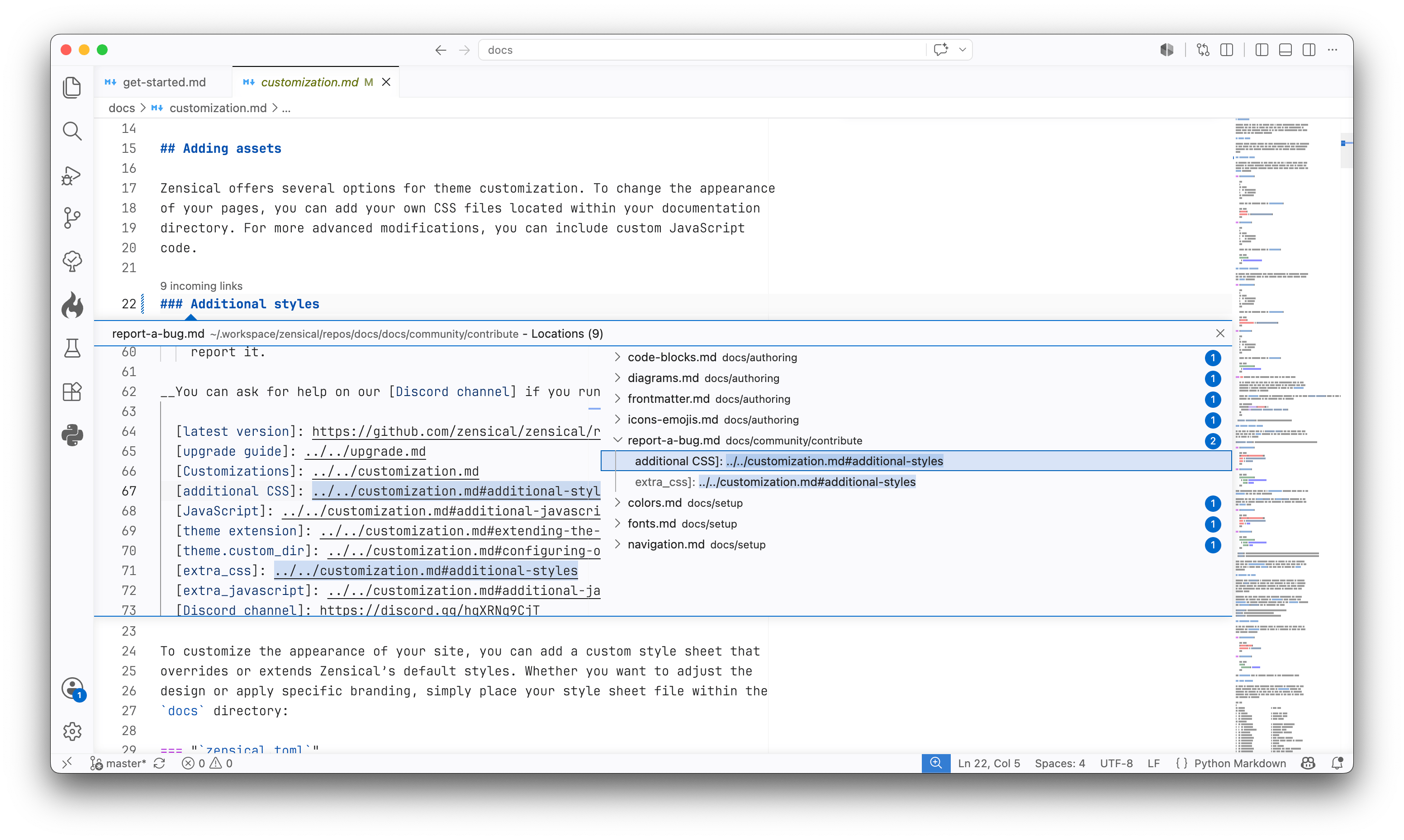
Zensical Studio in Visual Studio Code. Learn more at zensical.org/studio/.
Studio comes in three editions:
- Studio Free supports everyday authoring, preview, and diagnostics. It is free to use and does not require an account or subscription.
- Studio Pro adds project-wide refactoring, including automatic link updates when you move or rename content.
- Studio Team includes Studio Pro features with organization-owned, reassignable seats.
Compare features or view pricing. Subscriptions help support Zensical and our other Open Source projects, and allow us to keep Zensical independent.
Studio understands your Zensical or MkDocs project and brings everyday authoring tools into your editor. Features include:
- Python Markdown editing: accurate syntax highlighting, including nested content.
- Formatting and linting: format Markdown without reflowing your prose and catch structural problems as you write.
- Link assistance: complete links, preview their targets on hover, and spot broken links and missing assets.
- Project navigation: navigate your content, search workspace symbols, and find references across your project.
- Live preview: see your changes as you write, including reused content.
Studio Pro and Team add project-wide refactoring, automatic link updates when you move or rename files, and managed redirects that preserve incoming links when content changes. See all features.
Install Zensical Studio in Visual Studio Code
and open your Zensical or MkDocs project. Studio automatically detects
zensical.toml or mkdocs.yml and activates Python Markdown support for your
documentation files.
Studio Free works without signing in. To activate Studio Pro or Team, obtain your license key in Zensical Hub and run Zensical Studio: Enter License Key from the VS Code Command Palette.
For setup details and other editor integrations, see the installation guide.
Supported platforms
- Windows: arm64, x64
- macOS: arm64, x64
- Linux: arm64, x64
If you think you've found a bug, or have ideas for improvements, please report them in the Zensical Studio GitHub repository. With your feedback, we'll shape Zensical Studio into the authoring environment technical writers and documentation teams want to use.
This repository contains the editor integrations for Zensical Studio, which are licensed under MIT. Zensical Studio is licensed separately under the EULA. By using Zensical Studio, you agree to the terms of the EULA.