New navigation #4614
New navigation #4614
Conversation


Signed-off-by: Anastasiia Tovpeko <[email protected]>

|
Allow 10 minutes from last push for the staging site to build. If the link doesn't work, try using incognito mode instead. For internal reviewers, check web-documentation repo actions for staging build status. Link to build for this PR: http://docs-dev.timescale.com/docs-new-navigation |


 billy-the-fish
left a comment
billy-the-fish
left a comment
billy-the-fish
left a comment
There was a problem hiding this comment.
Good work. Nearly there.
| 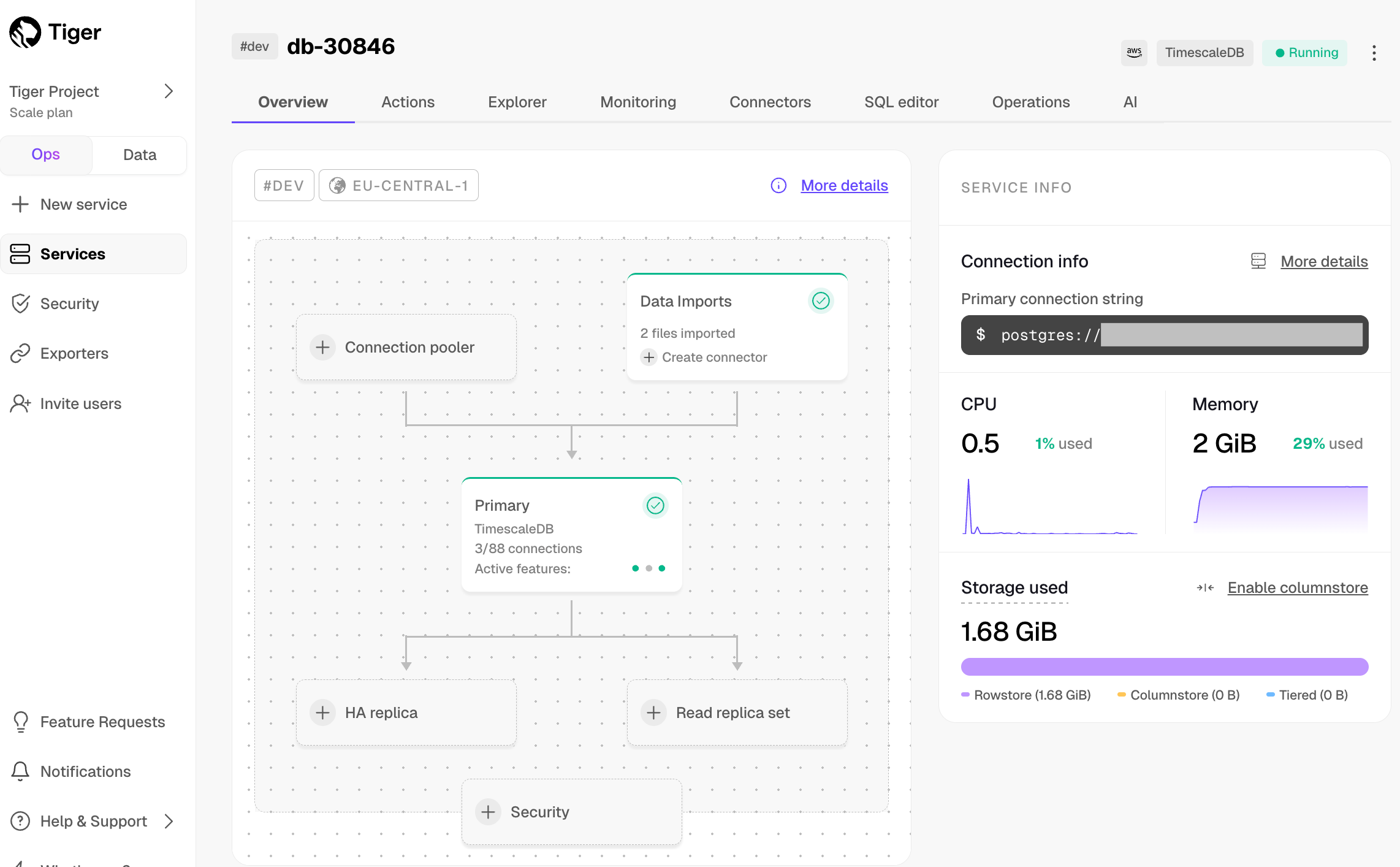 | ||
|
|
||
| Each $SERVICE_SHORT hosts a single database managed for you by $CLOUD_LONG. | ||
| Click a $SERVICE_SHORT to manage and configure it. Each $SERVICE_SHORT hosts a single database managed for you by $CLOUD_LONG. |
There was a problem hiding this comment.
| Click a $SERVICE_SHORT to manage and configure it. Each $SERVICE_SHORT hosts a single database managed for you by $CLOUD_LONG. | |
| To manage and configure a $SERVICE_LONG, click it. Each $SERVICE_SHORT is an optimized [$PG][postgres-link] instance extended with database engine innovations such as [$TIMESCALE_DB][timescaledb-link], managed for you by $CLOUD_LONG. |
| - `Connectors`: sync or stream directly, so data from another source is continuously updated in your $SERVICE_SHORT. See [Import and sync][import-sync]. | ||
| - `SQL editor`: query your $SERVICE_SHORTs. See [$SQL_EDITOR][run-queries-sql-editor]. | ||
| - `Operations`: fully manage your $SERVICE_SHORT: [configure compute and storage][change-resources], [set up replicas][replication], [back up][backup], [upgrade][upgrade], and more. | ||
|
|
There was a problem hiding this comment.
Can you add the AI tab please.
|
|
||
| </Tab> | ||
| - `Overview`: get an overview of your $SERVICE_SHORT details, infrastructure, [connection info][connect-service], and [performance optimization tips][recommendations]. | ||
| - `Actions`: connect and import data into your $SERVICE_SHORT. See [Import and sync][import-sync]. |
There was a problem hiding this comment.
Not too much of a fan of See links, please add the link into the sentence.
Actions: [connect and import data][import-sync] into your $SERVICE_SHORT.
Same for the others.
| When you log into [$CONSOLE][cloud-login], you see the | ||
| $PROJECT_SHORT overview. Click a $SERVICE_SHORT to view run-time data and connection information. | ||
| Click `Operations` to configure your $SERVICE_SHORT. | ||
| - `Services`: see all $SERVICE_SHORTs created in your $PROJECT_SHORT and their statuses. See [Create a $SERVICE_LONG][create-service]. |
There was a problem hiding this comment.
Not too much of a fan of See links, please add the link into the sentence for all these items.
| 1. **Connect to your $SERVICE_SHORT** | ||
|
|
||
| In [$CONSOLE][portal-data-mode], select your $SERVICE_SHORT in the connection drop-down in the top right. | ||
| Select your $SERVICE_SHORT in the connection drop-down in the top right. |
There was a problem hiding this comment.
In the connection drop-down in the top right, select your $SERVICE_SHORT.
| - [$DATA_MODE_CAP][run-popsql]: a rich experience powered by $POPSQL. You can write queries with | ||
| autocomplete, save them in folders, share them, create charts/dashboards, and much more. | ||
|
|
||
| - [$SQL_ASSISTANT_SHORT in the $DATA_MODE][sql-assistant]: write, fix, and organize SQL faster and more accurately. |
There was a problem hiding this comment.
| - [$SQL_ASSISTANT_SHORT in the $DATA_MODE][sql-assistant]: write, fix, and organize SQL faster and more accurately. | |
| - [$SQL_ASSISTANT_SHORT in $DATA_MODE][sql-assistant]: write, fix, and organize SQL faster and more accurately. |
There was a problem hiding this comment.
We've been discussing the use of this article several times and agreed on having it.
|
|
||
| <NotAvailableFreePlan /> | ||
|
|
||
| To start using the $DATA_MODE, open $CONSOLE and click `Data view`. This includes the following tabs: |
There was a problem hiding this comment.
| To start using the $DATA_MODE, open $CONSOLE and click `Data view`. This includes the following tabs: | |
| To start using $DATA_MODE, open $CONSOLE and click `Data view`. This includes the following tabs: |
Please get rid of all the $DATA_MODEs please
There was a problem hiding this comment.
We have been discussing this with Ana several times and agreed on having it.
|
|
||
| To start using the $DATA_MODE, open $CONSOLE and click `Data view`. This includes the following tabs: | ||
|
|
||
| - **Files**: list all files in your project. |
There was a problem hiding this comment.
Not quite. Files is where you store all your Queries, Dashboards, Notebooks and folders. These elements are either public to all users in the project, or private for the current user.
| To start using the $DATA_MODE, open $CONSOLE and click `Data view`. This includes the following tabs: | ||
|
|
||
| - **Files**: list all files in your project. | ||
| - **Schemas**: list all schemas per database in your $SERVICE_SHORT. |
There was a problem hiding this comment.
view the schemas in each service.
Co-authored-by: Iain Cox <[email protected]>
Signed-off-by: Anastasiia Tovpeko <[email protected]>
Co-authored-by: Iain Cox <[email protected]>
Signed-off-by: Anastasiia Tovpeko <[email protected]>


No description provided.