░█▀█░█▀▀░█▀▀░
░█▀█░█░░░█▀▀░
░▀░▀░▀▀▀░▀▀▀░


English | 中文
ACECode is a C++17 AI coding agent for the terminal. It provides an FTXUI-based TUI, provider support for GitHub Copilot and OpenAI-compatible APIs, tool calling for repository work, session persistence, a daemon HTTP/WebSocket API, a React web UI, and an optional desktop shell.
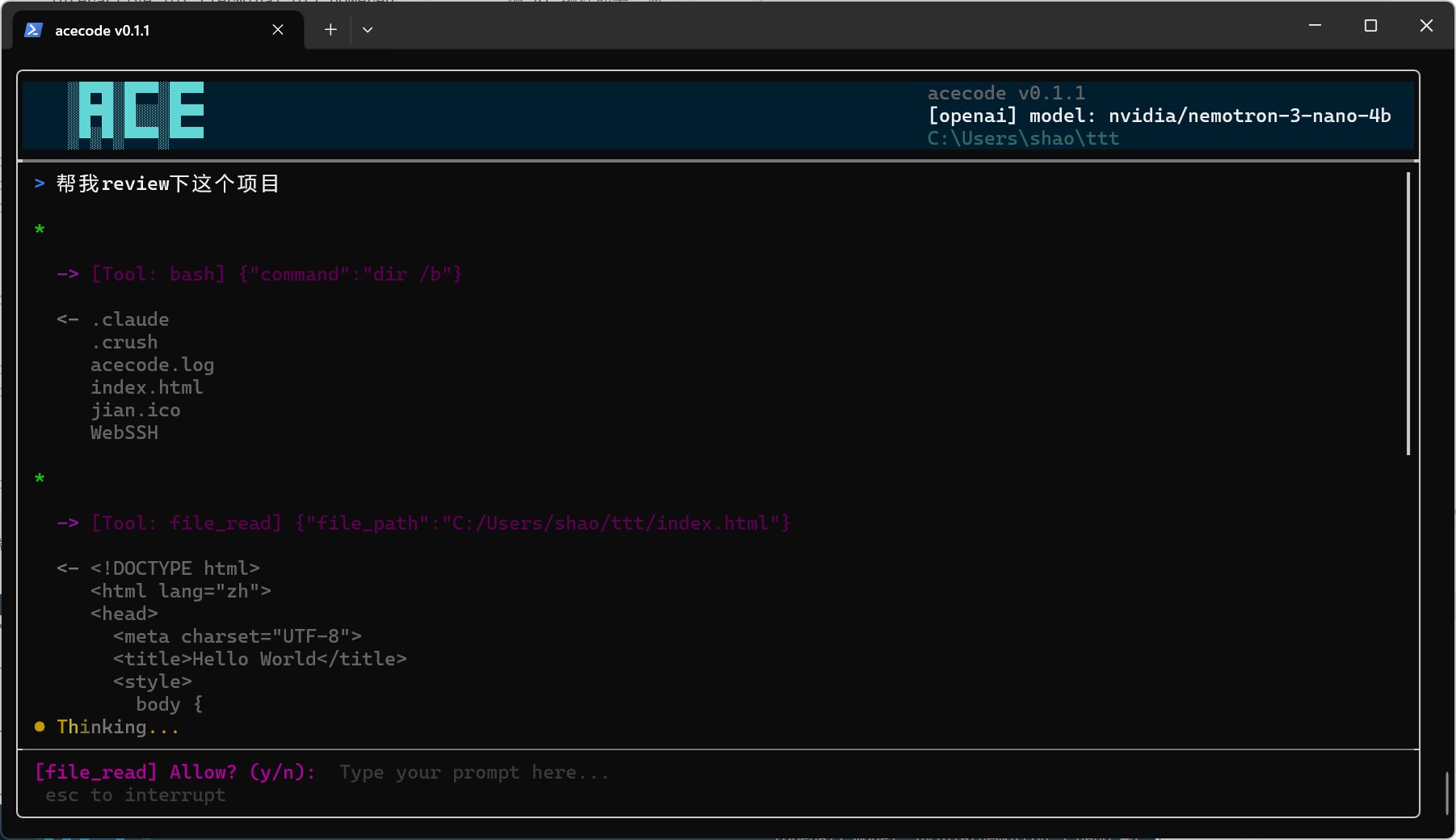
- Interactive terminal UI with streaming responses, input history, scrollable chat, markdown rendering, and live tool progress.
- Multi-turn agent loop with tool calls, permission prompts, cancellation, compaction, rewind, and resumable sessions.
- Provider support for GitHub Copilot device-flow auth and OpenAI-compatible Chat Completions endpoints.
- Built-in repository tools for shell execution, file reads/writes/edits, search, globbing, user questions, skills, memory, and optional web search.
- Daemon mode with HTTP/WebSocket endpoints, token-protected non-loopback access, and a bundled React/Vite web UI.
- Optional desktop shell that can manage multiple workspaces through separate daemon processes.
- Cross-platform build support for macOS, Linux, and Windows.
- CMake 3.20 or newer.
- Ninja or another supported CMake generator.
- A C++17 compiler: MSVC 2019+, GCC 9+, or Clang 10+.
- Git with submodule support.
- vcpkg.
pnpmwhen building the embedded web UI.
Set <triplet> to one of the supported vcpkg triplets:
| Platform | Triplet |
|---|---|
| Linux x64 | x64-linux |
| Linux arm64 | arm64-linux |
| Windows x64 | x64-windows-static |
| macOS x64 | x64-osx |
| macOS arm64 | arm64-osx |
CMake embeds the frontend from web/dist/. Build the Web UI before running cmake -S ... when you want the daemon to serve the full browser UI.
cd web
pnpm install
pnpm test
pnpm build
cd ..
If web/dist/ is missing during CMake configure, the build embeds a minimal fallback page so daemon APIs can still build, but the full Web UI will not be included. See web/README.md.
git submodule update --init --recursive

cmake -S . -B build -G Ninja \
  -DCMAKE_BUILD_TYPE=Release \
  -DCMAKE_TOOLCHAIN_FILE=<vcpkg-root>/scripts/buildsystems/vcpkg.cmake \
  -DVCPKG_TARGET_TRIPLET=<triplet> \
  -DVCPKG_OVERLAY_PORTS=$PWD/ports \
  -DBUILD_TESTING=ON

cmake --build build --config Release
The main binary is build/acecode for single-config Ninja builds.
cmake --build build --target acecode_unit_tests
ctest --test-dir build --output-on-failure
Unit tests live under tests/ and link against the acecode_testable object library. TUI-heavy entry-point code stays out of the test target unless logic is isolated into reusable helpers.
Use the same supported <triplet> values listed above. Build web/ first, then configure CMake, when the desktop shell should use the full embedded Web UI.
cmake -S . -B build -G Ninja \
  -DCMAKE_BUILD_TYPE=Release \
  -DCMAKE_TOOLCHAIN_FILE=<vcpkg-root>/scripts/buildsystems/vcpkg.cmake \
  -DVCPKG_TARGET_TRIPLET=<triplet> \
  -DVCPKG_OVERLAY_PORTS=$PWD/ports \
  -DACECODE_BUILD_DESKTOP=ON

cmake --build build --target acecode-desktop
On Linux, install the WebKitGTK development package before configuring the desktop target, for example sudo apt install libwebkit2gtk-4.1-dev on Ubuntu 24.04. At runtime the system WebKitGTK library is required, for example libwebkit2gtk-4.1-0 on Ubuntu.
On macOS, this target produces build/ACECode.app. On Windows and Linux, it produces a flat layout with acecode-desktop and the colocated acecode daemon executable in the build directory.
Windows builds use UTF-8 compilation flags and default to a static vcpkg triplet when the toolchain is vcpkg and no triplet is provided. libcurl 8.14 or newer is required for Windows TLS behavior.
Download a prebuilt binary from Releases, then run:
./acecode configure
cd /path/to/your/project
./acecode
The setup wizard creates ~/.acecode/config.json. Choose GitHub Copilot for device-flow login, or choose an OpenAI-compatible endpoint and provide base_url, api_key, and model name.
Once the TUI starts, type a request and press Enter:
refactor the session serializer and add focused unit tests
Read-only tools normally run automatically. File writes, edits, and shell commands ask for confirmation unless the current permission mode or rules allow them.
./acecode                     # Start a fresh TUI session in the current directory
./acecode --resume            # Resume the latest session for this project
./acecode --resume <id>       # Resume a specific session
./acecode configure           # Run the setup wizard
./acecode --alt-screen        # Force fullscreen alternate-screen rendering for this launch
./acecode --dangerous         # Skip permission prompts; use only in a sandbox
ACECode expects an interactive TTY. It is designed to be launched from the project root you want the agent to work on.
./acecode daemon --foreground
./acecode daemon start
./acecode daemon status
./acecode daemon stop
The daemon serves the API and bundled web UI at http://127.0.0.1:28080 by default. Configure web.bind, web.port, and web.static_dir in ~/.acecode/config.json.
Runtime files live under <data_dir>/run/. Each daemon start writes a token file; loopback clients can connect without it, while non-loopback clients must pass X-ACECode-Token or a ?token= query parameter. See docs/daemon-api.md for the protocol.
On Windows, ACECode can install the daemon as an SCM service:
acecode service install
acecode service start
acecode service status
acecode service stop
acecode service uninstall
Service mode uses the platform service data directory rather than the normal user data directory, so sessions and config are separate from TUI mode.
The optional acecode-desktop target wraps the web UI in a native desktop shell. It can track multiple workspaces through a shared daemon process. Build it with -DACECODE_BUILD_DESKTOP=ON; on Linux it uses WebKitGTK through webview/webview. See docs/desktop-shell/multi-workspace.md for the current model.
| Command | Purpose |
|---|---|
/help |
Show command help. |
/clear |
Clear the current conversation. |
/model |
Show or switch the current model profile. |
/config |
Show active provider, model, context window, and permission mode. |
/tokens |
Show session token usage. |
/compact |
Compress long conversation history. |
/resume |
Open the session picker. |
/rewind |
Rewind to a previous user turn. |
/checkpoint |
Alias for /rewind. |
/mcp |
Manage MCP servers and tools. |
/skills |
List, invoke, or reload installed skills. |
/memory |
Manage persistent user memory. |
/init |
Generate or improve project instructions for the current directory. |
/history |
List or clear per-working-directory input history. |
/proxy |
Show, refresh, or override the HTTP proxy for LLM/API requests. |
/websearch |
Show or switch the web-search backend. |
/title |
Set or show the terminal title. |
/page-step |
Toggle PgUp/PgDn between default single-line and page scrolling. |
/models |
Inspect the bundled models.dev registry. |
/exit |
Exit ACECode. |
Installed skills also register slash commands by skill name.
| Tool | Default permission | Purpose |
|---|---|---|
bash |
Prompt | Run shell commands in the project context. |
file_read |
Auto | Read files, with line-range support. |
file_write |
Prompt | Create or overwrite files. |
file_edit |
Prompt | Apply targeted text edits. |
grep |
Auto | Search file contents with regex. |
glob |
Auto | Find paths by glob pattern. |
task_complete |
Auto | Optional explicit task-completion signal. |
AskUserQuestion |
Prompt in UI | Ask the user a structured follow-up question. |
skills_list, skill_view |
Auto | Discover and load skill instructions. |
memory_read, memory_write |
Auto / constrained write | Read and update persistent memory. |
web_search |
Auto | Search the web when enabled in config. |
MCP servers can add more tools at runtime.
Primary config lives at ~/.acecode/config.json. User data also includes Copilot tokens, session metadata, input history, memory files, runtime daemon files, and state under ~/.acecode/.
Important config areas:
| Area | Purpose |
|---|---|
provider, openai, copilot |
Legacy provider selection and endpoint/model settings. |
saved_models, default_model_name |
Named model profiles and defaults. |
context_window, models_dev |
Context-window resolution and bundled models.dev lookup behavior. |
skills, memory, project_instructions |
Optional context sources and their limits. |
agent_loop.max_iterations |
Hard cap for one agent turn. |
daemon, web |
Daemon heartbeat, service, bind, port, and static asset settings. |
network |
System/manual proxy behavior, proxy probing, and TLS options. |
web_search |
Web-search tool enablement and backend choice. |
tui.alt_screen_mode |
Terminal rendering mode; auto starts fullscreen, never restores terminal-output mode. |
desktop.notifications |
Desktop shell notification behavior. |
mcp_servers |
Stdio, SSE, or Streamable HTTP MCP server definitions. |
Model selection details are documented in docs/model-context-resolution.md.
- ARCHITECTURE.md: durable runtime and source-ownership map.
- AGENTS.md: contributor and coding-agent rules.
- CLAUDE.md: current implementation memory.
- docs/user-manual.md: user workflow details.
- docs/daemon-api.md: daemon HTTP/WebSocket API.
- docs/model-context-resolution.md: model profile and context-window resolution.
- docs/skills.md: skill authoring and usage.
- docs/skills-implementation.md: skill runtime implementation notes.
- docs/desktop-shell/multi-workspace.md: desktop multi-workspace behavior.
See the repository license before redistributing binaries or bundled assets.