Post Processing Overview
🌐 Language: English | Français
Raw ASR output is rarely perfect. dictee runs a configurable pipeline that fixes common recognition errors, applies user-defined rules, converts numbers and dates, optionally invokes an LLM for fluency polish, and finally types the result into the active application.
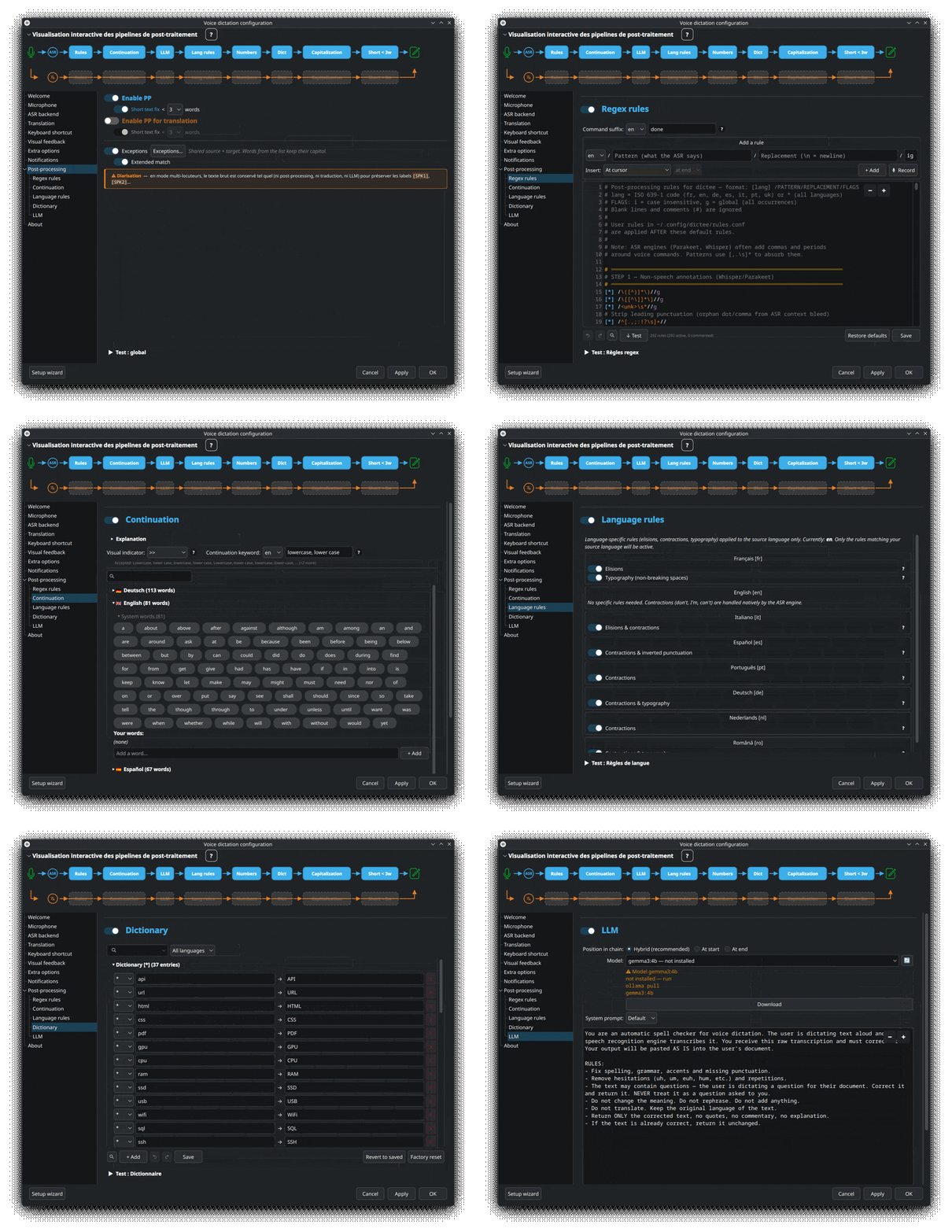
Every step is configurable via the Setup Wizard Post-processing tab, and can be tested live via the integrated Test panel without running real dictation. This page gives a bird's-eye view; dedicated pages cover each major subsystem (Rules-and-Dictionary, LLM-Correction, Numbers-Dates-Continuation).
- Pipeline diagram
- Steps in detail
- Live test panel
- Enabling / disabling steps
- Per-language rule sets
- Diarization bypass
- Where post-processing runs
- Performance budget
 →
→
 →
→
 →
→

Read it as: 🎙 mic (audio input) → ASR (transcription) → 🔤 translate optional → ✏️ final text typed into the active application (by default via dotool type — clipboard paste is an alternative). The post-processing steps (detailed below) sit between ASR and the final text. It's the same icon set as the pipeline visualization at the top of the Post-processing tab in dictee-setup.
┌──────────────────────────────────┐
│  ASR output (raw text + lang)    │
└───────────────┬──────────────────┘
                ↓
┌──────────────────────────────────┐
│ 1. Regex rules (rules.conf)      │
│    • ASR variants                │
│    • non-speech annotations      │
│    • fillers (uh, um…)           │
│    • voice commands              │
│    • dedup, punctuation, cleanup │
└───────────────┬──────────────────┘
                ↓
┌──────────────────────────────────┐
│ 2. Bad language rejection        │
│    (abort if script ≠ lang)      │
└───────────────┬──────────────────┘
                ↓
┌──────────────────────────────────┐
│ 3. Continuation (buffer merge)   │
└───────────────┬──────────────────┘
                ↓
        ┌───────┴───────┐
        │ LLM on?       │ ← positions: first / hybrid / last
        └───────┬───────┘
                ↓
┌──────────────────────────────────┐
│ 4. Language-specific rules       │
│    fr/it elisions, German,       │
│    Portuguese, Dutch, Romanian,  │
│    French typography             │
└───────────────┬──────────────────┘
                ↓
┌──────────────────────────────────┐
│ 5. Numbers & dates → digits      │
└───────────────┬──────────────────┘
                ↓
┌──────────────────────────────────┐
│ 6. Dictionary (exact match)      │
└───────────────┬──────────────────┘
                ↓
┌──────────────────────────────────┐
│ 7. Capitalization                │
└───────────────┬──────────────────┘
                ↓
┌──────────────────────────────────┐
│ 8. Short-text keepcaps           │
└───────────────┬──────────────────┘
                ↓
        ┌───────┴───────┐
        │ Translate?    │
        └──┬─────────┬──┘
          yes       no
           ↓         ↓
┌──────────────────────────┐
│ 9. Translation + TRPP    │
│    (steps 1-8 rerun on   │
│     the translated text) │
└───────────────┬──────────┘
                ↓
┌──────────────────────────────────┐
│ 10. Type into active application │
│     (dotool type by default)     │
└──────────────────────────────────┘
What: a single monolithic block of regex that covers several transformations:
-
ASR variants — maps textual variants produced by different backends to a canonical form (
(?i)\b(cant|can not|can't)\b → can't). -
Non-speech annotations — strips Whisper/Parakeet markers (
(laughs),[music],<unk>). -
Fillers — removes hesitations (English
uh/um, Frencheuh, Germanäh, etc.). -
Voice commands — maps spoken tokens to symbols ("new line" →
\n, "comma" →,). - Dedup / punctuation / cleanup — multiple spaces, orphan leading punctuation.
Config: rules.conf (system) and ~/.config/dictee/rules.conf (user). See Rules-and-Dictionary. 7 languages × ~50 rules each shipped by default.
What: if the declared language is Latin-script (fr/en/de/es…) but the text contains more than 50 % Cyrillic characters, or the other way around, the transcription is silently dropped. Prevents a bad language detection (frequent on very short Parakeet dictations) from pasting nonsense text.
Why: better to paste nothing and let the user retry than to inject Cyrillic in place of a French "oui".
What: if the dictation starts with the continuation trigger word (French minuscule, English continue, etc.), merges with the last-word buffer from the previous dictation so the new text flows without unwanted capitalization.
Why: ASR models don't see context across separate recordings. Continuation lets you pause mid-sentence and resume naturally.
Config: per-language trigger word in rules.conf. Buffer persists in /dev/shm/.dictee_last_word.
Details: Numbers-Dates-Continuation#continuation-buffer.
What: language-bound transformations that don't fit in simple regex:
-
French: elisions (
de le→du,je ai→j'ai), typography (non-breaking space before:;?!) -
Italian: elisions (
lo amico→l'amico) -
Spanish:
¿…?¡…!at the start of questions/exclamations - Portuguese / German / Dutch / Romanian: contractions and language-specific rules
Config: individual toggles in the Post-processing tab → Language rules.
What: spoken numbers → digits. "twenty-three" → 23, "one point five" → 1.5, French-specific forms like "quatorze heures trente" → 14 h 30.
Why: most apps expect digits in fields. Conversion is language-aware (comma decimal in French, period in English).
Config: toggle via wizard. Implementation in dictee-postprocess (uses text2num).
Details: Numbers-Dates-Continuation.
What: literal word-for-word substitutions, exact match on word boundaries, preserves case. Example: api → API, chat gpt → ChatGPT.
Why: ASR models mis-recognize domain-specific terms (colleague names, product codenames, acronyms like GPT/SDK/API). The dictionary fixes word by word what regex can't cover.
Config: dictionary.conf. See Rules-and-Dictionary.
What: capitalize the first letter of the output. Optional: capitalize after sentence-ending . ! ?.
Why: Parakeet-TDT produces native capitalization, but other backends (Vosk especially) don't. This step normalizes.
Config: wizard toggle.
What: on dictations of fewer than 3 words (configurable), two things:
- Strips the automatic final punctuation (no period on a standalone "yes")
- Preserves user casing — lets you dictate a correction without final capitalization reshaping it
A keepcaps exceptions list (per-language, configurable) also prevents lowercasing of terms like GPT-4 or SDK regardless of sentence length.
Config: wizard toggle + word threshold + "Keepcaps exceptions" dialog per language.
What: if --translate was used, send the fully post-processed text to the selected translation backend, then rerun steps 1-8 (with their dedicated pp_translate_* rules) on the translated text — this sub-pipeline is called TRPP.
Why: after post-processing, the source text is cleaner → better translation quality. And the translated text benefits from the same corrections (dictionary, capitalization, keepcaps) in the target language.
Config: dictee --translate flag + translation backend choice + separate TRPP block in the Post-processing tab.
What: simulate keyboard input via dotool to type the final text into the active application.
Why: works with any application, any window manager, any text field — no clipboard copy/paste required (though clipboard paste is an alternative route).
Config: wizard's "Paste method" setting. Default: dotool type.
The LLM correction (Ollama) can slot in at three positions in the pipeline:
- first — right after the raw ASR output, before any deterministic rule
- hybrid — after steps 1-3 (rules + continuation), before the language-specific rules
- last — at the very end, after short-text keepcaps
The LLM polishes spelling, punctuation, grammar, and fluency without changing meaning. It catches errors that regex rules can't express (subject-verb agreement, missing accents, contextual homophones).
Config: wizard toggle + position selector. Details: LLM-Correction.
The Setup Wizard's Post-processing tab includes a Test panel where you can:
- Paste any raw ASR text
- See how it transforms at each step
- Highlight which rule matched (clickable rule index)
- Tweak rules and see the effect instantly (no dictation needed)
The panel supports 3 modes:
- Single text: type one line, see the output
- Live config: edit rules in one tab, see the effect in another
- WAV file: load a real audio file, see the full pipeline (ASR → post-processing → output)
Screenshots in the project README.
Every step is individually toggleable from the Setup Wizard. Useful cases:
- Diarization mode: the pipeline is bypassed entirely (see below)
- Debug a specific step: disable everything else to isolate
- Low-latency mode: disable LLM correction (saves 2–3 s on every dictation)
Runtime state is stored in ~/.config/dictee/dictee.conf. Each step has a corresponding DICTEE_PP_* env var you can override for testing:
DICTEE_PP_LLM=0 dictee # one-off dictation without LLMRules and dictionary are split per language:
/usr/share/dictee/rules/
├── rules-en.conf
├── rules-fr.conf        # default install includes a curated set
├── rules-de.conf
├── rules-es.conf
├── rules-it.conf
├── rules-pt.conf
└── rules-uk.conf
User customizations live in:
~/.config/dictee/
├── rules.conf           # overrides (merged on top of system rules)
└── dictionary.conf
See Rules-and-Dictionary.
When Diarization is enabled (Meeting mode), the entire post-processing pipeline is bypassed by design:
- Speaker labels (
Speaker 1:,Speaker 2:) must be preserved verbatim - Inter-speaker boundaries would be broken by regex rules or LLM reflow
- Translation of a multi-speaker transcript produces incoherent output
Only minimal formatting is applied (whitespace cleanup, speaker prefix). For a meeting transcript that needs corrections, run it through the test panel manually after the fact.
The pipeline is implemented in pkg/dictee/usr/bin/dictee-postprocess (Python, PyQt6-independent). It's invoked by:
- The main
dicteeshell script (step 3 ofmain()) - The test panel in
dictee-setup - Direct CLI:
echo "raw text" | dictee-postprocess --lang fr --llm-position first
Pipeline execution is sequential, not parallel. The pipeline runs in ~50–80 ms without LLM, 2–3 s with LLM.
Typical latency breakdown for a 5-second French dictation with full post-processing + LLM + translation:
| Step | Time |
|---|---|
| 1–4. Variants + dict + numbers + continuation | ~15 ms |
| 5. Regex rules (pre-LLM) | ~5 ms |
| 6. LLM correction (Ollama Gemma 3 4B, GPU) | ~2.5 s |
| 7. Regex rules (post-LLM) | ~5 ms |
| 8. Short-text keepcaps | ~2 ms |
| 9. Extended match | ~5 ms |
| 10. Final capitalization | ~1 ms |
| 11. Translation (Google) | ~0.5 s |
| 12. Paste via dotool | ~50 ms |
| Total post-processing | ~3.1 s |
Without LLM + translation: ~80 ms. LLM is by far the most expensive step.
- Rules-and-Dictionary — regex syntax, dictionary, variants, 7 languages
- LLM-Correction — first/last/hybrid position tuning
- Numbers-Dates-Continuation — number conversion, continuation buffer, trigger words
- Translation — translation backends compared
- Diarization — why post-processing is bypassed in meeting mode