

An EasyPDM workbench for FreeCAD: Upload the active document to an EasyPDM server, Download an item with its whole assembly, Log in (approved in the browser, so FreeCAD never sees your password) and Log out, from its menu and toolbar. The same menu can be shown in every workbench: tick EasyPDM menu in every workbench in the EasyPDM menu (off by default). EasyPDM is a free, self-hosted PDM for small engineering firms: numbering, revisions, statuses, BOM and drawing title blocks filled in from the PDM.
Wiki: how to install and use it, with screenshots of where everything is
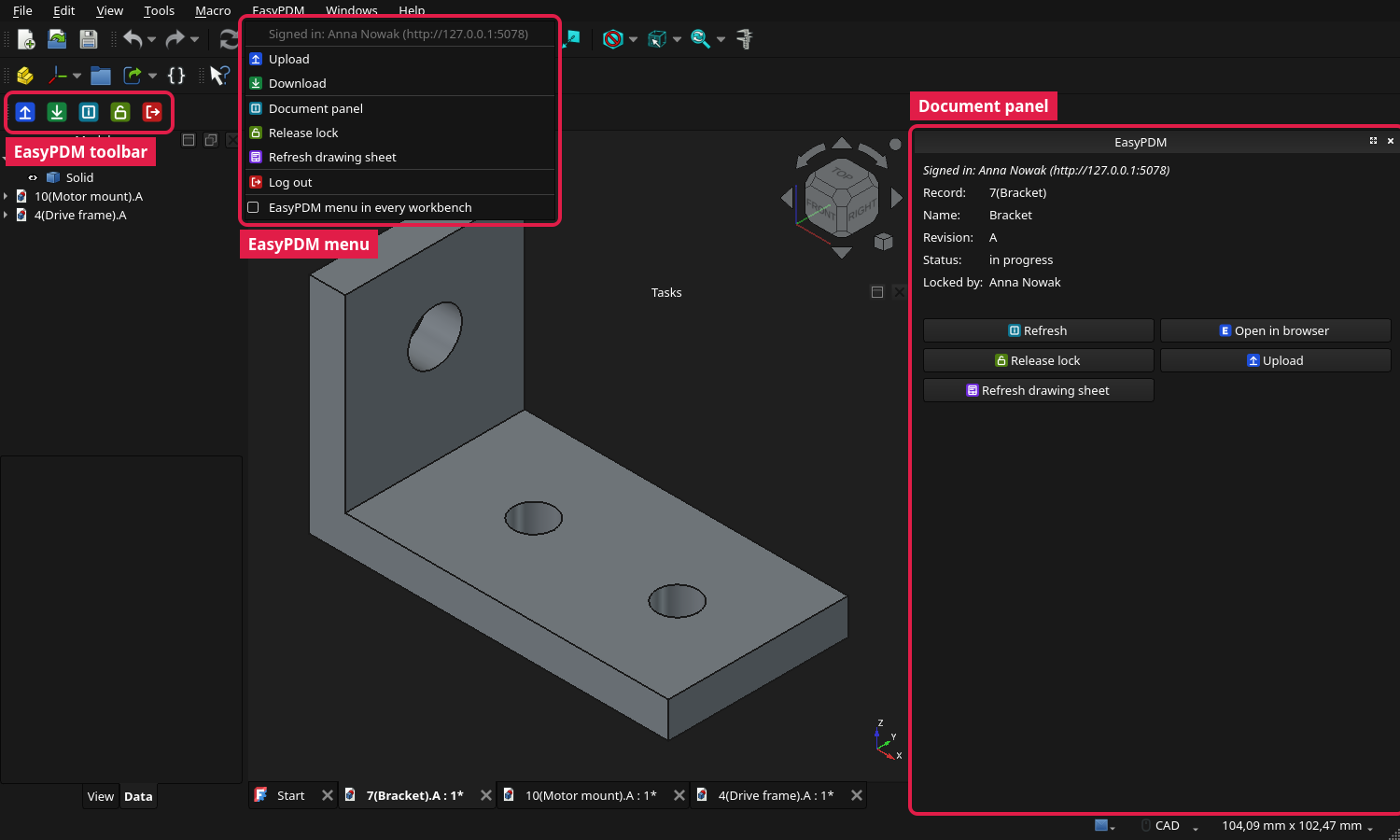
This is the home of EasyPDM's FreeCAD integration: report problems and send changes here. The EasyPDM server and web app live in pawelcel/EasyPDM, the other CAD integrations in EasyPDM-SolidWorks, EasyPDM-SolidCraft and, for Inventor, the EasyPDM repository itself. Signing in through the browser, "Open in browser" on the item itself and the check for outdated components need an EasyPDM server from 0.9; everything else works with 0.8.
- FreeCAD → Edit → Preferences → Addon Manager → Custom repositories: add
https://github.com/pawelcel/EasyPDM-FreeCADwith branchmain. - Tools → Addon manager: install EasyPDM from the list and restart FreeCAD.
Updates arrive the same way; restart FreeCAD after one. Step by step with screenshots: Installation on the wiki.
Or unpack EasyPDM_FreeCad_Addon_vX.zip from a release into FreeCAD's Mod folder (it holds an EasyPDM folder) (Linux usually
~/.local/share/FreeCAD/v1-1/Mod, Windows %APPDATA%\FreeCAD\v1-1\Mod).
- Upload of parts, assemblies (FreeCAD's native Assembly workbench, with their components as BOM positions) and TechDraw drawings: the item is created or picked in the browser, the file is renamed to the EasyPDM record name, STEP, PDF and a preview go along, mass and material are stored, and the EasyPDM drawing sheet is filled in.
- Download of an item with its whole component tree into one folder, opened in FreeCAD.
- Log in through the browser (EasyPDM servers from 0.9; "Log in with password…" for older ones) and Log out.
- Document panel (EasyPDM → Document panel): beside the model tree, the active document's item — record name, name, revision, status, who holds the lock — with buttons for the commands below and "Open in browser" (opens the item in EasyPDM; with a server older than 0.9, the whole-database view). For an assembly, the tree of its components, each marked whether it is the newest file in EasyPDM, changed here, or has a newer file uploaded by someone else.
- Upload refuses work built on outdated files: when the document or one of its components is older than its file in EasyPDM, it lists them, with who uploaded the newer one and when, so they can be downloaded first (EasyPDM servers from 0.9).
- Lock for editing / Release lock on the active document's item, as the lock in the browser: one button, which shows what a click does and is greyed out for a released item or while someone else holds the lock. Log in / Log out is one button too.
- Refresh drawing sheet: fills the EasyPDM sheet with the item's current data without uploading.
- Who is signed in, and to which server, at the top of the EasyPDM menu.
- Edit → Preferences → EasyPDM: server address, download folder, the menu in every workbench, where the login is kept, and Log out.
- In English, Polish and German, following FreeCAD's language (Qt translations; more languages welcome).
Upload and Download are the former EasyPDM FreeCAD macros, live-tested on FreeCAD 1.1, now modules of the add-on.
Not supported: other assembly workbenches (A2plus, Assembly3, Assembly4), and downloading an older revision (Download always fetches the current one).
Only the EasyPDM server whose address you enter when logging in, over HTTP(S). Nothing is sent anywhere else, and nothing is contacted until you use a command.
The login is a revocable EasyPDM token (never your password), kept per server in the system's
secret storage: DPAPI on Windows, the keychain on macOS, the Secret Service (KWallet, GNOME
Keyring…) through secret-tool on Linux. Without one — on Linux when secret-tool (package
libsecret) is missing — it stays in FreeCAD's preferences and the Report view says so. A token
an earlier version left in FreeCAD's preferences is moved into the secret storage on first use.
The server address and your name are kept in FreeCAD's preferences
(User parameter:BaseApp/EasyPDM).
- The wiki: installing, signing in, the document panel, Upload and Download, with screenshots of where everything is.
- CAD Integrations on the EasyPDM wiki
- How Upload and Download work (polski, Deutsch): assemblies, drawings, drawing sheets, limitations
FreeCAD 1.0 or newer. MIT licence.
- The add-on is FreeCAD's namespaced layout: everything in
freecad/EasyPDM/, imported by FreeCAD asfreecad.EasyPDM.init_gui. To try a change, link or copy this repository into FreeCAD'sModfolder asEasyPDM. - Translations are Qt
.ts/.qmfiles infreecad/EasyPDM/translations/, kept in step with the code bytools/update_translations.py;--add frstarts a new language. - The drawing sheets come from
tools/build_templates.py(see its docstring); never edit the SVG templates orfreecad/EasyPDM/sheet.pyby hand. - A release is a
vX.Y.Ztag matching<version>inpackage.xml; the workflow makes a draft GitHub release with the zip. See CLAUDE.md for the conventions.