


This workflow enables running a 3DCS Monte Carlo or contributor analysis job using multiple workers on a SLURM cluster in the cloud. Here's how to use it:
- Upload your model's files to a cloud bucket on the platform (see this link).
- Fill in the workflow's input form.
- Click the execute button.
- For parameter descriptions, hover over the help (?) icon next to each parameter's name.
- Before running, the workflow checks that your group has sufficient 3DCS allocation balance.
- The job is divided into sub-jobs based on the selected number of workers (up to 20).
- Each worker is submitted as an individual SLURM job and uses the specified number of threads.
- The simulation runs in the resource defined in the simulation executor section of the input form.
- The
#SBATCH --exclusiveflag is set by default in the SLURM directives due to issues running multiple 3DCS workers on a single node. This means each worker occupies a full node.
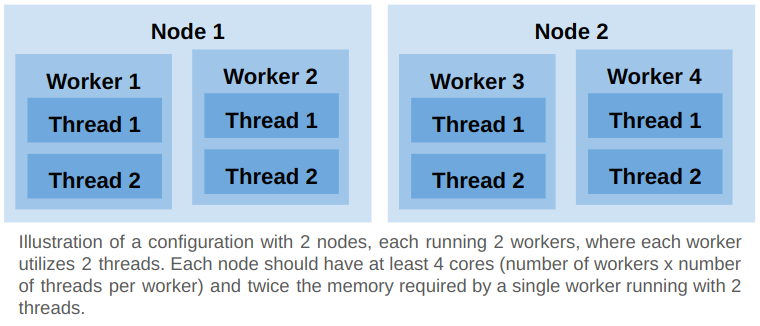
- A final job merges the results using the resource defined in the merge executor section of the input form.
- Outputs are stored in the same cloud bucket as the model, under the specified output path.
- Outputs include data generated by each worker, merged results, and metrics like memory and CPU utilization per node, and total 3DCS runtime, including overhead time for loading and processing input files.
- If multiple workers run on a single node, CPU and memory utilization plots will show overlapped usage.
- 3DCS usage is calculated based on the total number of hours a node uses any number of 3DCS workers.
- For example, if 2 nodes run a 3DCS job for 10 hours with 3 workers per node and 4 threads per worker, the usage is 2 nodes x 10 hours = 20 hours.
- To minimize 3DCS license usage, fit as many workers as possible on a single node.
- Usage data is continuously transferred to the metering server during the run.