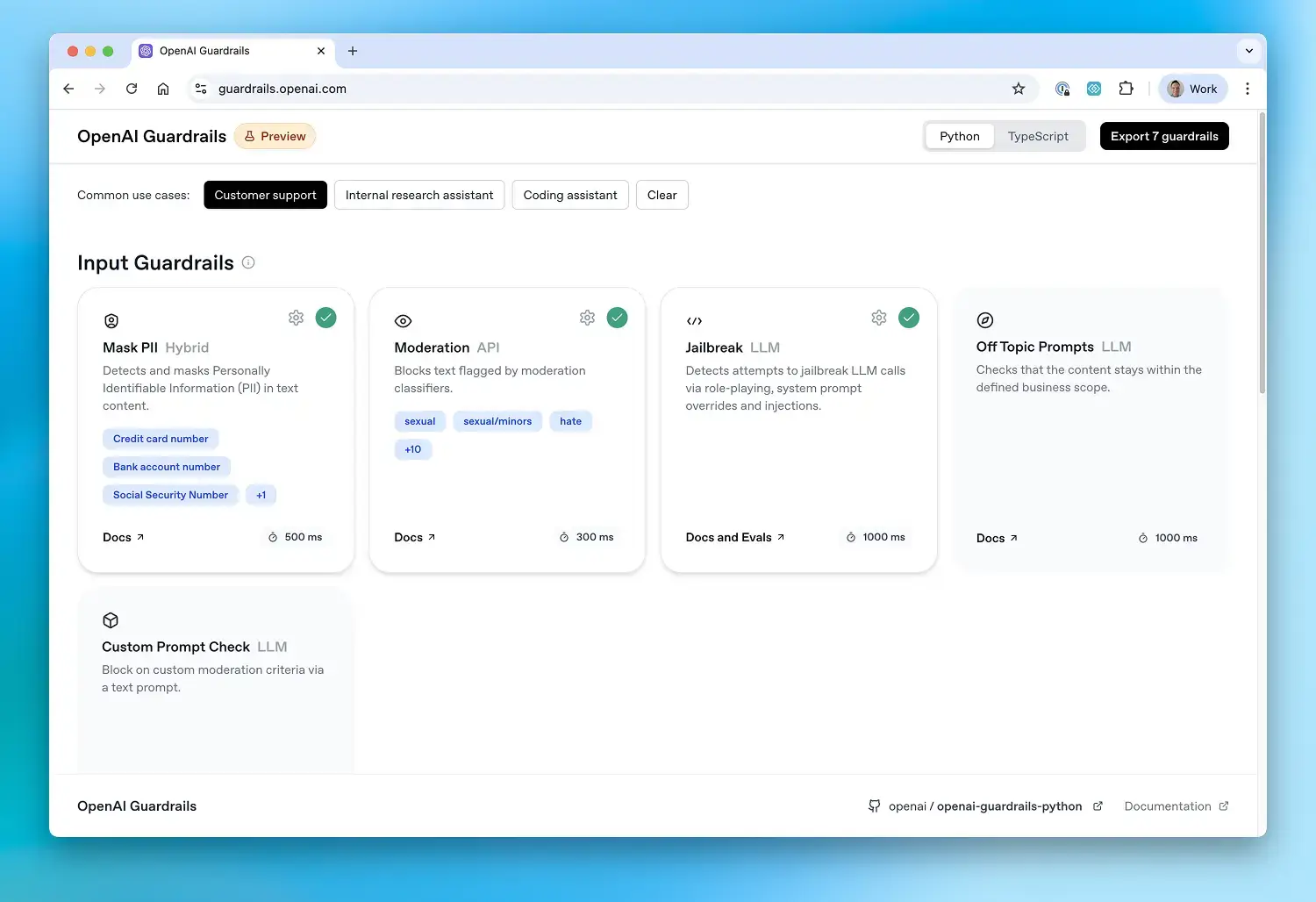
Add configurable safety and compliance checks to LLM applications. OpenAI Guardrails wraps the OpenAI Python client to validate inputs and outputs, and integrates with the OpenAI Agents SDK.
Configure guardrails · Documentation · Examples
Requires Python 3.11+. Install openai-guardrails:
pip install openai-guardrailsIf your configuration uses Contains PII, also install its spaCy model during build or deployment:
python -m spacy download en_core_web_smFor uv with spaCy 3.8, install the model wheel directly:
uv pip install https://github.com/explosion/spacy-models/releases/download/en_core_web_sm-3.8.0/en_core_web_sm-3.8.0-py3-none-any.whlContains PII validates and loads this model during client initialization; a missing or unloadable model fails configuration before any request. See the Contains PII guide for configuration options.
- Create and export a pipeline configuration with the Guardrails wizard. Save it as
guardrails_config.jsonin your working directory. - Set the
OPENAI_API_KEYenvironment variable to your OpenAI API key. - Use
GuardrailsOpenAIin place ofOpenAI:
from pathlib import Path

from guardrails import GuardrailsOpenAI, GuardrailTripwireTriggered

client = GuardrailsOpenAI(config=Path("guardrails_config.json"))

try:
    # Chat Completions API
    chat = client.chat.completions.create(
        model="gpt-5",
        messages=[{"role": "user", "content": "Hello world"}],
    )
    print(chat.choices[0].message.content)

    # Responses API
    response = client.responses.create(
        model="gpt-5",
        input="What are the main features of your premium plan?",
    )
    print(response.output_text)
except GuardrailTripwireTriggered:
    print("Message blocked by guardrails.")
For async and Azure clients, see the quickstart guide. Read about tripwire handling and streaming behavior before integrating those flows.
Use GuardrailAgent with the OpenAI Agents SDK. This example uses the same config file and API key as the quickstart:
import asyncio
from pathlib import Path

from agents import InputGuardrailTripwireTriggered, OutputGuardrailTripwireTriggered, Runner
from agents.run import RunConfig

from guardrails import GuardrailAgent

agent = GuardrailAgent(
    config=Path("guardrails_config.json"),
    name="Customer support agent",
    instructions="You help customers with their questions.",
)


async def main():
    try:
        result = await Runner.run(
            agent, "Hello, can you help me?", run_config=RunConfig(tracing_disabled=True)
        )
        print(result.final_output)
    except (InputGuardrailTripwireTriggered, OutputGuardrailTripwireTriggered):
        print("Message blocked by guardrails.")


if __name__ == "__main__":
    asyncio.run(main())
See the Agents SDK integration guide for configuration and tool guardrails.
Measure guardrail performance on labeled datasets using the same exported configuration. Install the evaluation dependencies first (currently required for basic evaluation as well as benchmarking):
pip install "openai-guardrails[benchmark]"
python -m guardrails.evals.guardrail_evals \
  --config-path guardrails_config.json \
  --dataset-path data.jsonl
Save one JSON object per line in data.jsonl, with labels for the guardrails in your configuration. For a configuration containing Moderation and NSFW Text:
{"id": "sample_1", "data": "Hello world", "expected_triggers": {"Moderation": false, "NSFW Text": false}}For the programmatic API, model comparisons, benchmark dependencies, and dataset options, see the evaluation guide.
Clone the repository and install it with the example dependencies:
git clone https://github.com/openai/openai-guardrails-python.git
cd openai-guardrails-python
pip install -e ".[examples]"
Set OPENAI_API_KEY as above. Install the spaCy model from the installation section for examples that use Contains PII, including agents_sdk.py.
python examples/basic/hello_world.py
python examples/basic/agents_sdk.py
Explore the examples:
- Basic chatbot — async client with guardrails
- Agents SDK — agent with input and output checks
- Local models — OpenAI-compatible model endpoints
- Structured outputs
- PII masking
- Tripwire suppression
| Guardrail | Checks for |
|---|---|
| Keyword Filter | Configured keywords and phrases |
| Competitors | Mentions of configured competitors |
| Moderation | Content flagged by OpenAI's moderation API |
| URL Filter | URLs against domain allowlists or blocklists |
| Secret Keys | Potential API keys, secrets, and credentials |
| Contains PII | Personally identifiable information |
| Hallucination Detection | Claims against reference material in vector stores |
| Jailbreak | Jailbreak attempts |
| Prompt Injection Detection | Misaligned tool calls and tool outputs |
| NSFW Text | Workplace-inappropriate content |
| Off Topic Prompts | Content outside a configured topic or scope |
| Custom Prompt Check | Violations of custom instructions |
Please share bug reports and feature requests through GitHub issues. Pull requests are limited to repository collaborators; we do not accept pull requests from non-collaborators. See CONTRIBUTING.md for the contribution policy and development guide. For security vulnerabilities, follow SECURITY.md.
MIT.
Guardrails may use Third-Party Services such as the Presidio open-source framework, which are subject to their own terms and conditions and are not developed or verified by OpenAI.
Developers are responsible for implementing appropriate safeguards to prevent storage or misuse of sensitive or prohibited content (including but not limited to personal data, child sexual abuse material, or other illegal content). OpenAI disclaims liability for any logging or retention of such content by developers. Developers must ensure their systems comply with all applicable data protection and content safety laws, and should avoid persisting any blocked content generated or intercepted by Guardrails. Guardrails calls paid OpenAI APIs, and developers are responsible for associated charges.