Scrolly Android Application using Kotlin

This project represents an android application Scrolly,that allows user to express their thoughts and ideas with each other.It's more like a social media app.
This application was built using the following technologies:
-
Canva
-
Adobe Photoshop
-
Figma
-
Adobe Photoshop
- IntelliJ IDEA for improving code quality.
- Android Architecture Components:MVVM,Navigation, Livedata.
- RecyclerViews & Adapters.
- Required Libraries
- Firebase
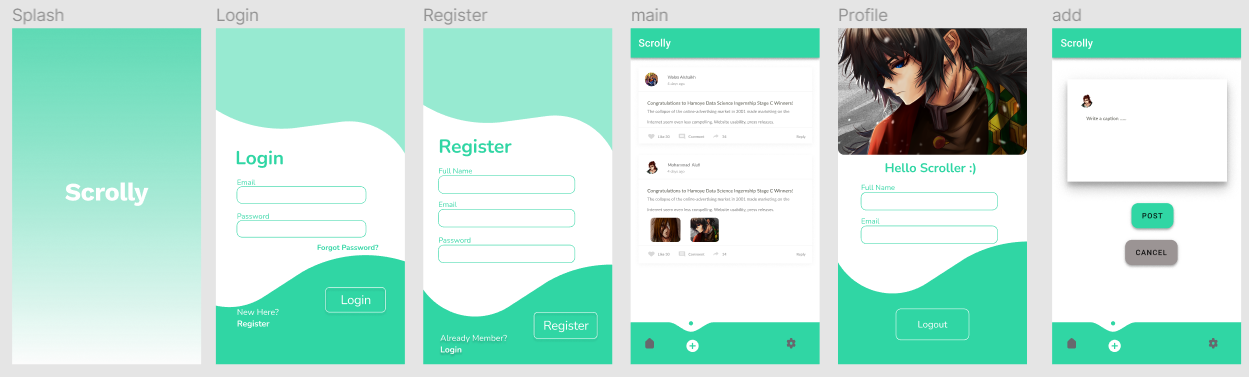
link to Figma Figma Wireframe
-
As a user,I want to display other users' posts so that I csn be in contact with people with their different perspectives
-
As a user I want to be able to login so that I can share my thoughts with other people .
-
As a user I want to uplaod images so that I can be able to share visible items.
-
As a user I would like to be able to add post so that I write down my personal opinion and thoughts.
-
As a user I would like to be able to switch from Arabic to English or vice versa so that I have more options when diplaying the app with forign people.
Follow the steps below to get started with the project's development environment:
- Install Android Studio from Android Studio
- Clone this repository:
$ git clone https://github.com/mohammed-aloufi/Project-01.git- Navigate to the project directory:
$ cd Project-01- List of the depencenceies used in the project:
   dependencies {
   implementation "androidx.navigation:navigation-fragment-ktx:2.3.5"
   implementation "androidx.navigation:navigation-ui-ktx:2.3.5"
}- for notification:
    val core_version = "1.6.0"
    dependencies {
    implementation("androidx.core:core-ktx:$core_version")

    implementation 'com.google.firebase:firebase-messaging-ktx:23.0.0'

}- for ViewModel
    dependencies {
   implementation "androidx.lifecycle:lifecycle-viewmodel-ktx:2.4.0-rc01"
   implementation "androidx.fragment:fragment-ktx:1.3.6"
}- for live data
    dependencies {
   implementation "androidx.lifecycle:lifecycle-livedata-ktx:2.4.0-rc01"
} dependencies {
implementation 'com.google.firebase:firebase-auth-ktx:21.0.1'
implementation 'com.google.firebase:firebase-firestore-ktx:24.0.0'
implementation 'com.google.firebase:firebase-storage-ktx:20.0.0'
implementation 'com.google.firebase:firebase-database-ktx:20.0.3'
implementation 'com.google.firebase:firebase-messaging-ktx:23.0.0'
implementation 'com.firebaseui:firebase-ui-firestore:8.0.0'
}- for coroutines
    dependencies {
   implementation 'org.jetbrains.kotlinx:kotlinx-coroutines-core:1.5.2'
}- for Images
    dependencies {
   implementation 'com.squareup.picasso:picasso:2.71828'
   implementation 'com.github.bumptech.glide:glide:4.12.0'
    annotationProcessor 'com.github.bumptech.glide:compiler:4.12.0'
    // for making pic circular
    implementation 'de.hdodenhof:circleimageview:3.1.0'
}- for animation
    dependencies {
    implementation 'com.facebook.shimmer:shimmer:0.5.0'
- for language (Localization)
    dependencies {
    implementation 'com.akexorcist:localization:1.2.11'
Firstly, Me and @Walaalshaikh brainstormed some ideas related to the requirement of the app and then took a general idea of the design and the mechanisim of some popular apps from app store Secondly, We designed a logo according to the purpose of the app and gave it name. Thirdly,We designed the screens each of them suitable for a specific action using the Figma and Photoshop,after that I statred programming the app using the android studio by dividing the project into several tasks to work on it: at first, I installed the required libraries and dependencies . As for the obstacles that we faced,first we needed to decide the nature of the error (if it's syntax, runtime or logical), and then find the solution accordingly.Such solutions that can be disovered when debugging the error, using (Log.d)to specifty the location of the error, searching for similar cases online in stackoverflow and asking for the help of the experts.
- The issue of adding more than one picture in the post.
- completing on working on comments functionality
- Some conflects in ui regarding Localization (when switching from English into Arabic).
- some minor issues regarding the enhancment of the design to make the user expereince more dynamic.
- Localization to switch from englidh into arabic
// in MainActivity.kt file
private val localizationDelegate = LocalizationActivityDelegate(this)

// in fragment file
val localizationDelegate = LocalizationActivityDelegate(requireActivity())

       // set the language into Arabic when clicking on it
       binding.acivBotton.setOnClickListener {
           localizationDelegate.setLanguage(requireContext(),"ar")

       }
       // set the language into English when clicking on it
       binding.engButton.setOnClickListener{
           localizationDelegate.setLanguage(requireContext(),"en")

}- using Meta (facebook) library for animation an Android library that provides an easy way to add a shimmer effect to any view in your Android app. It is useful as an unobtrusive loading indicator that was originally developed for Facebook Home.
// Gradle dependency on Shimmer for Android
dependencies {
 implementation 'com.facebook.shimmer:shimmer:0.5.0'
}

in xml
<com.facebook.shimmer.ShimmerFrameLayout
    android:id="@+id/shimmer_view_container"
    android:layout_width="wrap_content"
    android:layout_height="wrap_content"
>
    ...(your complex view here)...
</com.facebook.shimmer.ShimmerFrameLayout>