Remote GPU execution server for training and inference. Send Python code from your laptop to a GPU server via REST API and get results back.


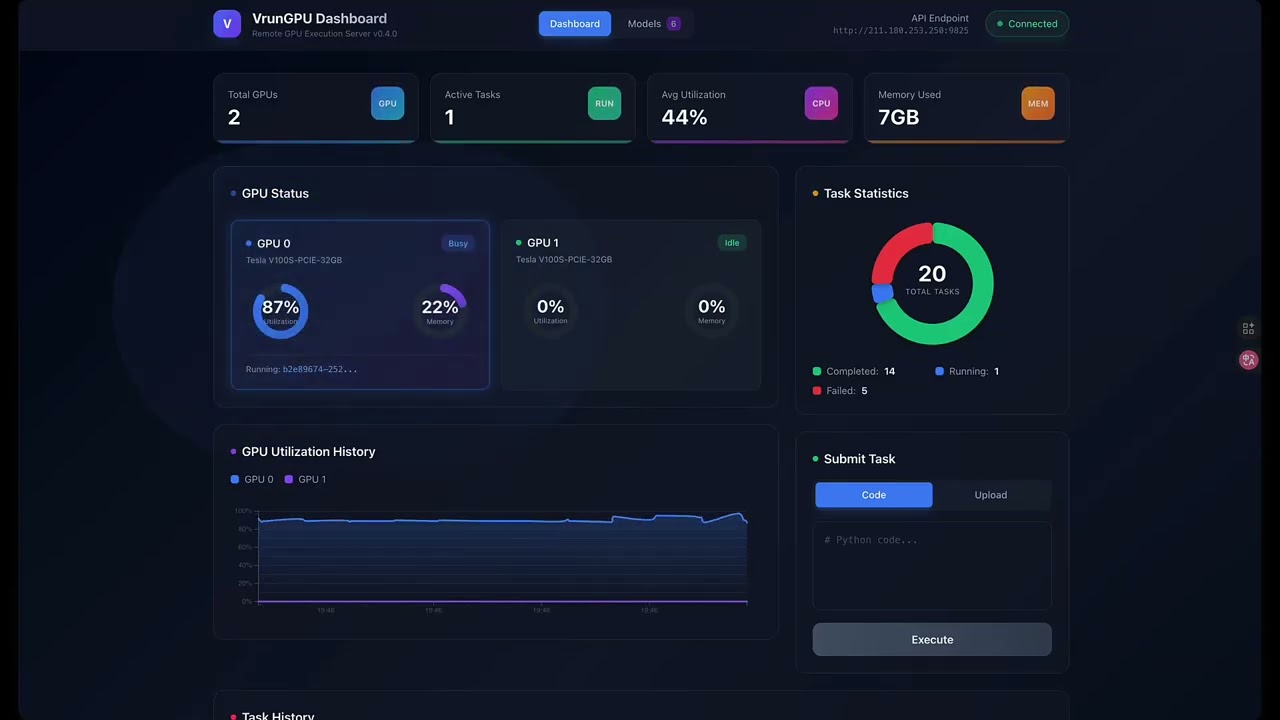
- Sync/Async Execution: Sync for quick tasks, async for long training jobs
- Multi-GPU Support: Automatic job distribution across multiple GPUs
- ZIP Project Upload: Upload multiple Python files + datasets as a ZIP archive
- File Upload API: Streaming multipart upload for datasets/checkpoints — no base64 embed workaround
- WebSocket Streaming: Real-time training logs via WebSocket
- Web Dashboard: Visual monitoring of GPU status and tasks (D3.js charts)
- SQLite Persistence: Task and model data survives server restarts
- Model Registry: Register, query, and download trained models
- Inference API: Run inference on registered models
- Progress Tracking: Real-time training progress monitoring
- LLM Chat API: Built-in LLM inference service (Qwen2.5/Qwen3/Qwen3.5, Vision-Language)
- Fine-Tuning: SFT LoRA + DPO (RLHF) with TRL DPOTrainer, V100-compatible fp16
- Session Management: Server-side multi-turn chat sessions with TTL
- Auto GPU Switching: LLM and training jobs share GPU automatically
- ML engineers who want quick GPU experiments without infrastructure overhead
- Small teams prototyping before building full MLOps pipelines
- Researchers running ad-hoc experiments on remote GPU servers
- Anyone tired of the SSH → git pull → run → copy results workflow
| Scenario | MLOps Platforms | VrunGPU |
|---|---|---|
| Quick experiments / prototyping | Heavy setup overhead | ✅ Lightweight |
| Ad-hoc GPU tasks | Pipeline setup required | ✅ Instant execution |
| Small teams / individuals | Infrastructure cost | ✅ Minimal setup |
| Production deployment | ✅ Recommended | Not designed for |
| CI/CD pipelines | ✅ Recommended | Not designed for |
| A/B testing / Feature stores | ✅ Recommended | Not designed for |
ML Development Lifecycle:

[Idea] → [Experiment] → [Development] → [Production]
              ↑               ↑               ↑
          VrunGPU         VrunGPU          MLOps
        (quick tests)   (iteration)    (deployment)
Note: VrunGPU complements MLOps platforms by providing a lightweight execution layer for experimentation and development phases.
# Clone the repository
git clone https://github.com/maior/vrungpu.git
cd vrungpu

# Create virtual environment
python3 -m venv .venv
source .venv/bin/activate

# Install dependencies
pip install -r requirements.txt

# Install PyTorch with CUDA
pip install torch --index-url https://download.pytorch.org/whl/cu121

# Install dashboard (optional)
cd dashboard && npm install && npm run build# Start backend (port 9825)
.venv/bin/python server.py
# Start dashboard (port 9824)
cd dashboard && npm run start -- -p 9824| Service | URL |
|---|---|
| Backend API | http://your-server:9825 |
| Dashboard | http://your-server:9824 |
| API Docs (Swagger) | http://your-server:9825/docs |
curl http://your-server:9825/{
"service": "VrunGPU",
"status": "running",
"version": "0.4.0",
"gpu_count": 2,
"available_gpus": 2,
"total_tasks": 150,
"total_models": 10
}curl -X POST http://your-server:9825/run/sync \
-H "Content-Type: application/json" \
-d '{
"code": "import torch\nprint(torch.cuda.get_device_name(0))"
}'# Submit job - runs until completion (no timeout by default)
curl -X POST http://your-server:9825/run/async \
-H "Content-Type: application/json" \
-d '{
"code": "import time\nfor i in range(10):\n print(f\"Step {i+1}/10\")\n time.sleep(1)"
}'
# Response: {"task_id": "abc-123", "status": "pending", ...}
# Check status
curl http://your-server:9825/task/abc-123Note: By default, tasks run without timeout. Training can run for hours or days. To set a timeout, add
"timeout": 3600(seconds).
curl -X POST http://your-server:9825/run/sync \
  -H "Content-Type: application/json" \
  -d '{
    "code": "import torch\nprint(f\"Running on GPU: {torch.cuda.current_device()}\")",
    "gpu_id": 1
}'Report training and evaluation progress from your code and monitor it in real-time.
# Print progress in this format from your code
print(f"[PROGRESS:{progress_percent}:{message}]")import torch
import torch.nn as nn
# === Training Phase (0-85%) ===
print("[PROGRESS:0:Training started]")
num_epochs = 3
for epoch in range(1, num_epochs + 1):
for batch_idx, batch in enumerate(train_loader):
# Training logic...
loss = train_step(batch)
# Report every 100 batches
if batch_idx % 100 == 0:
progress = int((epoch - 1 + batch_idx / len(train_loader)) / num_epochs * 85)
print(f"[PROGRESS:{progress}:Epoch {epoch} Batch {batch_idx}, Loss: {loss:.4f}]")
# === Evaluation Phase (85-95%) ===
print("[PROGRESS:85:Evaluating...]")
model.eval()
with torch.no_grad():
for batch_idx, batch in enumerate(eval_loader):
# Evaluation logic...
evaluate_step(batch)
# Report every 10 batches
if batch_idx % 10 == 0:
progress = 85 + int((batch_idx + 1) / len(eval_loader) * 10)
print(f"[PROGRESS:{progress}:Eval {batch_idx+1}/{len(eval_loader)}]")
# === Save Model (95-100%) ===
print("[PROGRESS:95:Saving model...]")
torch.save(model.state_dict(), "model.pt")
print("[PROGRESS:100:Training complete!]")Recommended Progress Allocation:
| Phase | Progress Range | Description |
|---|---|---|
| Training | 0-85% | Main training loop |
| Evaluation | 85-95% | Validation/test evaluation |
| Saving | 95-100% | Model checkpoint & results |
curl http://your-server:9825/task/{task_id}Response:
{
  "task_id": "abc-123",
  "status": "running",
  "progress": 60.0,
  "progress_message": "Epoch 6/10, Loss: 0.0234",
  "task_type": "training"
}curl -X POST http://your-server:9825/model/register \
-F "name=mnist-classifier-v1" \
-F "model_file=@model.pt" \
-F "model_type=classifier" \
-F "framework=pytorch"Response:
{
  "model_id": "a1b2c3d4",
  "name": "mnist-classifier-v1",
  "model_type": "classifier",
  "framework": "pytorch",
  "status": "ready",
  "file_size": 12345,
  "created_at": "2026-01-05T12:00:00"
}curl http://your-server:9825/modelscurl http://your-server:9825/model/{model_id}curl -O http://your-server:9825/model/{model_id}/downloadcurl -X DELETE http://your-server:9825/model/{model_id}Run inference on registered models.
curl -X POST http://your-server:9825/model/{model_id}/inference \
  -H "Content-Type: application/json" \
  -d '{
    "input_data": {"image": "base64...", "batch_size": 1},
    "timeout": 60
  }'
Response:
{
  "task_id": "inference-xyz",
  "status": "pending",
  "message": "Inference task started. Model: mnist-classifier-v1"
}curl http://your-server:9825/task/{task_id}Built-in LLM inference service with multi-GPU support. Run different (or same) models on each GPU simultaneously. Supports Qwen2.5/Qwen3/Qwen3.5, Vision-Language, DeepSeek, GPT-OSS models.
Model aliases (short names) are accepted wherever a model name is expected.
| Model | Alias | HuggingFace Name | VRAM (FP16) | Note |
|---|---|---|---|---|
| Qwen3.5-9B | qwen3.5-9b |
Qwen/Qwen3.5-9B |
~18GB | Default, fine-tuning ready |
| Qwen2.5-7B | qwen2.5-7b |
Qwen/Qwen2.5-7B-Instruct |
~16GB | |
| Qwen2.5-VL-7B | qwen2.5-vl-7b |
Qwen/Qwen2.5-VL-7B-Instruct |
~16GB | Vision-Language (use /run/async) |
| Qwen3-8B | qwen3-8b |
Qwen/Qwen3-8B |
~18GB | |
| DeepSeek-R1-7B (Qwen) | deepseek-7b |
deepseek-ai/DeepSeek-R1-Distill-Qwen-7B |
~16GB | |
| DeepSeek-R1-8B (Llama) | deepseek-8b |
deepseek-ai/DeepSeek-R1-Distill-Llama-8B |
~18GB | |
| DeepSeek-R1-14B | deepseek-14b |
deepseek-ai/DeepSeek-R1-Distill-Qwen-14B |
~28GB | V100 32GB recommended |
| GPT-OSS-20B | gpt-oss-20b |
openai/gpt-oss-20b |
~41GB | MXFP4 → BF16 dequant for V100 |
Each GPU runs an independent inference server (port = 9826 + gpu_id). You can run different or the same models on multiple GPUs simultaneously.
# Start model on GPU 0 (port 9826)
curl -X POST "http://your-server:9825/llm/start?model=qwen3.5-9b&gpu=0"

# Start a different model on GPU 1 (port 9827) — runs simultaneously
curl -X POST "http://your-server:9825/llm/start?model=qwen2.5-7b&gpu=1"

# Or same model on both GPUs for higher throughput
curl -X POST "http://your-server:9825/llm/start?model=qwen2.5-7b&gpu=0"
curl -X POST "http://your-server:9825/llm/start?model=qwen2.5-7b&gpu=1"# Route to specific GPU
curl -X POST "http://your-server:9825/llm/chat?gpu=0" \
-H "Content-Type: application/json" \
-d '{
"messages": [{"role": "user", "content": "Hello!"}],
"max_new_tokens": 256,
"temperature": 0.7
}'
# Omit gpu → routes to any running instance
curl -X POST http://your-server:9825/llm/chat \
-H "Content-Type: application/json" \
-d '{
"messages": [{"role": "user", "content": "Hello!"}],
"max_new_tokens": 256
}'# Route to GPU 1 specifically
curl -X POST "http://your-server:9825/llm/generate?gpu=1" \
-H "Content-Type: application/json" \
-d '{
"prompt": "Write a Python quicksort function",
"max_new_tokens": 512
}'# Check all instances
curl http://your-server:9825/llm/status
# Returns: instances[] with per-GPU model, port, pid, running status
# Stop specific GPU only
curl -X POST "http://your-server:9825/llm/stop?gpu=0"
# Stop all instances
curl -X POST http://your-server:9825/llm/stopClient Request VrunGPU Server (port 9825)
│ │
├─ /llm/chat?gpu=0 ──────────►├──► inference_server (GPU 0, port 9826)
│ │
├─ /llm/chat?gpu=1 ──────────►├──► inference_server (GPU 1, port 9827)
│ │
└─ /llm/chat (no gpu) ───────►├──► any running instance (auto-select)
- Independent instances: Each GPU loads its own model, has its own sessions
- Auto GPU switching: Training jobs still trigger LLM auto-stop per GPU
- Selective stop: Free one GPU for training while keeping the other serving
import requests

SERVER = "http://your-server:9825"

# Start models on both GPUs
requests.post(f"{SERVER}/llm/start", params={"model": "qwen3.5-9b", "gpu": 0})
requests.post(f"{SERVER}/llm/start", params={"model": "qwen2.5-7b", "gpu": 1})

# Chat with GPU 0 (Qwen3.5-9B)
r0 = requests.post(f"{SERVER}/llm/chat", params={"gpu": 0}, json={
    "messages": [{"role": "user", "content": "Explain machine learning"}],
    "max_new_tokens": 512
})
print("GPU0:", r0.json()["generated_text"])

# Chat with GPU 1 (Qwen2.5-7B)
r1 = requests.post(f"{SERVER}/llm/chat", params={"gpu": 1}, json={
    "messages": [{"role": "user", "content": "Explain machine learning"}],
    "max_new_tokens": 512
})
print("GPU1:", r1.json()["generated_text"])

# Stop GPU 0, keep GPU 1 running
requests.post(f"{SERVER}/llm/stop", params={"gpu": 0})

# Chat without gpu param → routes to GPU 1 (only running instance)
r = requests.post(f"{SERVER}/llm/chat", json={
    "messages": [{"role": "user", "content": "Hello"}]
})
print(r.json()["generated_text"])

# Stop all
requests.post(f"{SERVER}/llm/stop")Upload arbitrary files (datasets, checkpoints, configs) via streaming multipart. The returned path can be reused directly in /llm/finetune, /llm/finetune/dpo, /run/async, etc. — no base64 embedding in your code.
curl -X POST http://your-server:9825/upload \
  -F "file=@/local/path/dataset.jsonl"
Response:
{
  "file_id": "f3a1...",
  "filename": "dataset.jsonl",
  "path": "/home/maiordba/projects/vrungpu/data/uploads/f3a1.../dataset.jsonl",
  "size": 12345,
  "sha256": "9a4961...",
  "uploaded_at": "2026-04-13T09:34:39"
}curl http://your-server:9825/uploads # list
curl http://your-server:9825/upload/{file_id} # metadata
curl -O http://your-server:9825/upload/{file_id}/download # download
curl -X DELETE http://your-server:9825/upload/{file_id} # deleteimport requests
SERVER = "http://your-server:9825"
# Upload dataset
with open("pairs.jsonl", "rb") as f:
r = requests.post(f"{SERVER}/upload", files={"file": f})
dataset_path = r.json()["path"]
# Use it in fine-tuning directly
requests.post(f"{SERVER}/llm/finetune/dpo", json={
"model": "qwen2.5-7b",
"dataset_path": dataset_path,
"epochs": 1,
"beta": 0.1,
})LoRA-based fine-tuning with PEFT. Two modes: SFT (supervised) and DPO (preference learning / RLHF). Both V100-compatible fp16 with AMP GradScaler.
Dataset formats auto-detected (JSONL):
{"messages": [{"role": "user", "content": "..."}, {"role": "assistant", "content": "..."}]}{"instruction": "...", "input": "...", "output": "..."}(Alpaca){"text": "..."}(raw)
curl -X POST http://your-server:9825/llm/finetune \
  -H "Content-Type: application/json" \
  -d '{
    "model": "qwen3.5-9b",
    "dataset_path": "/path/to/train.jsonl",
    "epochs": 3,
    "lora_r": 16,
    "learning_rate": 2e-4,
    "batch_size": 4,
    "gpu": 1
}'Preference-pair dataset (JSONL):
{"prompt": "What is 2+2?", "chosen": "2+2 equals 4.", "rejected": "idk lol"}curl -X POST http://your-server:9825/llm/finetune/dpo \
-H "Content-Type: application/json" \
-d '{
"model": "qwen2.5-7b",
"dataset_path": "/path/to/pairs.jsonl",
"epochs": 1,
"beta": 0.1,
"lora_r": 16,
"batch_size": 2,
"grad_accum": 4,
"learning_rate": 5e-6
}'Uses TRL DPOTrainer with ref_model=None — the LoRA adapter is disabled to reuse the base model as reference, saving VRAM (critical on V100 32GB).
curl "http://your-server:9825/llm/finetune/status?task_id={task_id}"Response includes epoch, step, total_steps, loss, progress, and for DPO also reward margins via training logs.
# Graceful stop (saves checkpoint)
curl -X POST "http://your-server:9825/llm/finetune/stop?task_id={task_id}"# Start LLM with the adapter merged in
curl -X POST "http://your-server:9825/llm/start?model=qwen3.5-9b&lora_adapter={task_id}&gpu=1"
# Then chat normally via /llm/chatimport requests
SERVER = "http://your-server:9825"
# 1. Upload preference pairs
with open("pairs.jsonl", "rb") as f:
dataset_path = requests.post(f"{SERVER}/upload", files={"file": f}).json()["path"]
# 2. Start DPO
job = requests.post(f"{SERVER}/llm/finetune/dpo", json={
"model": "qwen2.5-7b",
"dataset_path": dataset_path,
"epochs": 1, "beta": 0.1, "lora_r": 16,
}).json()
task_id = job["task_id"]
# 3. Poll status
import time
while True:
s = requests.get(f"{SERVER}/llm/finetune/status", params={"task_id": task_id}).json()
print(f"{s['status']} {s['progress']:.1f}% loss={s['loss']}")
if s["status"] in ("completed", "failed", "cancelled"):
break
time.sleep(5)
# 4. Serve the DPO-trained adapter
requests.post(f"{SERVER}/llm/start", params={
"model": "qwen2.5-7b", "lora_adapter": task_id, "gpu": 0,
})
reply = requests.post(f"{SERVER}/llm/chat", json={
"messages": [{"role": "user", "content": "What is 2+2?"}]
}).json()
print(reply["generated_text"])For complex inference, use the /run/async endpoint:
code = """
import torch
import json

# Load model
model = torch.load('/path/to/model.pt')
model.eval()

# Process input and run inference
input_tensor = preprocess(input_data)
with torch.no_grad():
    output = model(input_tensor)

# Output results
result = {"prediction": output.argmax().item()}
print(json.dumps(result))
"""

response = requests.post(
    "http://your-server:9825/run/async",
    json={"code": code, "timeout": 60}
)Upload multiple Python files and datasets as a ZIP archive.
my_project/
├── train.py          # Entry point
├── model.py          # Model definition
├── utils.py          # Utility functions
├── config.json       # Configuration
└── data/             # Dataset folder
    ├── train.csv
    └── test.csv
# Method 1: Compress entire folder
cd /path/to/projects
zip -r my_project.zip my_project/

# Method 2: Compress files from inside folder
cd my_project
zip -r ../my_project.zip .Using curl:
curl -X POST http://your-server:9825/run/project \
  -F "file=@my_project.zip" \
  -F "entry_point=train.py"
Using Python:
import requests

with open("my_project.zip", "rb") as f:
    response = requests.post(
        "http://your-server:9825/run/project",
        files={"file": f},
        data={
            "entry_point": "train.py",
            "gpu_id": 0  # Optional: specify GPU
        }
    )

task_id = response.json()["task_id"]
print(f"Task started: {task_id}")
Note: No timeout by default. Add
"timeout": 3600if you want to limit execution time.
Using Dashboard:
- Go to http://your-server:9824
- Select "File Upload" tab
- Choose ZIP file
- Enter entry point (e.g., train.py)
- Click "Upload & Run"
| Endpoint | Method | Description |
|---|---|---|
/ |
GET | Server status and storage info |
/gpu |
GET | GPU details (memory, utilization) |
/gpu/pool |
GET | GPU pool status (allocation) |
/ws |
WebSocket | Real-time monitoring connection |
/stats |
GET | Server statistics |
| Endpoint | Method | Description |
|---|---|---|
/run/sync |
POST | Synchronous execution (waits for completion) |
/run/async |
POST | Asynchronous execution (returns task_id) |
/run/project |
POST | Upload ZIP/file and execute |
/task/{task_id} |
GET | Get task status/result/progress |
/tasks |
GET | List tasks |
/task/{task_id} |
DELETE | Delete task record + workspace (⚠ does NOT kill process — cancel first) |
/task/{task_id}/progress |
PUT | Manual progress update |
Live observability and control over in-flight tasks — cancel a stuck training run, tail logs, browse workspace files, or subscribe to live stdout via SSE.
| Endpoint | Method | Description |
|---|---|---|
/task/{task_id}/cancel |
POST | Cancel running task: SIGTERM → (timeout) → SIGKILL. Releases GPU. ?timeout=5 (default 5s) |
/task/{task_id}/logs |
GET | Tail logs. ?source=stdout|stderr|all|workspace · ?tail=200 · running uses 1000-line ring buffer, completed uses task.stdout/stderr |
/task/{task_id}/logs/stream |
GET | SSE live log stream. Pushes 200-line snapshot, then real-time lines. Emits event: end on task completion |
/task/{task_id}/files |
GET | Workspace file tree. ?max_depth=3 (default). Returns path/type/size_bytes/mtime |
/task/{task_id}/files/{path} |
GET | Read individual file from workspace. ?tail=N for text tail, otherwise full file download |
Why it matters — many frameworks (RecBole, TensorFlow, etc.) write logs to their own files instead of stdout, leaving task.stdout empty. GET /task/{id}/logs?source=workspace scans work_dir/**/*.log and tails the most recently modified file, so you can see epoch/loss progress even for file-logger frameworks.
Example — tail RecBole training log:
# Show most recent log file (auto-detected)
curl "http://{SERVER_IP}:9825/task/{TASK_ID}/logs?source=workspace&tail=50"

# Target specific file
curl "http://{SERVER_IP}:9825/task/{TASK_ID}/logs?source=workspace&workspace_file=log/LightGCN/train.log&tail=20"
Example — Python SSE client (live tail -f):
import httpx

url = f"http://{SERVER_IP}:9825/task/{TASK_ID}/logs/stream"
with httpx.stream("GET", url, timeout=None) as r:
    for line in r.iter_lines():
        if line.startswith("data: "):
            import json
            evt = json.loads(line[6:])
            print(f"[{evt['stream']}] {evt['line']}", end="")
        elif line.startswith("event: end"):
            print("\n--- task finished ---")
            break
Example — cancel a stuck task:
# Default 5-second SIGTERM grace period, then SIGKILL
curl -X POST "http://{SERVER_IP}:9825/task/{TASK_ID}/cancel"

# Give the task 30 seconds to flush checkpoints before force-kill
curl -X POST "http://{SERVER_IP}:9825/task/{TASK_ID}/cancel?timeout=30"
The GPU is automatically returned to the pool on cancel. Status transitions from running → cancelled (preserved — not overridden to failed).
Example — browse workspace for debugging:
# List all files within workspace, depth 3
curl "http://{SERVER_IP}:9825/task/{TASK_ID}/files?max_depth=3"

# Download a config file
curl "http://{SERVER_IP}:9825/task/{TASK_ID}/files/config.yaml" -o config.yaml

# Peek at last 30 lines of any text file
curl "http://{SERVER_IP}:9825/task/{TASK_ID}/files/saved/LightGCN-Mar-30-2026.pth.txt?tail=30"
Path traversal (..) is blocked — requests resolving outside the workspace return 400.
For workloads that don't need a GPU (data preprocessing, classic ML, RecBole eval, offline inference), pass device=cpu to keep the GPU pool free for training.
| Endpoint | Method | Description |
|---|---|---|
/pool |
GET | Unified GPU + CPU pool status (v0.8.0~) |
/tasks?device=cpu|gpu |
GET | Filter task list by device |
/run/async, /run/sync, /run/project |
POST | New device field: "gpu" (default) or "cpu" |
CPU slot auto-detection — slot count is computed at server start using os.sched_getaffinity(0) (respects cgroups/taskset), reserving 25% or 4 cores (whichever is larger) as headroom for GPU DataLoader workers and the OS, then dividing the remainder by 4 (assumed average cores per CPU task), capped at 16. Override with VRUNGPU_CPU_SLOTS=N env.
| Host cores | Slots | Rationale |
|---|---|---|
| 4 | 1 | Minimum |
| 16 | 3 | 12 effective ÷ 4 |
| 32 | 6 | 24 effective ÷ 4 |
| 64 | 12 | 48 effective ÷ 4 |
| 128+ | 16 | Upper cap |
Example — submit CPU preprocessing job:
curl -X POST "http://{SERVER_IP}:9825/run/async" \
  -H "Content-Type: application/json" \
  -d '{
    "code": "import pandas as pd\ndf = pd.read_csv(\"/data/large.csv\")\nprint(df.describe())",
    "name": "preprocess_job",
    "device": "cpu"
  }'
Example — run RecBole eval on CPU while training runs on GPU:
curl -X POST "http://{SERVER_IP}:9825/run/project" \
  -F "file=@eval_project.zip" \
  -F "entry_point=run_eval.py" \
  -F "device=cpu"
Example — check pool status:
curl "http://{SERVER_IP}:9825/pool"
# {
#   "gpu": {"total_gpus": 2, "available_gpus": [1], "busy_gpus": {"task-abc": 0}},
#   "cpu": {"max_slots": 6, "in_use": 1, "tasks": ["task-xyz"], "auto_detected": true}
# }
What happens to CPU tasks internally — CUDA_VISIBLE_DEVICES="" and VRUNGPU_DEVICE="cpu" are injected into the subprocess env. The task runs in a separate CPU slot pool from the GPU pool, so a CPU task never blocks GPU scheduling and vice versa. CPU and GPU tasks can run concurrently.
Recommended CPU workloads: pandas/numpy preprocessing, scikit-learn/xgboost, RecBole eval_args.mode=full evaluation, offline inference on small models.
Not recommended on CPU: LLM fine-tuning, large tensor ops — practical speed is too low. If you try, it is permitted but will be slow.
| Endpoint | Method | Description |
|---|---|---|
/upload |
POST | Upload arbitrary file (streaming multipart) |
/uploads |
GET | List uploaded files |
/upload/{file_id} |
GET | Get upload metadata |
/upload/{file_id}/download |
GET | Download uploaded file |
/upload/{file_id} |
DELETE | Delete uploaded file |
| Endpoint | Method | Description |
|---|---|---|
/llm/finetune |
POST | Start SFT LoRA fine-tuning |
/llm/finetune/dpo |
POST | Start DPO LoRA fine-tuning (RLHF) |
/llm/finetune/status |
GET | Fine-tuning progress (shared SFT/DPO) |
/llm/finetune/stop |
POST | Graceful stop with checkpoint save |
/llm/finetune/models |
GET | List fine-tuned adapter models |
| Endpoint | Method | Description |
|---|---|---|
/models |
GET | List models |
/model/register |
POST | Register model (file upload) |
/model/{model_id} |
GET | Get model info |
/model/{model_id} |
DELETE | Delete model |
/model/{model_id}/download |
GET | Download model file |
/model/{model_id}/inference |
POST | Run inference with model |
All LLM endpoints accept an optional ?gpu=N parameter to target a specific GPU instance.
| Endpoint | Method | Description |
|---|---|---|
/llm/start |
POST | Start LLM instance on GPU (params: model, gpu, lora_adapter) |
/llm/stop |
POST | Stop instance (?gpu=N for specific, omit for all) |
/llm/status |
GET | All instances status (per-GPU model, port, health) |
/llm/generate |
POST | Text generation (?gpu=N or auto-route) |
/llm/chat |
POST | Chat completion (?gpu=N or auto-route, session_id) |
/llm/sessions |
GET | List active chat sessions (all instances or ?gpu=N) |
/llm/session/{id} |
GET | Get session history |
/llm/session/{id} |
DELETE | Delete session |
The dashboard uses WebSocket for real-time updates.
// Initial data on connection
{ "type": "init", "gpus": [...], "tasks": [...] }

// GPU status update
{ "type": "gpu_update", "gpus": [...] }

// Task status change
{ "type": "task_update", "task": {...} }

// Real-time output (logs)
{ "type": "task_output", "task_id": "...", "stream": "stdout", "line": "..." }const ws = new WebSocket("ws://your-server:9825/ws");
ws.onmessage = (event) => {
const data = JSON.parse(event.data);
if (data.type === "task_output") {
console.log(data.line); // Real-time log output
}
};from client import VrunGPUClient
client = VrunGPUClient("http://your-server:9825")
# Get GPU info
print(client.get_gpu_info())
# Synchronous execution
result = client.run_sync("print('Hello GPU!')")
print(result['stdout'])
# Asynchronous execution + wait for completion
task_id = client.run_async(train_code)
result = client.wait_for_task(task_id)
print(result['stdout'])
# File upload
task_id = client.run_file("train.py", timeout=600, gpu_id=0)
result = client.wait_for_task(task_id)When multiple GPUs are available, concurrent job submissions run on different GPUs in parallel.
# Submit job 1 -> Allocated to GPU 0
curl -X POST http://your-server:9825/run/async -d '{"code": "..."}'

# Submit job 2 -> Allocated to GPU 1
curl -X POST http://your-server:9825/run/async -d '{"code": "..."}'

# Check GPU pool status
curl http://your-server:9825/gpu/pool
# {"total_gpus": 2, "available_gpus": [], "busy_gpus": {"task1": 0, "task2": 1}}
When all GPUs are busy, new tasks wait in queued status and automatically start when a GPU becomes available.
All data is persisted starting from v0.4.0.
vrungpu/
└── data/
    ├── vrungpu.db        # SQLite database (tasks, model metadata)
    ├── workspaces/       # Task execution environments and results
    │   ├── {task_id}/
    │   │   ├── main.py
    │   │   └── model.pt
    │   └── inference_{task_id}/
    │       └── inference.py
    ├── models/           # Registered model files
    │   └── {model_id}/
    │       └── model.pt
    └── uploads/          # Uploaded ZIP files
vrungpu/
├── server.py              # FastAPI server (main, multi-GPU LLM management)
├── inference_server.py    # LLM inference server (per-GPU instance)
├── finetune_worker.py     # SFT LoRA fine-tuning worker
├── finetune_dpo_worker.py # DPO fine-tuning worker (TRL DPOTrainer)
├── client.py              # Python client
├── requirements.txt       # Dependencies
├── test_server.py         # Test script
├── README.md              # Documentation
├── data/                  # Persistent storage
│   ├── vrungpu.db         # SQLite database
│   ├── workspaces/        # Task workspaces
│   ├── models/            # Registered + fine-tuned models
│   │   └── finetune/      # LoRA adapter outputs
│   ├── uploads/           # Uploaded files (datasets, etc.)
│   └── logs/              # Per-GPU inference server logs
├── dashboard/             # Next.js dashboard
│   ├── app/
│   │   ├── page.tsx       # Dashboard UI (D3.js charts)
│   │   └── globals.css    # Animation styles
│   └── package.json
└── examples/              # Example projects
    └── mnist_project/
# Compress example project
cd examples
zip -r mnist_project.zip mnist_project/

# Upload and run (no timeout - runs until completion)
curl -X POST http://your-server:9825/run/project \
  -F "file=@mnist_project.zip" \
-F "entry_point=train.py"# Check progress
curl http://your-server:9825/task/{task_id}
# Response shows progress
# "progress": 60.0, "progress_message": "Epoch 6/10..."After training completes, register the model from the workspace:
curl -X POST http://your-server:9825/model/register \
  -F "name=mnist-v1" \
  -F "model_file=@/path/to/workspace/{task_id}/model.pt" \
-F "model_type=classifier"curl -X POST http://your-server:9825/model/{model_id}/inference \
-H "Content-Type: application/json" \
-d '{"input_data": {"image": "..."}, "timeout": 30}'Get server-wide statistics.
curl http://your-server:9825/statsResponse:
{
  "tasks": {
    "by_status": {
      "completed": 150,
      "running": 2,
      "failed": 5
    },
    "avg_duration": {
      "training": 3600,
      "inference": 5
    },
    "last_24h": 25
  },
  "models": {
    "by_status": {
      "ready": 10,
      "archived": 3
    },
    "total": 13
  },
  "gpu": {
    "usage_count": {"0": 100, "1": 80},
    "current": {
      "total_gpus": 2,
      "available_gpus": [0, 1],
      "busy_gpus": {}
    }
  }
}- Python 3.10+
- CUDA-capable GPU(s)
- PyTorch with CUDA support
- Node.js 18+ (for dashboard)
- v0.8.0 - CPU Task Support:
device="cpu"opt-in for/run/async,/run/sync,/run/projectroutes the task to a separateCPUSlotPoolwith auto-detected slot count (os.sched_getaffinity→ headroom 25%/4-core → divide by 4, cap 16). GPU pool untouched, so CPU and GPU tasks run concurrently without contention. NewGET /poolendpoint (unified GPU+CPU view),?device=cpu|gpufilter on/tasks,VRUNGPU_CPU_SLOTS=Nenv override. Subprocesses getCUDA_VISIBLE_DEVICES=""+VRUNGPU_DEVICE="cpu". Idempotent DB migration addstasks.devicecolumn defaulting to"gpu". - v0.7.0 - Task Management API:
POST /task/{id}/cancel(SIGTERM→SIGKILL, GPU auto-release),GET /task/{id}/logs?source=stdout|stderr|all|workspace(ring-buffer tail for running tasks, file-based tail for frameworks like RecBole that bypass stdout),GET /task/{id}/logs/stream(SSE live tail),GET /task/{id}/files+/files/{path}(workspace browsing with path-traversal protection). Preservescancelledstatus instead of overwriting withfailed. - v0.6.0 - Multi-GPU LLM (GPU별 독립 인스턴스, 동시 서빙), File Upload API, DPO fine-tuning (TRL DPOTrainer + LoRA), fix asyncio LimitOverrunError on large subprocess output
- v0.5.0 - LLM Chat API (Qwen2.5/Qwen3/Qwen3.5, Qwen2.5-VL), SFT LoRA fine-tuning, server-side chat sessions, model aliases, auto GPU switching
- v0.4.0 - SQLite persistence, model management API, inference API, progress tracking
- v0.3.0 - D3.js dashboard with smooth animations
- v0.2.0 - ZIP project upload, multi-GPU support
- v0.1.0 - Basic sync/async execution
Apache License 2.0 - see LICENSE for details.
Contributions are welcome! Please feel free to submit a Pull Request.
- Fork the repository
- Create your feature branch (
git checkout -b feature/AmazingFeature) - Commit your changes (
git commit -m 'Add some AmazingFeature') - Push to the branch (
git push origin feature/AmazingFeature) - Open a Pull Request