

Horovod is a distributed training framework for TensorFlow, Keras, PyTorch, and MXNet. Ansible is a radically simple IT automation system. We can easily install the horovod on all server through its automatic setup on AWS or On-premise
- All On-premise nodes should be ubuntu>=16.04. I assumed that all nodes were equipped with Ansible(On-premise)
- Until now, only the examples of tensorflow and pyrotorch can used(Not MXNet, Caffe.. etc YET).
AWSStep : 0 - 1 -3On-permStep : 0 - 2 - 3
All steps will be conducted under Docker container for beginners.
$ docker run -it --name horovod-ansible graykode/horovod-ansible:0.1 /bin/bashTo create horovod clustering enviorment, start provisioning with Terraform code. Change some option variables.tf which you want. But you should not below ## DO NOT CHANGE BELOW.
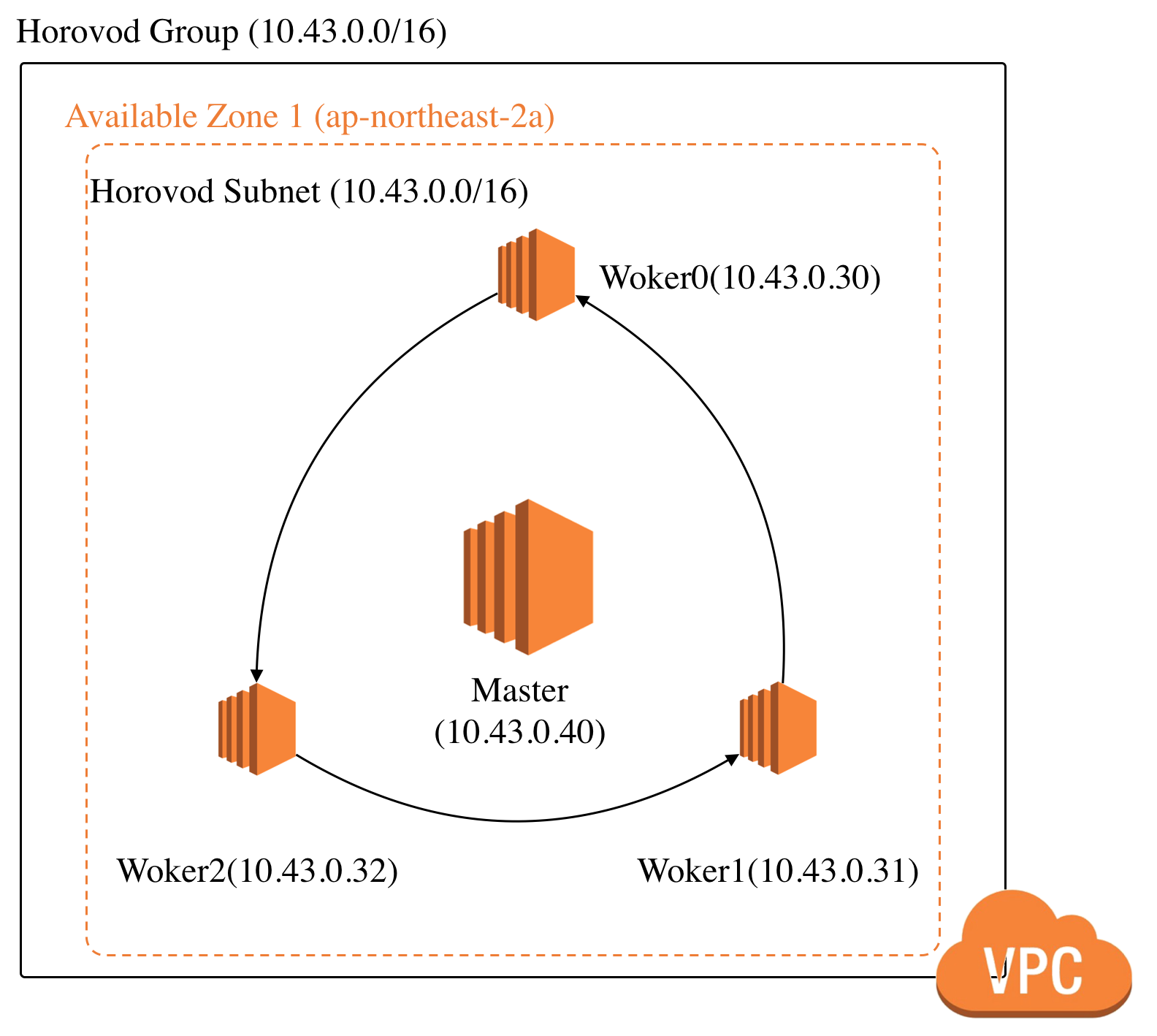
If I created EC2 with option number_of_worker 3, Total architecture is same with below picture.
$ export AWS_ACCESS_KEY_ID=<Your Access Key in AWS>
$ export AWS_SECRET_ACCESS_KEY=<Your Access Key in Secret>
Initializing terraform and create private key to use.
$ cd terraform/ && ssh-keygen -t rsa -N "" -f horovod
$ terraform init
provisioning all resource EC2, VPC(gateway, router, subnet, etc..)
$ terraform applyThen, you can get output :
Apply complete! Resources: 12 added, 0 changed, 0 destroyed.

Outputs:

horovod_master_public_ip = <master's public IP>
horovod_workers_public_ip = <worker0's public IP>,<worker1's public IP>As I said above, assume that all nodes are 'ansible' and network setup is finished. If you want to see install Ansible, Please read Ansible Install Guide on document.
Install ansible and jinja2 using pip.
$ ../ansible && pip install -r requirements.txtSet inventory.ini in Ansible Folder.
master ansible_host=<master's public IP>
worker0 ansible_host=<worker0's public IP>
worker1 ansible_host=<worker1's public IP>
....
worker[n] ansible_host=

[all]
master
worker0
worker1
...
worker[n]

[master-servers]
master

[worker-servers]
worker0
worker1
...
worker[n]
Ping Test to all nodes!
$ chmod +x ping.sh && ./ping.shNow ssh configure to using Open MPI, Download Open MPI and build
$ chmod +x playbook.sh && ./playbook.shTest all nodes of mpi that it is fine in master node.
$ chmod +x test.sh && ./test.sh

# go to master node.
ubuntu@master:~$ mpirun -np 3 -mca btl sm,self,tcp -host master,worker0,worker1 ./test
Processor name: master
master (0/3)
Processor name: worker0
slave  (1/3)
Processor name: worker1
slave (2/3)I'd like you to change this part fluidly.
-
Install Tensorflow on CPU, Horovod and Run Distributed
$ chmod +x tensorflow.sh && ./tensorflow.sh

# go to master node.
ubuntu@master:~$ horovodrun -np 3 -H master,worker0,worker1 python3 tensorflow-train.py
-
Install Pytorch on CPU, Horovod and Run Distributed
$ chmod +x pytorch.sh && ./pytorch.sh

# go to master node.
ubuntu@master:~$ horovodrun -np 3 -H master,worker0,worker1 python3 pytorch-train.py
-
Issue Note : If you want to change framework after install horovod, you reinstall horovod with
HOROVOD_WITH_*option, '*' is just framework name. please see horovod issue. But in my Ansible Script, I 'm not add it yet.
- Tae Hwan Jung(Jeff Jung) @graykode
- Author Email : [email protected]