








Fleet EDR is an open-source endpoint detection and response (EDR) system for macOS fleets. It gives security teams real-time visibility into process, network, and DNS activity on Apple Silicon Macs, runs behavioral detection rules against a materialized process graph, and can block execution or kill a process on the endpoint. It is fully self-hosted: your own server, your own data, no SaaS dependency.
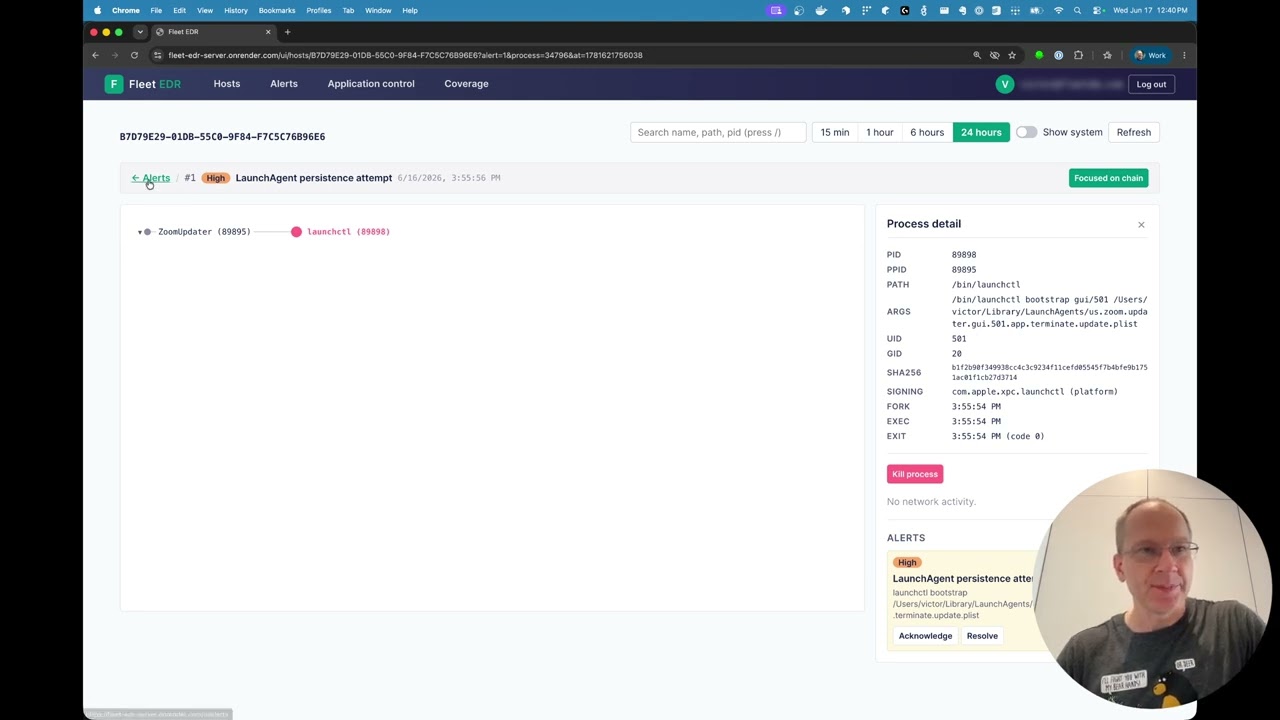
Either deploy it and enroll real Macs, or try it first with the Mac-free demo.
Two steps. Stand up a server, then push the agent to your Macs.
1. Stand up the server.
-
Single VM with your own domain (recommended). One Linux VM, one script: Caddy gets a Let's Encrypt certificate automatically and reverse-proxies to the server, so you manage no certificates and no content-inspecting edge WAF flags your agents' telemetry as attacks. Full walkthrough: docs/quickstart-vm.md.
EDR_DOMAIN=edr.example.com EDR_VERSION=v0.2.1 ./bootstrap.sh
-
Or self-host the container on any container host (Docker, Kubernetes, AWS ECS/EKS, GCP, Azure, or your own VM). The server is a standard multi-arch Linux image. Setup, secrets, and TLS: docs/install-server.md.
2. Deploy the agent to your Macs (Apple Silicon, macOS 26+). The agent ships as a Developer ID-signed, notarized .pkg plus two .mobileconfig profiles, delivered by your MDM.
- Via MDM (Fleet, Jamf, Kandji, Intune, mosyle): the vendor-neutral contract is in docs/mdm-deployment.md; the Fleet-specific recipe is in docs/fleet-deployment.md.
- Manually on 1 to 5 Macs (no MDM, for evaluation): docs/install-agent-manual.md.
Once agents enroll, open the server's /ui/ to watch hosts, process trees, and alerts in real time.
Want to look before deploying? Evaluate the full server, UI, and detection pipeline in about five minutes. No Apple Silicon Mac, MDM, or Apple entitlement needed.
docker compose -f docker-compose.demo.yml upOpen https://localhost:8088/ui/, accept the self-signed certificate warning, and sign in with the bundled SSO account demo@fleet-edr.local / demo.
You'll see two real macOS hosts (an engineer laptop and a CI build server), each with a deep process graph and correlated network and DNS activity drawn from genuine scrubbed captures. Woven into that ambient activity are five fired ATT&CK detections: a credential keychain dump and a DNS C2 beacon (exec, DNS, and outbound connection correlated across all three streams), plus sudoers tampering, launchd persistence, and an application-control block. Every alert comes from the real ingestion and detection pipeline, not hand-inserted rows, and the benign activity raises no false alarms.
Notes:
- The on-device half (system extension, network extension, agent) needs an Apple-granted Endpoint Security entitlement and Apple Silicon, so it cannot run in Docker. The demo exercises the server, UI, and detection pipeline; deploy on a real Mac (above) to see live capture.
- Response actions enqueue but never complete in the demo because no live agent is connected.
- Evaluation only: empty MySQL password, self-signed cert, checked-in dev secrets. Do not expose it to the internet.
- To build the demo images from source instead of pulling the release tag:
docker compose -f docker-compose.demo.yml -f docker-compose.demo.build.yml up --build.
- Real-time macOS monitoring. On-device extensions capture process execution, fork/exit, file access, DNS queries, and network connections, streamed continuously to your server.
- Process-graph correlation. The server reconstructs a live per-host process tree, so every alert carries the full ancestry that led to it.
- Behavioral detections. A catalog of rules covering credential access, persistence, privilege escalation, process injection, command-and-control beaconing, and suspicious execution, including detections that correlate exec, DNS, and network together.
- Application control. Block execution by binary hash, path, CDHash, signing ID, team ID, or leaf certificate, enforced on the endpoint at exec time.
- Response. Kill a running process on a host on demand.
- Operator UI with RBAC, SSO, and an append-only audit log. OIDC single sign-on plus a WebAuthn break-glass path, five built-in roles, and an immutable record of every privileged action.
For the full per-release capability list, see the changelog.
- System extension (Swift): subscribes to macOS Endpoint Security Framework events (exec, fork, exit, open) and captures process metadata, code-signing info, and file hashes.
- Network extension (Swift): monitors TCP/UDP connections with process attribution, and resolves DNS to emit per-process
dns_queryevents. - Agent daemon (Go): receives events from the extensions over XPC, buffers them in a durable SQLite queue, and uploads to the server (store-and-forward, so a transient outage doesn't lose events).
- Ingestion API: accepts event batches from agents over HTTP.
- Processor: materializes a per-host process graph from raw events and runs the detection rules.
- MySQL storage: events, processes, alerts, and commands. The server is stateless (ADR-0010), so it scales as multiple replicas behind a load balancer.
- Web UI (React/TypeScript): process-tree visualization, alert management, and response actions.
Operator and reference docs live in docs/:
| Topic | Doc |
|---|---|
| Deploy on a single VM with your own domain (recommended) | quickstart-vm.md |
| Self-host the server stack | install-server.md |
| Deploy the agent via any MDM | mdm-deployment.md |
| Fleet MDM recipe | fleet-deployment.md |
| Evaluate on 1 to 5 Macs without an MDM | install-agent-manual.md |
| Day-2 ops: upgrades, rotations, backups, troubleshooting | operations.md |
| Detection rules: behavior, ATT&CK mapping, configuration | detection-rules.md |
| HTTP API reference | api.md + api/openapi.yaml |
| Architecture decisions (the "why") | adr/ |
Repository layout:
extension/edr/       Swift system extension + network extension (Xcode project)
agent/               Go agent daemon (XPC receiver, SQLite queue, uploader)
server/              Go server (ingestion, processor, detection, REST API)
internal/            Shared packages (envparse, etc.)
ui/                  React/TypeScript frontend (Vite, D3.js process tree)
docs/                Operator + reference docs, ADRs
Building from source or contributing? See CONTRIBUTING.md for the full guide. The short version:
mise install        # install pinned tools (Go, Node, golangci-lint, lefthook, task) from .tool-versions
lefthook install    # format + lint on commit, build + tsc on push
task lint:install   # builds the custom golangci-lint (with the commentwrap plugin)

task db:up          # local MySQL on 33306 (dev) / 33307 (test)
task build:ui       # build the UI, embedded into the server binary
task dev:server     # run the server at https://localhost:8088/ui/ (break-glass-only auth)

task test           # everything (Go + UI); requires MySQL
task --list         # the Taskfile is the source of truth for all commands
task dev:server runs break-glass-only. To exercise SSO locally against the bundled dex IdP, run task qa:up then task dev:server:qa-oidc; see docs/okta-setup.md for a real OIDC tenant.