A feature-rich command-line argument parser library for Mojo, with both builder and struct-based declarative APIs. Inspired by Python's argparse, Rust's clap, Go's cobra, and Swift's swift-argument-parser.


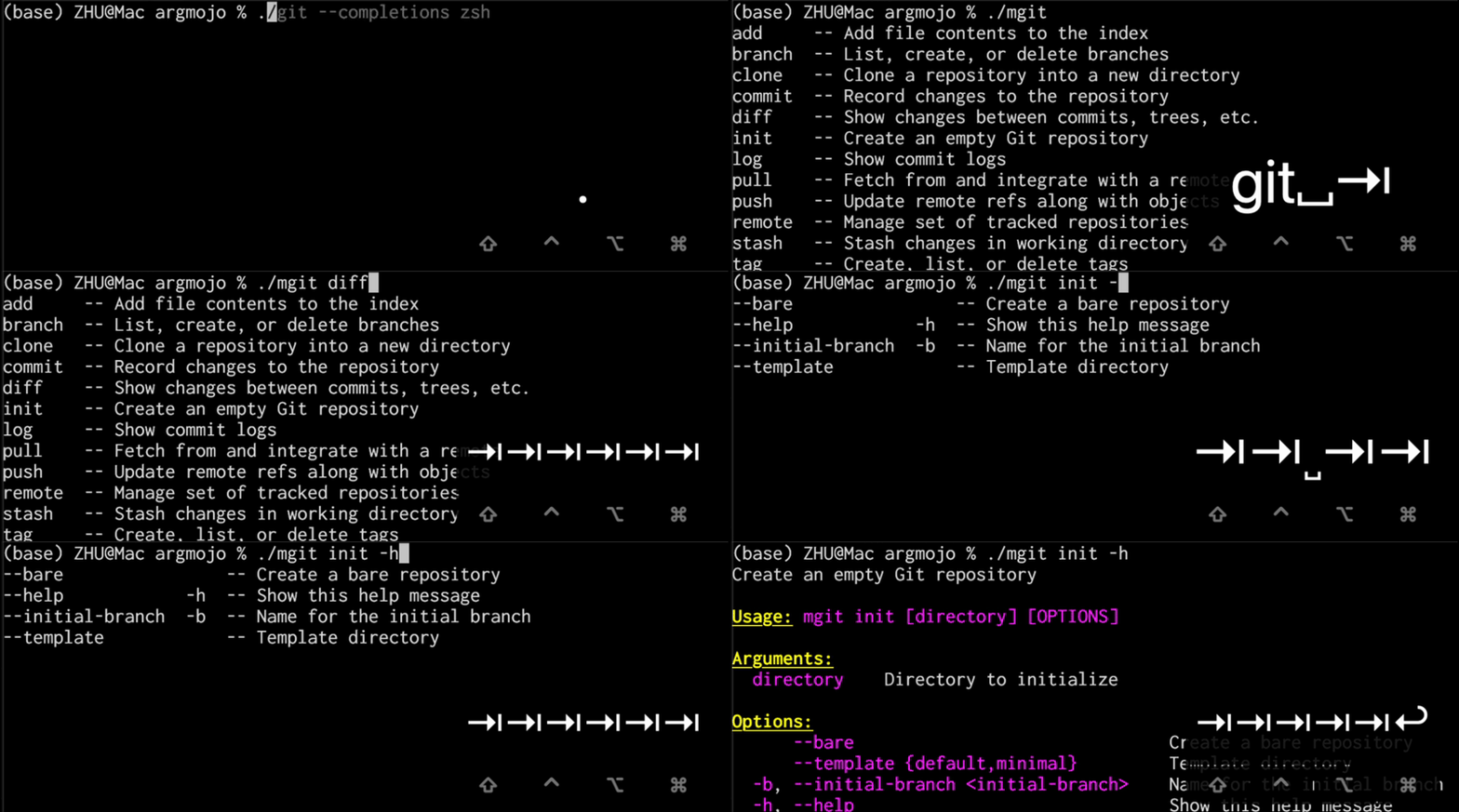
Demo: Shell tab-completion powered by ArgMojo
ArgMojo provides two complementary styles for defining and parsing command-line arguments in Mojo: a builder API for maximum control (Command + Argument chains) and an optional struct-based declarative API inspired by Swift's swift-argument-parser (define a Parsable struct, call MyArgs.parse(), get typed results). You can mix both freely — put most of your arguments in a struct and drop down to builder methods whenever you need finer control.
ArgMojo currently supports:
- Long options:
--verbose,--output file.txt,--output=file.txt - Short options:
-v,-o file.txt - Boolean flags: options that take no value
- Positional arguments: matched by position
- Default values: fallback when an argument is not provided
- Required arguments: validation that mandatory args are present
- Auto-generated help:
--help/-h/-?with dynamic column alignment, pixi-style ANSI colours, and customisable header/arg colours - Help on no args: optionally show help when invoked with no arguments
- Version display:
--version/-V(also auto-generated) --stop marker: everything after--is treated as positional- Short flag merging:
-abcexpands to-a -b -c - Attached short values:
-ofile.txtmeans-o file.txt - Choices validation: restrict values to a set (e.g.,
json,csv,table) - Value name: custom display name for values in help text
- Hidden arguments: exclude internal args from
--helpoutput - Count flags:
-vvv→get_count("verbose") == 3 - Positional arg count validation: reject extra positional args
- Negatable flags:
--color/--no-colorpaired flags with.negatable() - Mutually exclusive groups: prevent conflicting flags (e.g.,
--jsonvs--yaml) - Required-together groups: enforce that related flags are provided together (e.g.,
--username+--password) - Long option prefix matching: allow abbreviated options (e.g.,
--verb→--verbose). If the prefix is ambiguous (e.g.,--vercould match both--verboseand--version-info), an error is raised. - Append / collect action:
--tag x --tag ycollects repeated options into a list with.append() - One-required groups: require at least one argument from a group (e.g., must provide
--jsonor--yaml) - Value delimiter:
--env dev,staging,prodsplits by delimiter into a list with.delimiter[","]() - Multi-value options (nargs):
--point 10 20consumes N consecutive values with.number_of_values[N]() - Key-value map options:
--define CC=gcc --define CXX=g++collects key=value pairs with.map_option() - Numeric range validation:
--level 5checked against[min, max]bounds with.range[1, 10](); optional clamping with.clamp() - Conditional requirements:
--outputrequired when--saveis present - Aliases: alternative long names (e.g.,
--colourand--color) with.alias_name["color"]() - Deprecated arguments: emit a warning but continue parsing
- Custom tips: add tip lines below the help message
- Mutual implication:
--debugautomatically sets--verbosewith.implies() - Subcommands: hierarchical commands (
app search,app init), nested subcommands (app remote add), persistent (global) flags, subcommand aliases, hidden subcommands - Shell completion script generation:
generate_completion("bash"|"zsh"|"fish")produces a complete tab-completion script for your CLI - Typo suggestions: Levenshtein-distance "did you mean …?" for misspelled options and subcommands
- Interactive prompting:
.prompt()to interactively ask for missing values - Password / masked input:
.password()to hide typed input during prompts - Confirmation option:
confirmation_option()to add a--yes/-yskip-confirmation flag - Argument parents:
add_parent()to share argument definitions across commands - Custom usage line:
usage()to override the auto-generated usage string - Response files:
@args.txtexpansion (temporarily disabled due to a Mojo compiler bug) - CJK-aware help alignment: CJK characters treated as 2-column-wide
- CJK full-width auto-correction: fullwidth
--verbose→--verbosewith a warning - CJK punctuation detection: em-dash
——verbose→--verbose - Argument groups:
.group["Network"]()to group arguments under dedicated help sections - Default-if-no-value:
--compressuses a fallback;--compress=bzip2overrides - Require equals syntax:
--key=valuerequired,--key valuerejected - Remainder positional:
.remainder()consumes all remaining tokens - Allow hyphen values:
.allow_hyphen_values()accepts-as a regular value (stdin convention) - Partial parsing:
parse_known_arguments()collects unrecognised options instead of erroring - Compile-time validation: builder parameters validated at
mojo buildtime viacomptime assert - Registration-time validation: group constraint typos caught when the program starts, not when the user runs it
I created this project to support my experiments with a CLI-based Chinese character search engine in Mojo, as well as a CLI-based calculator for Decimo. It is inspired by Python's argparse, Rust's clap, Go's cobra, Swift's swift-argument-parser, and other popular argument parsing libraries, but designed to fit Mojo's unique features and constraints.
My goal is to provide a Mojo-idiomatic argument parsing library that can be easily adopted by the growing Mojo community for their CLI applications. Before Mojo v1.0 (which means Mojo is not yet stable), my focus is on building core features and ensuring correctness. "Core features" refer to those who are commonly used in famous CLI apps. "Correctness" means that the library should handle edge cases properly, provide clear error messages, and have good test coverage. Some fancy features will be piloted depending on my time and interest, and will be optional for users.
ArgMojo is available in the modular-community https://repo.prefix.dev/modular-community package repository. To access this repository, add it to your channels list in your pixi.toml file:
channels = ["https://conda.modular.com/max", "https://repo.prefix.dev/modular-community", "conda-forge"]Then, you can install ArgMojo using any of these methods:
-
From the
pixiCLI, run the commandpixi add argmojo. This fetches the latest version and makes it immediately available for import. -
In the
mojoproject.tomlfile of your project, add the following dependency:argmojo = "*"
Then run
pixi installto download and install the package.
The package manager may not be up to date with the latest ArgMojo release. If you want to use the latest version, you can download the mojopkg file from the latest release and include it in your project directory.
Here is a simple example using the builder API. See examples/mgrep.mojo for the full version.
from argmojo import Argument, Command


def main() raises:
    var app = Command("mgrep", "Search for PATTERN in each FILE.", version="1.0.0")

    # Positional arguments
    app.add_argument(Argument("pattern", help="Search pattern").positional().required())
    app.add_argument(Argument("path", help="Search path").positional().default["."]())

    # Boolean flags
    app.add_argument(
        Argument("ignore-case", help="Ignore case distinctions")
        .long["ignore-case"]().short["i"]().flag()
    )
    app.add_argument(
        Argument("recursive", help="Search directories recursively")
        .long["recursive"]().short["r"]().flag()
    )

    # Count flag (verbosity)
    app.add_argument(
        Argument("verbose", help="Increase verbosity (-v, -vv, -vvv)")
        .long["verbose"]().short["v"]().count()
    )

    # Key-value option with choices
    app.add_argument(
        Argument("format", help="Output format")
        .long["format"]().short["f"]().choice["text"]().choice["json"]().choice["csv"]().default["text"]()
    )

    # Negatable flag — --color enables, --no-color disables
    app.add_argument(
        Argument("color", help="Highlight matching text")
        .long["color"]().flag().negatable()
    )

    # Parse and use
    var result = app.parse()

    print("pattern:", result.get_string("pattern"))
    print("path:   ", result.get_string("path"))
    print("format: ", result.get_string("format"))
print("color: ", result.get_flag("color"))The same arguments can be expressed as a struct. See examples/declarative/search.mojo for the full version.
from argmojo import Parsable, Option, Flag, Positional, Count


struct Search(Parsable):
    var pattern: Positional[String, help="Search pattern", required=True]
    var path: Positional[String, help="File or directory", default="."]
    var ignore_case: Flag[short="i", help="Case-insensitive search"]
    var verbose: Count[short="v", help="Increase verbosity", max=3]
    var format: Option[
        String, long="format", short="f",
        choices="text,json,csv", default="text",
    ]

    @staticmethod
    def description() -> String:
        return "Search for patterns in files."


def main() raises:
    var args = Search.parse()    # one line — typed results

    print("pattern:", args.pattern.value)
    print("format: ", args.format.value)
    print("verbose:", args.verbose.value)
Need builder-level features (mutually exclusive groups, implications, custom help colours) on top of a declarative struct? Use the hybrid bridge:
var cmd = Deploy.to_command()              # struct → Command
cmd.mutually_exclusive(["force", "dry_run"])
cmd.implies("force", "validated")
var deploy = Deploy.parse_from_command(cmd^)     # Command → typed struct
The Parsable trait provides four parsing methods:
sys.argv() |
from Command |
|
|---|---|---|
returns Self |
parse() |
parse_from_command(cmd^) |
returns Tuple |
parse_full() |
parse_full_from_command(cmd^) |
Plus: parse_args(args) for testing, to_command() to reflect a struct into a Command, and from_parse_result(result) for subcommand write-back.
See examples/declarative/ for more patterns: pure declarative, hybrid, full parse, and subcommands.
For detailed explanations and more examples of every feature, see the User Manual.
ArgMojo ships with two complete example CLIs:
| Example | File | Features |
|---|---|---|
mgrep — simulated grep |
examples/mgrep.mojo |
Positional args, flags, count flags, negatable flags, choices, value_name, append/collect, value delimiter, nargs, mutually exclusive groups, required-together groups, conditional requirements, numeric range, key-value map, aliases, deprecated args, hidden args, negative-number passthrough, -- stop marker, custom tips |
mgit — simulated git |
examples/mgit.mojo |
Subcommands (clone/init/add/commit/push/pull/log/remote/branch/diff/tag/stash), nested subcommands (remote add/remove/rename/show), persistent (global) flags, per-command args, mutually exclusive groups, choices, aliases, deprecated args, custom tips, shell completion script generation |
demo — feature showcase |
examples/demo.mojo |
Comprehensive showcase of all ArgMojo features in a single CLI |
yu — Chinese CLI |
examples/yu.mojo |
CJK-aware help formatting, full-width auto-correction, CJK punctuation detection |
| Declarative examples | ||
search — pure declarative |
examples/declarative/search.mojo |
Positional args, flags, count flags, choices, range clamping, append/collect — all via Parsable struct |
deploy — hybrid |
examples/declarative/deploy.mojo |
Declarative struct + builder customisation (mutually_exclusive, implies, tips, colours) |
convert — full parse |
examples/declarative/convert.mojo |
Declarative fields + extra builder args; parse_full_from_command() dual return |
jomo — subcommands |
examples/declarative/jomo.mojo |
Declarative root + mix of declarative and builder subcommands; subcommands() hook, from_parse_result() dispatch |
Build both example binaries:
pixi run build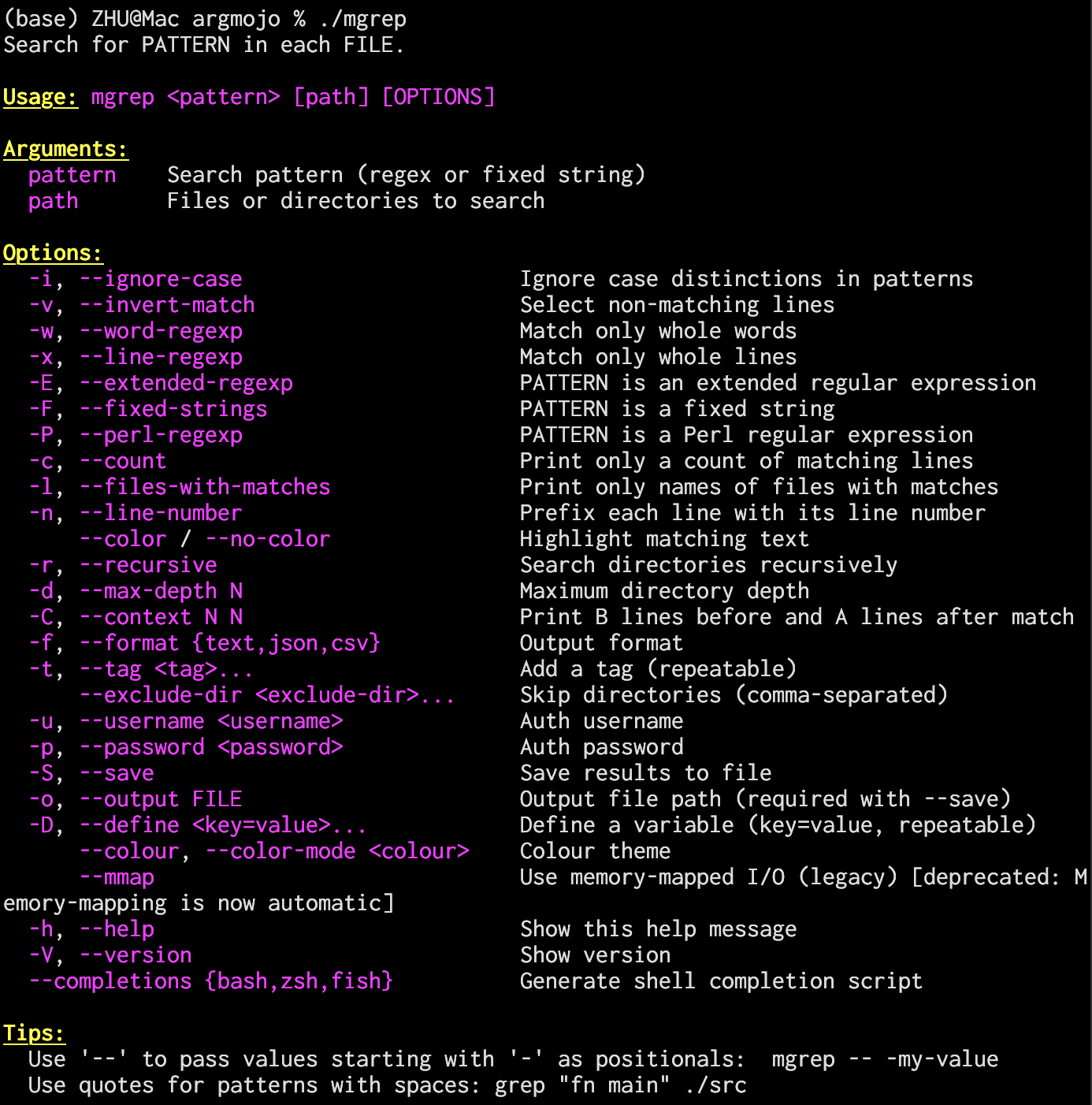
# Help and version
./mgrep --help
./mgrep --version

# Basic search
./mgrep "fn main" ./src

# Combined short flags + options
./mgrep -rnic "TODO" ./src --max-depth 5

# Choices, append, negatable
./mgrep "pattern" --format json --tag fixme --tag urgent --color

# -- stops option parsing
./mgrep -- "-pattern-with-dashes" ./src

# Prefix matching (--exc matches --exclude-dir)
./mgrep "fn" --exc .git,node_modules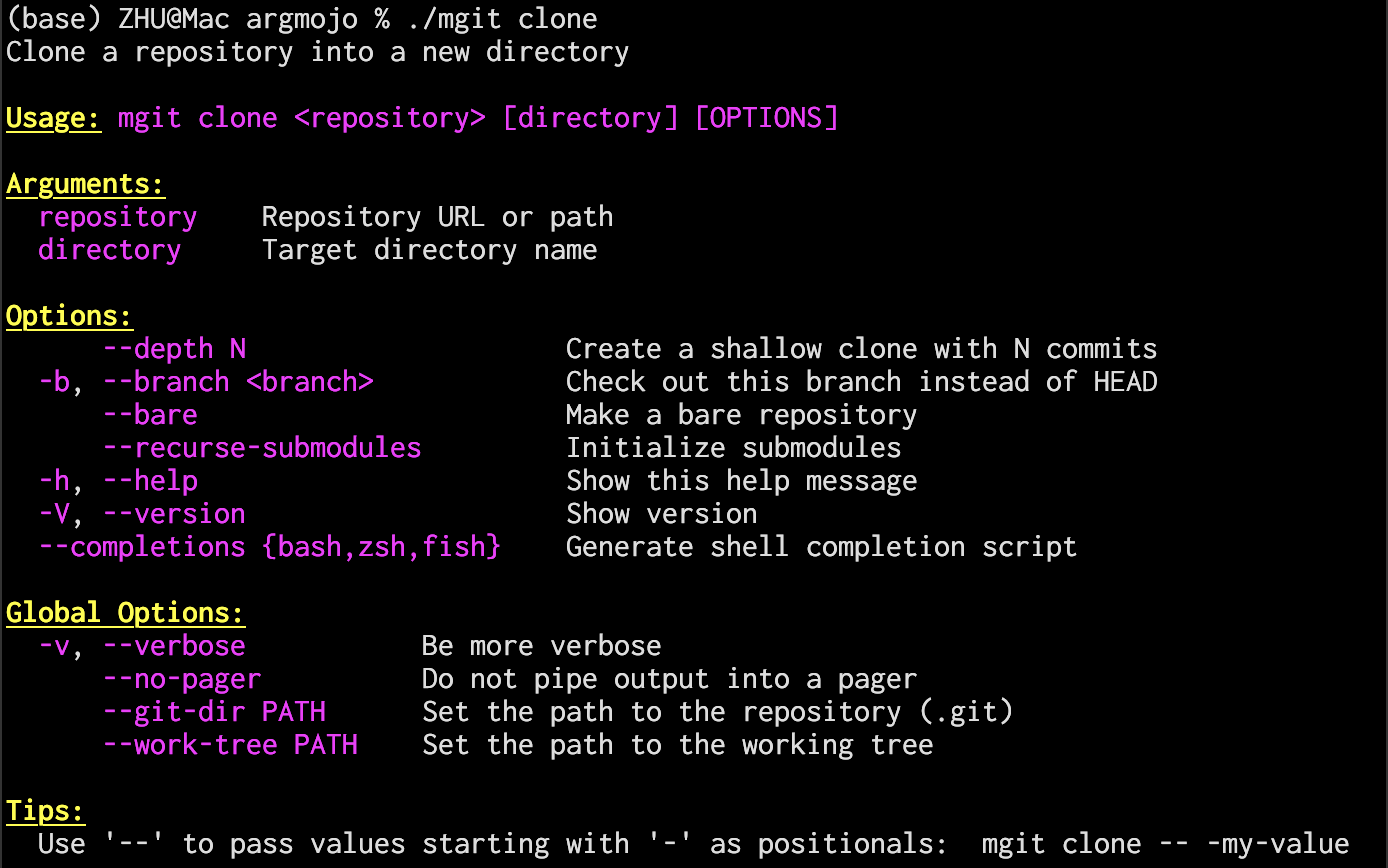
# Root help — shows Commands section + Global Options
./mgit --help

# Child help — shows full command path
./mgit clone --help

# Subcommand dispatch
./mgit clone https://example.com/repo.git my-project --depth 1
./mgit commit -am "initial commit"
./mgit log --oneline -n 20 --author "Alice"
./mgit -v push origin main --force --tags

# Nested subcommands (remote → add/remove/rename/show)
./mgit remote add origin https://example.com/repo.git
./mgit remote show origin

# Unknown subcommand → clear error
./mgit foo
# error: mgit: Unknown command 'foo'. Available commands: clone, init, ...

# Shell completion script generation
./mgit --completions bash   # bash completion script
./mgit --completions zsh    # zsh completion script
./mgit --completions fish # fish completion script# Format code
pixi run format
# Build package
pixi run package
# Run tests
pixi run test
# Clean build artifacts
pixi run cleanargmojo/
├── docs/ # Documentation
│ ├── argmojo_overall_planning.md # Planning document and feature matrix
│ ├── changelog.md # Release changelog
│ └── user_manual.md # User manual with detailed examples
├── examples/
│ ├── demo.mojo # Comprehensive feature showcase
│ ├── mgrep.mojo # grep-like CLI (no subcommands)
│ ├── mgit.mojo # git-like CLI (with subcommands)
│ ├── yu.mojo # Chinese-language CLI (CJK features)
│ └── declarative/ # Declarative API examples
│ ├── search.mojo # Pure declarative (simple tool)
│ ├── deploy.mojo # Hybrid (declarative + builder)
│ ├── convert.mojo # Full parse (dual return)
│ └── jomo.mojo # Subcommands (Mojo CLI lookalike)
├── src/
│ └── argmojo/ # Main package
│ ├── __init__.mojo # Package exports
│ ├── argument.mojo # Argument struct (argument definition)
│ ├── argument_wrappers.mojo # Declarative wrapper types (Option, Flag, ...)
│ ├── command.mojo # Command struct (parsing logic)
│ ├── parsable.mojo # Parsable trait (declarative API core)
│ ├── parse_result.mojo # ParseResult struct (parsed values)
│ └── utils.mojo # ANSI colour constants and utility functions
├── tests/ # Test suites
├── pixi.toml # pixi configuration
├── LICENSE
└── README.mdI would like to thank the developers of Python's argparse, Rust's clap, Go's cobra, and Swift's swift-argument-parser for building excellent libraries that helped shape the broader CLI ecosystem.
I am also grateful to the Mojo community, EmberJson, Prism, Mojopt, and other early adopters and pioneers whose experiments, usage patterns, and practical feedback helped inform several newer features in this project.
This project is licensed under the Apache License 2.0. See LICENSE for details.
