




Generate .http files from OpenAPI specifications
.http files were made popular by the Visual Studio Code extension REST Client, which then was adopted by JetBrains IDE's, and later on Visual Studio 2022
HTTP File Generator now ships as a Rust CLI plus thin IDE hosts.
The CLI was recently migrated to Rust for performance reasons and because I am using Rust more and more these days while working on older hardware. On a 10 year old laptop, the Rust based CLI currently runs the smoke tests about 60x faster than the legacy .NET tool.
cargo install httpgeneratorUse this when you already have Rust and Cargo and want the canonical Rust ecosystem install path. Requires Rust 1.95+.
curl -fsSL https://christianhelle.com/httpgenerator/install | bashUse this when you want the prebuilt CLI without installing the Rust toolchain.
irm https://christianhelle.com/httpgenerator/install.ps1 | iexUse this when you want the prebuilt CLI on Windows.
snap install httpgeneratorUse this on Linux systems with snapd available.
Install to a user-writable directory:
curl -fsSL https://christianhelle.com/httpgenerator/install \
  | INSTALL_DIR="$HOME/.local/bin" bash
Pin a specific release:
curl -fsSL https://christianhelle.com/httpgenerator/install \
| VERSION="<tag>" bashInstall to a custom directory:
$install = irm https://christianhelle.com/httpgenerator/install.ps1
& ([scriptblock]::Create($install)) `
  -InstallDir "$env:USERPROFILE\bin"
Pin a specific release:
$install = irm https://christianhelle.com/httpgenerator/install.ps1
& ([scriptblock]::Create($install)) `
-Version "<tag>"Download prebuilt archives from GitHub Releases. Archives are available for Linux x64, macOS x64, macOS ARM64, and Windows x64. Windows on ARM currently uses the x64 standalone install path.
Install the VS Code extension from Visual Studio Marketplace. Install the Visual Studio 2022 extension from Visual Studio Marketplace. Detailed VS Code and Visual Studio usage is covered below.
Install the legacy compatibility CLI from NuGet when you need the pre-Rust .NET tool surface:
dotnet tool install --global httpgeneratorThe legacy .NET CLI remains in the repository as a maintained
compatibility surface and migration oracle. It is no longer the primary
release path.
Compatibility fixes can still land in the legacy .NET CLI, but new
features will only be implemented in the Rust CLI. The .NET tool will be
retired at some point once the remaining compatibility story is no
longer needed.
For development setup, build commands, and repository layout, see CONTRIBUTING.md.
Generate .http files from OpenAPI specifications

Usage: httpgenerator [URL or input file] [OPTIONS]

Arguments:
  [URL or input file]  URL or file path to OpenAPI Specification file

Options:
  -o, --output <OUTPUT>
          Output directory [default: ./]
      --no-logging
          Don't log errors or collect telemetry
      --skip-validation
          Skip validation of OpenAPI Specification file
      --authorization-header <HEADER>
          Authorization header to use for all requests
      --load-authorization-header-from-environment
          Load the authorization header from an environment variable or define it in the .http file. You can use --authorization-header-variable-name to specify the environment variable name.
      --authorization-header-variable-name <VARIABLE-NAME>
          Name of the environment variable to load the authorization header from [default: authorization]
      --content-type <CONTENT-TYPE>
          Default Content-Type header to use for all requests [default: application/json]
      --base-url <BASE-URL>
          Default Base URL to use for all requests. Use this if the OpenAPI spec doesn't explicitly specify a server URL.
      --output-type <OUTPUT-TYPE>
          OneRequestPerFile generates one .http file per request. OneFile generates a single .http file for all requests. OneFilePerTag generates one .http file per first tag associated with each request. [default: OneRequestPerFile] [possible values: OneRequestPerFile, OneFile, OneFilePerTag]
      --azure-scope <SCOPE>
          Azure Entra ID Scope to use for retrieving Access Token for Authorization header
      --azure-tenant-id <TENANT-ID>
          Azure Entra ID Tenant ID to use for retrieving Access Token for Authorization header
      --timeout <SECONDS>
          Timeout (in seconds) for writing files to disk [default: 120]
      --generate-intellij-tests
          Generate IntelliJ tests that assert whether the response status code is 200
      --custom-header <HEADER>
          Add custom HTTP headers to the generated request
      --skip-headers
          Don't generate header parameters in the files
  -h, --help
          Print help information
  -v, --version
          Print version information

Examples:
  httpgenerator ./openapi.json
  httpgenerator ./openapi.json --output ./
  httpgenerator ./openapi.json --output-type onefile
  httpgenerator https://petstore.swagger.io/v2/swagger.json
  httpgenerator https://petstore3.swagger.io/api/v3/openapi.json --base-url https://petstore3.swagger.io
  httpgenerator ./openapi.json --authorization-header Bearer eyJhbGciOiJIUzI1NiIsInR5cCI6IkpXVCJ9c
  httpgenerator ./openapi.json --azure-scope [Some Application ID URI]/.default
  httpgenerator ./openapi.json --generate-intellij-tests
  httpgenerator ./openapi.json --custom-header X-Custom-Header: Value --custom-header X-Another-Header: AnotherValue
Running the following:
httpgenerator https://petstore.swagger.io/v2/swagger.jsonOutputs the following:

Which will produce the following files:
-rw-r--r-- 1 christian 197121  593 Dec 10 10:44 DeleteOrder.http
-rw-r--r-- 1 christian 197121  231 Dec 10 10:44 DeletePet.http
-rw-r--r-- 1 christian 197121  358 Dec 10 10:44 DeleteUser.http
-rw-r--r-- 1 christian 197121  432 Dec 10 10:44 GetFindPetsByStatus.http
-rw-r--r-- 1 christian 197121  504 Dec 10 10:44 GetFindPetsByTags.http
-rw-r--r-- 1 christian 197121  371 Dec 10 10:44 GetInventory.http
-rw-r--r-- 1 christian 197121  247 Dec 10 10:44 GetLoginUser.http
-rw-r--r-- 1 christian 197121  291 Dec 10 10:44 GetLogoutUser.http
-rw-r--r-- 1 christian 197121  540 Dec 10 10:44 GetOrderById.http
-rw-r--r-- 1 christian 197121  275 Dec 10 10:44 GetPetById.http
-rw-r--r-- 1 christian 197121  245 Dec 10 10:44 GetUserByName.http
-rw-r--r-- 1 christian 197121  513 Dec 10 10:44 PostAddPet.http
-rw-r--r-- 1 christian 197121  521 Dec 10 10:44 PostCreateUser.http
-rw-r--r-- 1 christian 197121  610 Dec 10 10:44 PostCreateUsersWithListInput.http
-rw-r--r-- 1 christian 197121  464 Dec 10 10:44 PostPlaceOrder.http
-rw-r--r-- 1 christian 197121  299 Dec 10 10:44 PostUpdatePetWithForm.http
-rw-r--r-- 1 christian 197121  274 Dec 10 10:44 PostUploadFile.http
-rw-r--r-- 1 christian 197121  513 Dec 10 10:44 PutUpdatePet.http
-rw-r--r-- 1 christian 197121  541 Dec 10 10:44 PutUpdateUser.http
In this example, the contents of PostAddPet.http looks like this:
@contentType = application/json

#############################################
### Request: POST /pet
### Summary: Add a new pet to the store
### Description: Add a new pet to the store
#############################################

POST https://petstore3.swagger.io/api/v3/pet
Content-Type: {{contentType}}

{
  "id": 0,
  "name": "name",
  "category": {
    "id": 0,
    "name": "name"
  },
  "photoUrls": [
    ""
  ],
  "tags": [
    {
      "id": 0,
      "name": "name"
    }
  ],
  "status": "available"
}
and the contents of GetPetById.http looks like this:
@contentType = application/json

#######################################
### Request: GET /pet/{petId}
### Summary: Find pet by ID
### Description: Returns a single pet
#######################################

### Path Parameter: ID of pet to return
@petId = 0

GET https://petstore3.swagger.io/api/v3/pet/{{petId}}
Content-Type: {{contentType}}
with the --generate-intellij-tests option, the output looks like this:
@contentType = application/json

#######################################
### Request: GET /pet/{petId}
### Summary: Find pet by ID
### Description: Returns a single pet
#######################################

### Path Parameter: ID of pet to return
@petId = 1

GET https://petstore3.swagger.io/api/v3/pet/{{petId}}
Content-Type: {{contentType}}

> {%
    client.test("Request executed successfully", function() {
        client.assert(
            response.status === 200,
            "Response status is not 200");
    });
%}
Here's an advanced example of generating .http files for a REST API hosted on Microsoft Azure that uses the Microsoft Entra ID service as an STS. For this example, I use PowerShell and Azure CLI to retrieve an access token for the user I'm currently logged in with.
az account get-access-token --scope [Some Application ID URI]/.default `
| ConvertFrom-Json `
| %{
    httpgenerator `
        https://api.example.com/swagger/v1/swagger.json `
        --authorization-header ("Bearer " + $_.accessToken) `
        --base-url https://api.example.com `
        --output ./HttpFiles
}
You can also use --azure-scope and --azure-tenant-id to let the Rust CLI acquire an access token during generation. The CLI currently checks Azure CLI and Azure Developer CLI logins and keeps generation running even if token acquisition fails.
httpgenerator `
  https://api.example.com/swagger/v1/swagger.json `
  --azure-scope [Some Application ID URI]/.default `
  --base-url https://api.example.com `
--output ./HttpFilesThe Rust CLI keeps a sink-agnostic telemetry recorder that can capture feature usage and redacted error context.
By default, logging is enabled, but --no-logging disables feature and error event recording entirely.
User tracking is anonymous and derived from the Support key shown when running the tool while logging is enabled.
HTTP File Generator v0.1.5
Support key: mbmbqvd
The support key is just the first 7 characters of the generated anonymous identity. Authorization headers are recorded as [REDACTED], and personal machine details are normalized before telemetry is emitted.
No support key is generated when you opt out with --no-logging.
Install the VS Code extension from
Visual Studio Marketplace.
It is shipped as platform-targeted .vsix packages because each extension package bundles the native Rust CLI for its target platform.
The extension resolves httpgenerator in this order: http-file-generator.executablePath, bundled extension binary, repo-root workspace target\debug / target\release outputs during development, then httpgenerator on PATH.
If http-file-generator.executablePath is set but invalid, the extension should fail fast and prompt you to fix the setting instead of silently continuing to the fallback chain.
This is a bundled-binary extension distribution, not a crates.io or legacy .NET Tool installer, although a Cargo-installed or release-downloaded CLI can still be reused through the explicit setting or PATH.
Install the Visual Studio 2022 extension from Visual Studio Marketplace.
From the Tools menu select Generate .http files
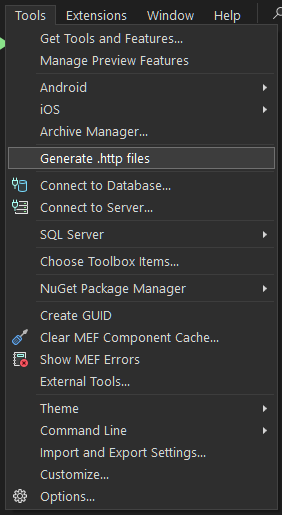
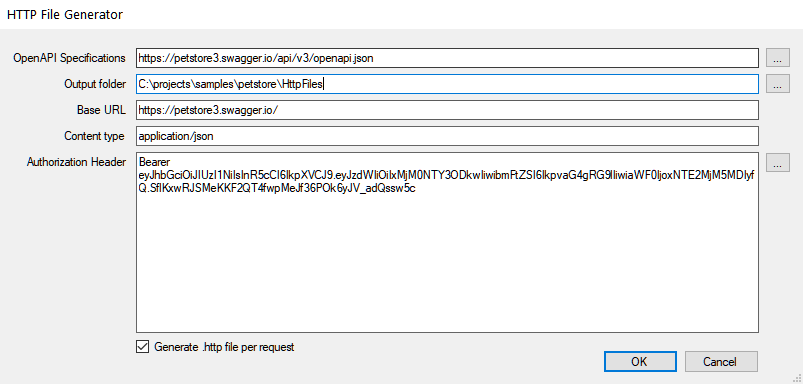
This opens the main dialog which has similar input fields as the CLI tool and now shells out to the Rust httpgenerator executable.
The Visual Studio extension resolves httpgenerator.exe from HTTPGENERATOR_PATH, the bundled VSIX payload, repo-root workspace target\debug / target\release outputs during development, or PATH. A Cargo-installed CLI can therefore be reused here as long as the binary is discoverable on PATH or via HTTPGENERATOR_PATH.
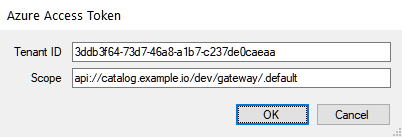
You can supply Azure Entra ID tenant and scope settings by clicking on the ... button beside the Authorization Headers input field. The Rust CLI acquires the access token during generation.
By default, the Output folder is pre-filled with the path of the currently active C# Project in the Solution Explorer, suffixed with \HttpFiles
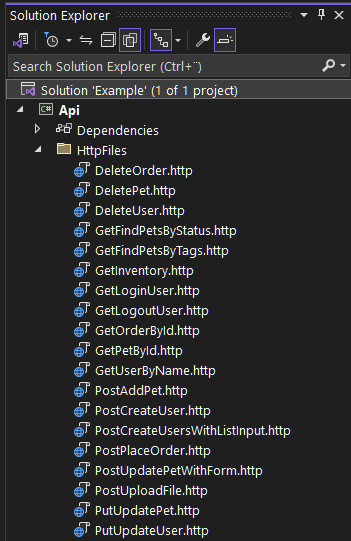
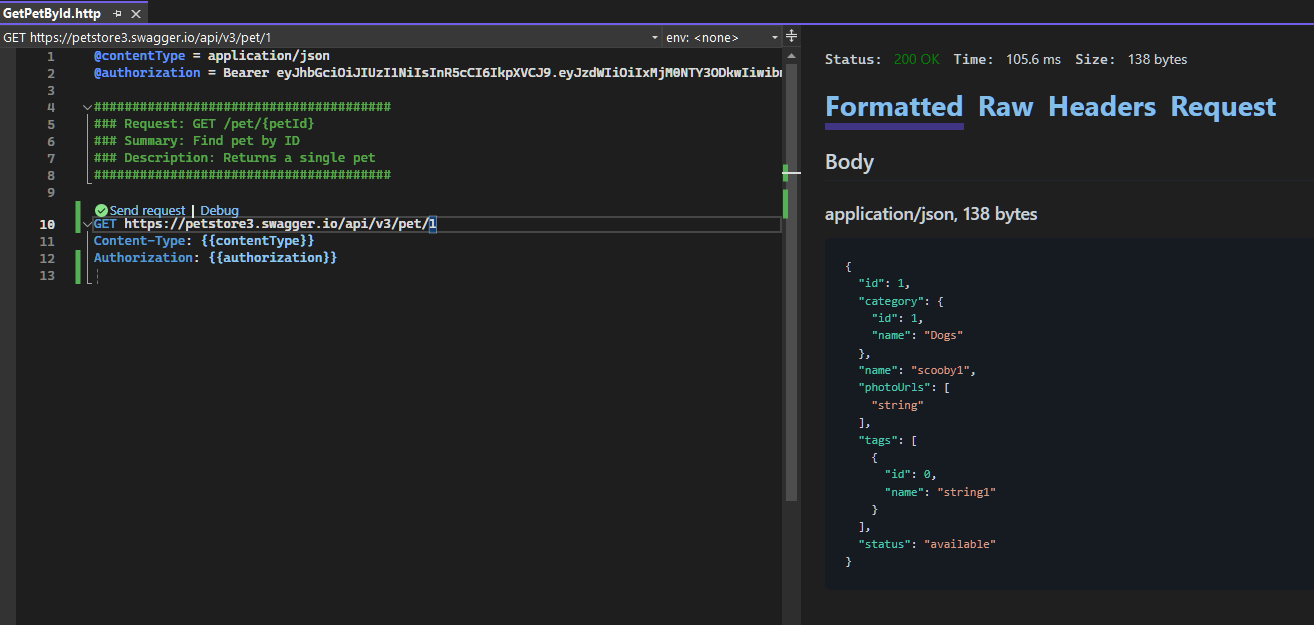
Once the .http files are generated you can easily open and inspect them
For tips and tricks on software development, check out my blog
If you find this useful and feel a bit generous then feel free to buy me a coffee ☕

