Releases: chhoumann/quickadd
Release list
2.17.2

2.17.1
2.17.0
2.16.0
2.15.0
2.14.1
2.14.0
This is the biggest QuickAdd update yet. The AI Assistant can now act as an agent that works in your vault - searching, reading, and (only with your approval) writing notes through tools you hand it. Prompts now write real typed properties - numbers, checkboxes, sliders, multi-select lists, date & time - instead of red untyped text. Capture can target notes by their properties, let you pick the heading at capture time, and keep newest-first logs that sort themselves. A new "New note from template" command runs any template without configuring a choice, {{CLIPBOARD}} now captures images, and the plugin itself is ~4x smaller, so Obsidian starts faster on every device - plus a security-hardening pass and a long list of quality-of-life fixes.
Note
Seeing this inside Obsidian for the first time? That's a fix, not a new habit. If you installed QuickAdd after late 2025, the default "Announce updates" level (Major versions only) never matched QuickAdd's releases - features ship as minor bumps (2.13 → 2.14), so those installs never got release notes in-app. Feature releases now announce as intended; patch releases stay quiet. You can change the level (or turn announcements off) in QuickAdd's settings.
🤖 Your AI assistant can now work in your vault
Until now, ai.prompt was one-shot: the model answered blind, with no way to look anything up. New in this release, a user script can hand the model tools - and it uses them in a loop until it has an answer. Ask "which books did I rate 5 stars this year?" and the agent actually searches your reading log, opens the notes, and answers from what it found:
module.exports = async ({ quickAddApi }) => {
  const agent = quickAddApi.ai.agent({
    model: "gpt-5",
    system: "You are a vault librarian. Ground every claim in the user's notes.",
    tools: { ...quickAddApi.ai.tools.vault({ only: ["read_note", "search_notes"], allowedRoots: ["Reading Log"] }) },
    stopWhen: quickAddApi.ai.stepCountIs(20),
  });
  const { text } = await agent.generate({ prompt: "Which books did I rate 5 stars this year, and what did I say about them?" });
  return text;
};
- Built-in tool groups you opt into:
ai.tools.vault()(read_note, list_notes, search_notes, get_property_values - plus write tools create_note, append_to_note, insert_under_heading),ai.tools.workspace()(active note, selection), andai.tools.system()(date). Or define your own withai.tool({ description, inputSchema, execute }). - Structured output:
agent.generate({ prompt, schema })returns a validated JSON object, not prose - perfect for feeding a template. - Works across OpenAI, Anthropic, and Gemini providers (and OpenAI-compatible local servers).
Safety is layered in, because an agent in your vault should earn its trust:
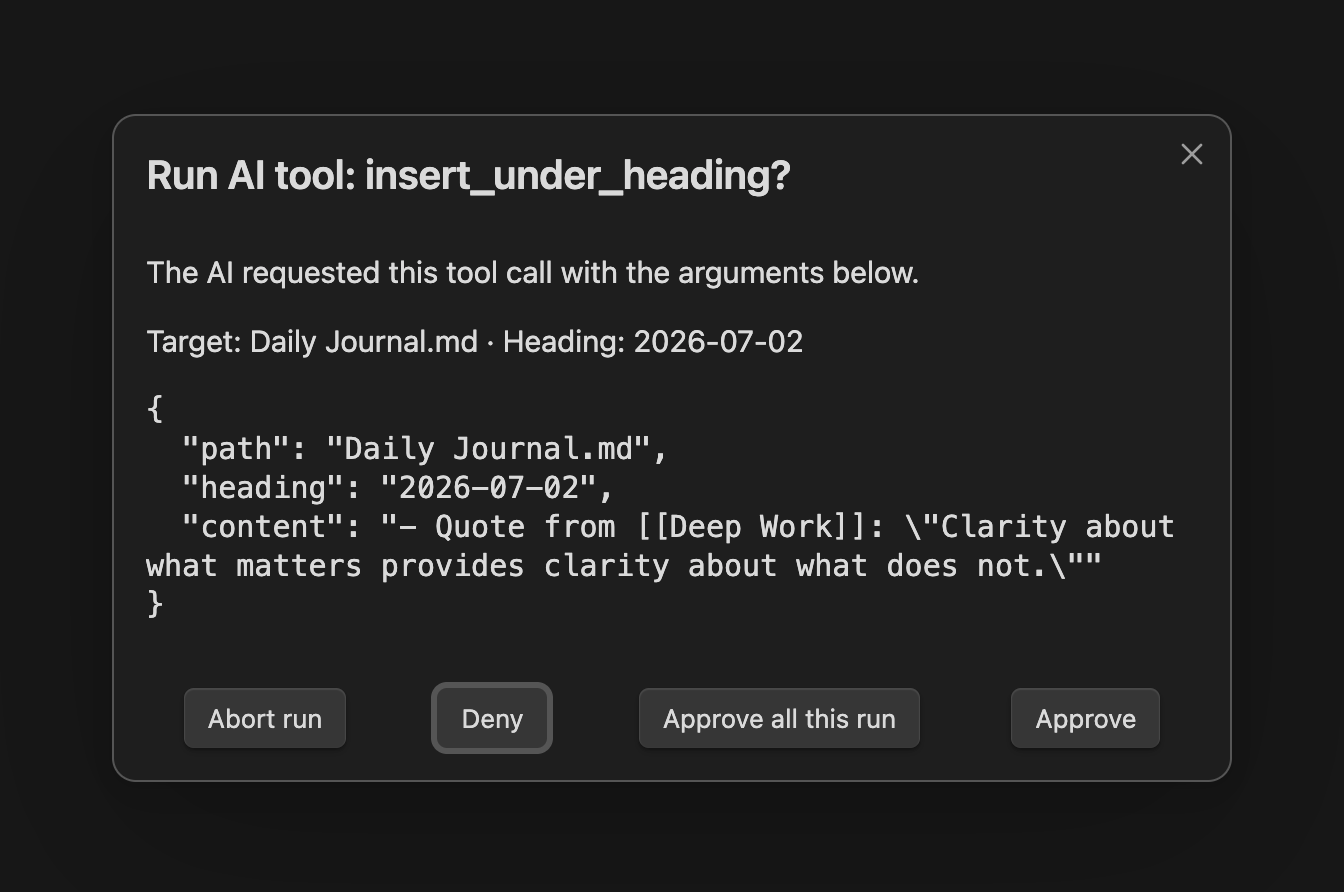
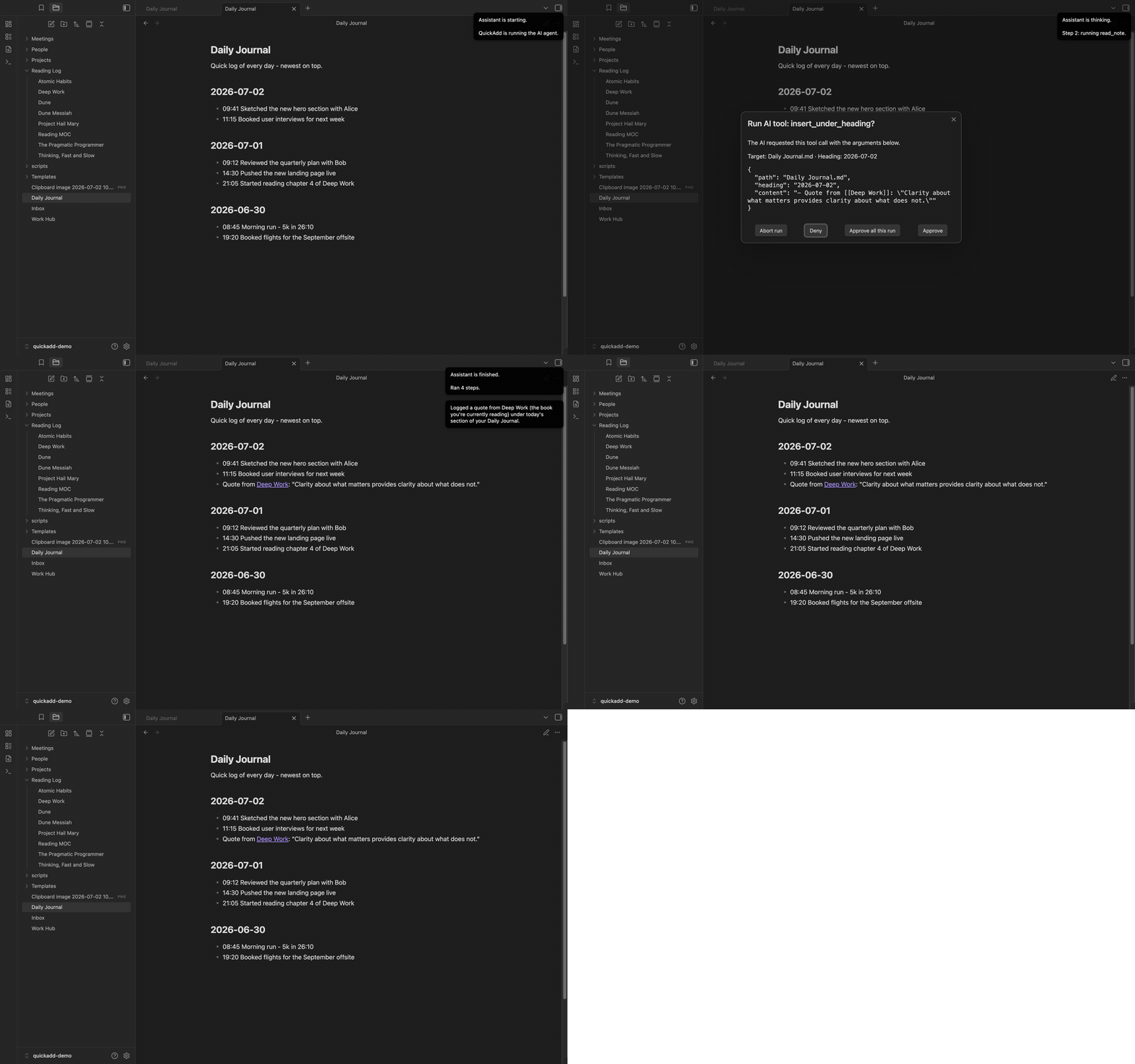
- The agent only ever has the tools you explicitly hand it - there are no ambient capabilities.
- Write tools pop a confirmation modal that says in plain language what the call will touch, with Deny as the focused default. A new "Confirm AI tool calls" setting (default: Destructive tools only) governs this.
allowedRootsfences a tool group to specific folders, so an agent can't surface notes outside them - enforced across every read tool.- Step and size caps bound the loop, and deliberately risky tools (delete, run choice, apply template) are not shipped in this first version.
One honest caution for script authors: the model chooses tool calls, and note content it reads can steer it. Treat tool results as untrusted input - the docs cover the details.
🪶 QuickAdd is ~4x smaller - Obsidian starts faster
QuickAdd's bundle went from 4.4 MB to 1.2 MB. Obsidian loads and parses a plugin's entire code at startup, so you feel this on every single launch - especially on mobile.
The weight was a bundled OpenAI-specific tokenizer, which was only ever accurate for some of the providers QuickAdd supports. Token counting is now a fast local estimate: scripts should use the new ai.estimateTokens(text) (the old countTokens still works as an alias), and chunked AI prompts plan with the estimator and automatically re-split if the provider says a chunk is too big.
🏷️ Prompts that write real typed properties
If you've ever had a template produce a red, "invalid" property - a number stored as text, a list crammed into one string - this section is for you. Format syntax placeholders can now declare their type, get the right input widget, and write properly typed Obsidian properties:
---
rating: {{VALUE:rating|type:number|min:1|max:10}}
finished: {{VALUE:finished|type:checkbox}}
genres: {{VALUE:fantasy,sci-fi,history|multi}}
started: {{VDATE:started,YYYY-MM-DDTHH:mm|time}}
---
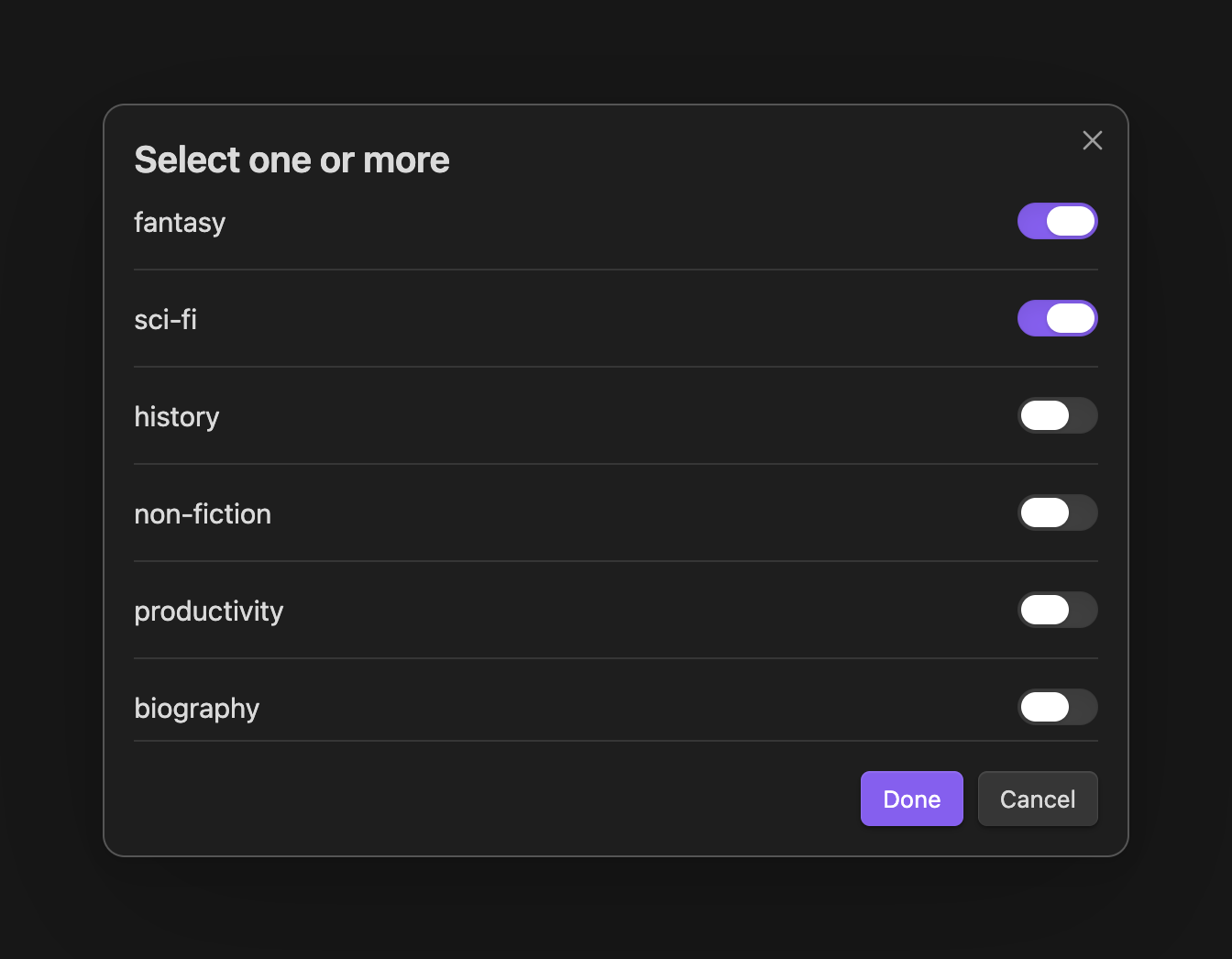
Run that book template and you get a numeric prompt, a true/false picker, a multi-select, and a date picker with a time control:
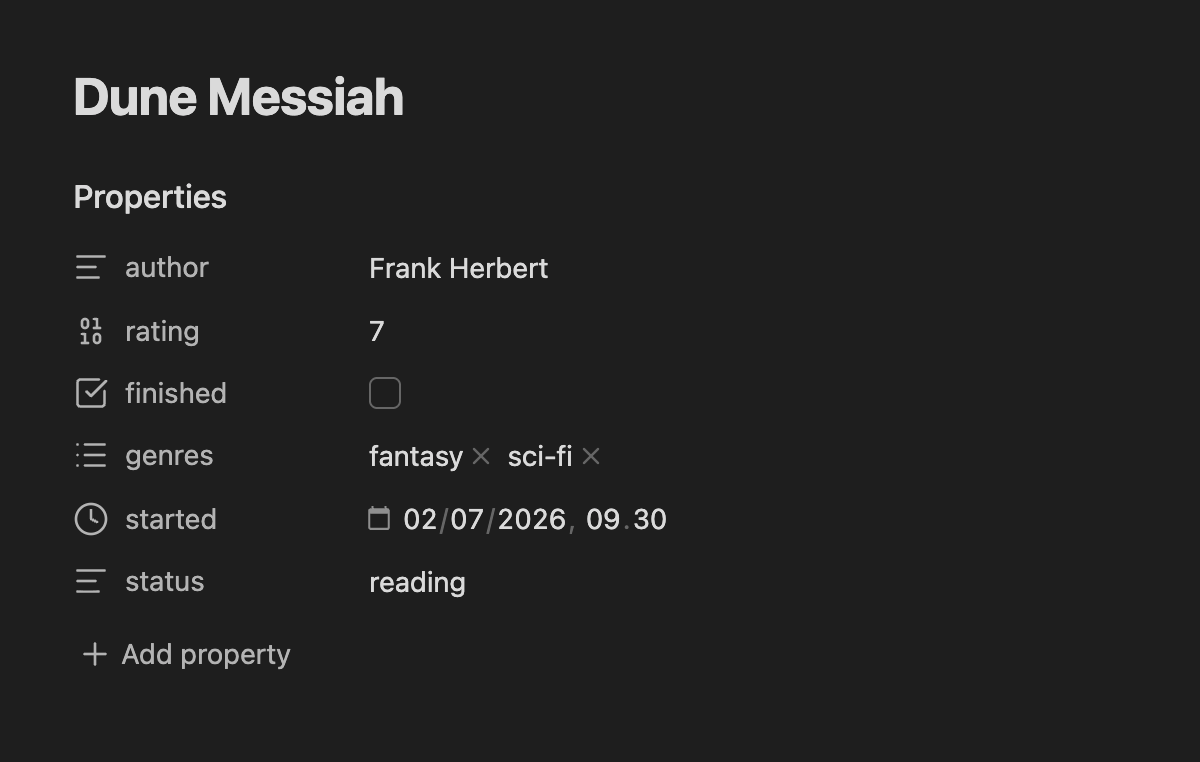
…and the created note's Properties panel shows a real Number, Checkbox, List, and Date & time. Nothing red:
-
Sliders:
{{VALUE:rating|type:slider|min:1|max:10|step:1|default:5}}shows a drag slider with a synced number field - ratings and priorities become one drag, even on mobile.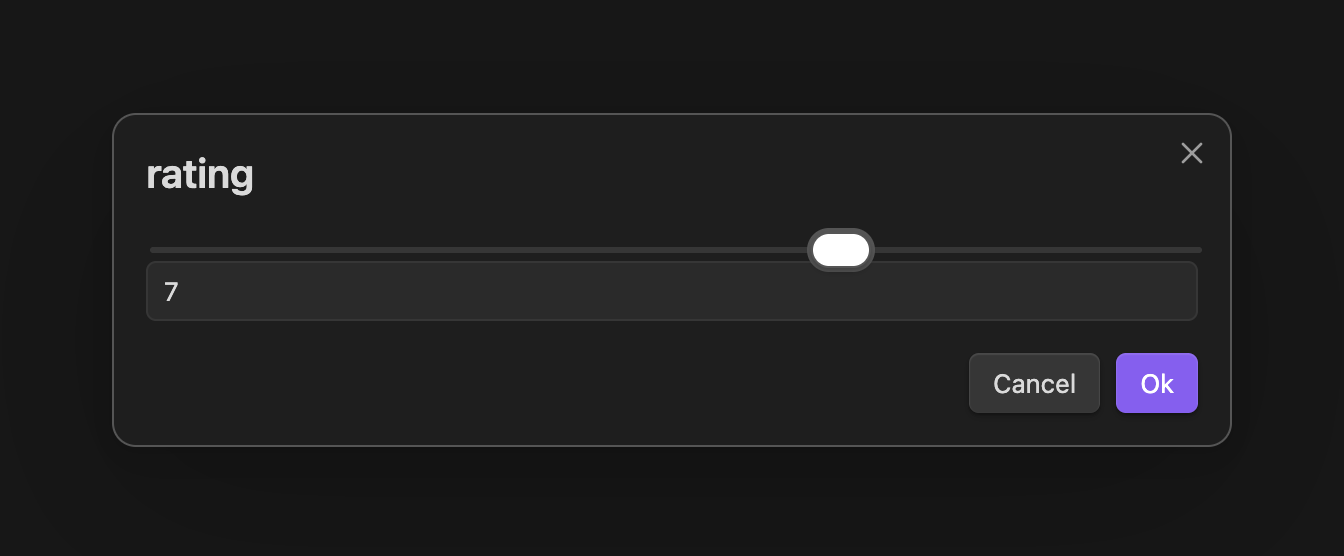
-
{{FIELD}}goes multi-select:{{FIELD:topic|multi}}gathers everytopicvalue across your vault and lets you check several - written as a real YAML list. -
Inherit metadata from the note you're in:
{{FIELD:project|default-from:active}}pre-fills the prompt with the active note's ownprojectvalue. Capture a task from inside a project note and its project property is already filled in. -
|type:textcloses the inverse trap: it quotes the value so0042stays text instead of silently becoming the number 42. -
Scripts get this for free: a macro that hands QuickAdd an array or object for a frontmatter field now writes a real List/object property out of the box - no beta toggle. The popular Movie & Series script finally produces clickable
cast/genre/directorlink lists instead of one broken red string (#662). -
Multi-select links:
|multi:linklistwraps each pick as a[[wikilink]];|multi|customlets you add off-list values.
🎯 Capture to notes by what they are, not where they live
Capture's "Capture to" field now accepts a property: target. Set it to property:status=reading and the note picker only lists notes whose frontmatter says so:
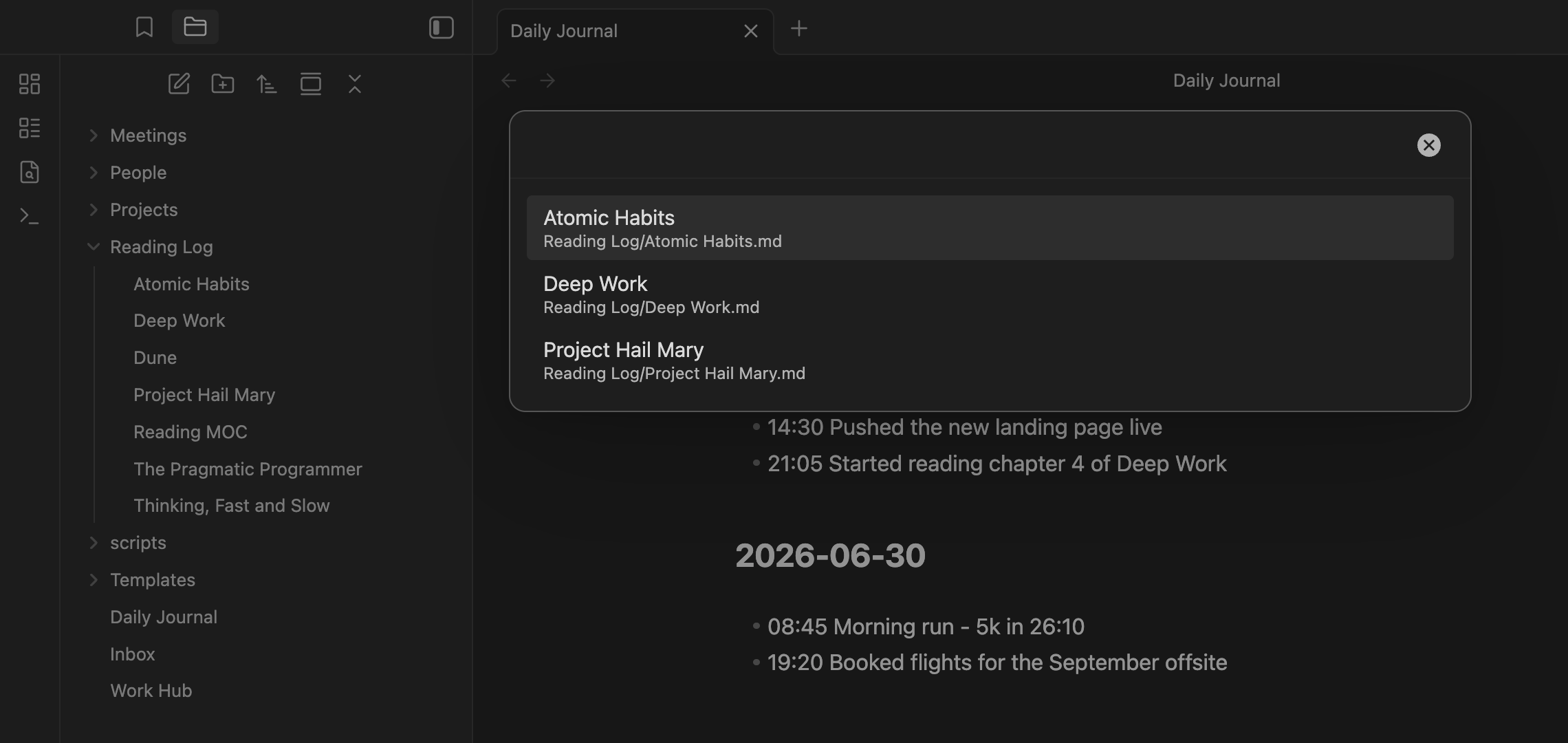
A reading log becomes one choice: Capture to property:status=reading, format {{DATE}} - {{VALUE:quote}}. Trigger it while reading, and the picker shows exactly your in-progress books - no more maintaining a folder just so a capture can find the right notes.
property:type(no value) lists every note that has atypeproperty.- Matching is case-insensitive and list-aware:
Status: Readingandstatus: [reading, favorite]both match. - Narrow further with pipe filters -
property:type=draft|folder:Notes, plus|tag:,|exclude-folder:,|exclude-tag:,|exclude-file:. - The value can itself be a token that resolves at run time:
property:status={{VALUE}}.
📌 Capture lands exactly where you want
Two placement upgrades that finally unlock classic workflows:
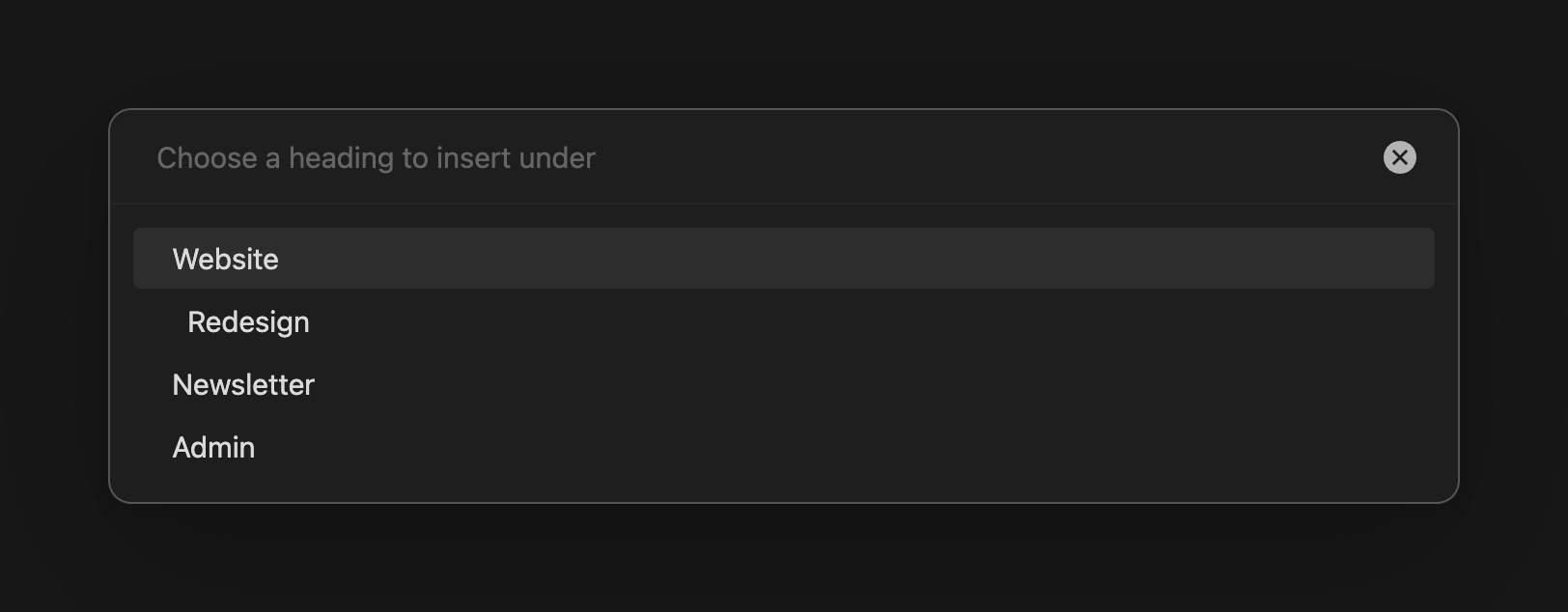
Pick the heading when you capture. "After line…" gains a Choose heading when capturing toggle: instead of hard-coding a target line in the choice, QuickAdd reads the note at capture time and shows a dropdown of its actual headings. Project notes with changing sections stop needing one choice per section:
Ordered sections: logs that sort themselves. "Create line if not found" gains an Ordered placement. When your insert-after heading (say ## {{DATE:YYYY-MM-DD}}) doesn't exist yet, QuickAdd creates it at its sorted position among sibling headings - by date, number, text, or even semver:
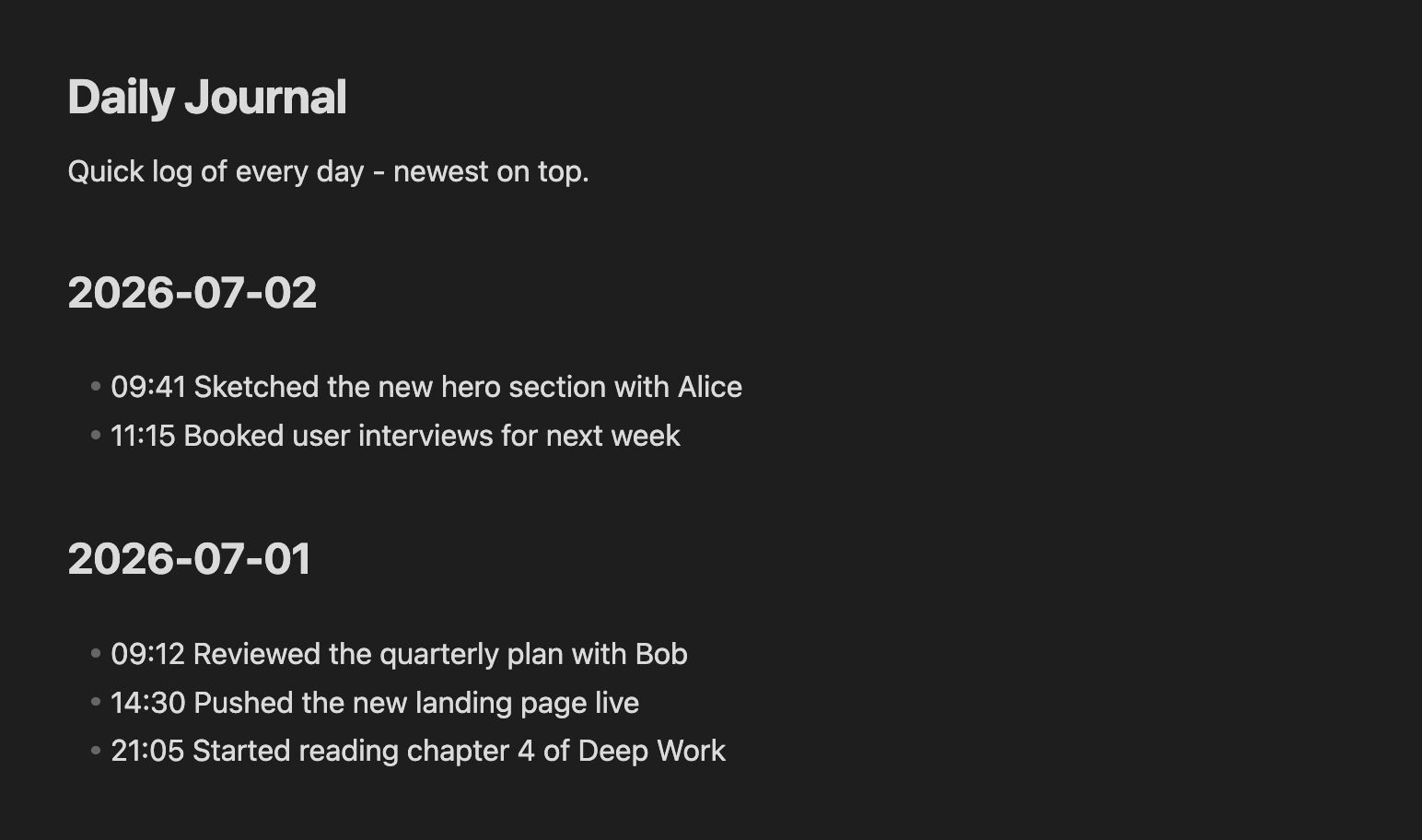
The newest-first daily log - impossible with one capture until now - just works: your pinned intro stays on top, each new day's section is created below it and above older days, and repeat captures the same day find the existing heading instead of duplicating it (#481). The same mechanism keeps a changelog sorted with 1.10.0 above 1.9.0.
Also in this area: when a capture opens the target note afterwards, the cursor now lands right after what you captured instead of at the top of the file (#348) - keep typing exactly where the text landed.
📎 `{{CLIPBOARD}...
2.13.1

2.13.0
This is one of the biggest QuickAdd updates yet. Prompts can now be optional, the choice picker searches your whole choice tree, you can apply a template to a note that already exists, package imports get a full security review screen, and creating & organizing choices has been completely reworked — plus a long list of quality-of-life fixes.
Important
QuickAdd now requires Obsidian 1.13.0 or newer. If you're on an older Obsidian, you'll simply stay on QuickAdd 2.12.3 (nothing breaks) until you update Obsidian. No settings are lost or changed by this update.
🎬 A 60-second tour of the highlights:
quickadd-2.13-release-web.mp4
⏭️ Make any prompt optional with |optional
Until now, every {{VALUE}} and {{VDATE}} placeholder forced an answer — annoying when a field just doesn't apply this time (a task with no due date, a sometimes-empty metadata field). Add |optional to any placeholder and the prompt becomes skippable:
- [ ] {{VALUE:task}} {{VDATE:due,[📅 ]YYYY-MM-DD|optional}}Answer the date prompt and you get - [ ] Buy milk 📅 2026-06-14. Press Skip (or just submit empty) and you get - [ ] Buy milk — the 📅 emoji disappears too, because literal text in square brackets inside the date format only renders when the date does.
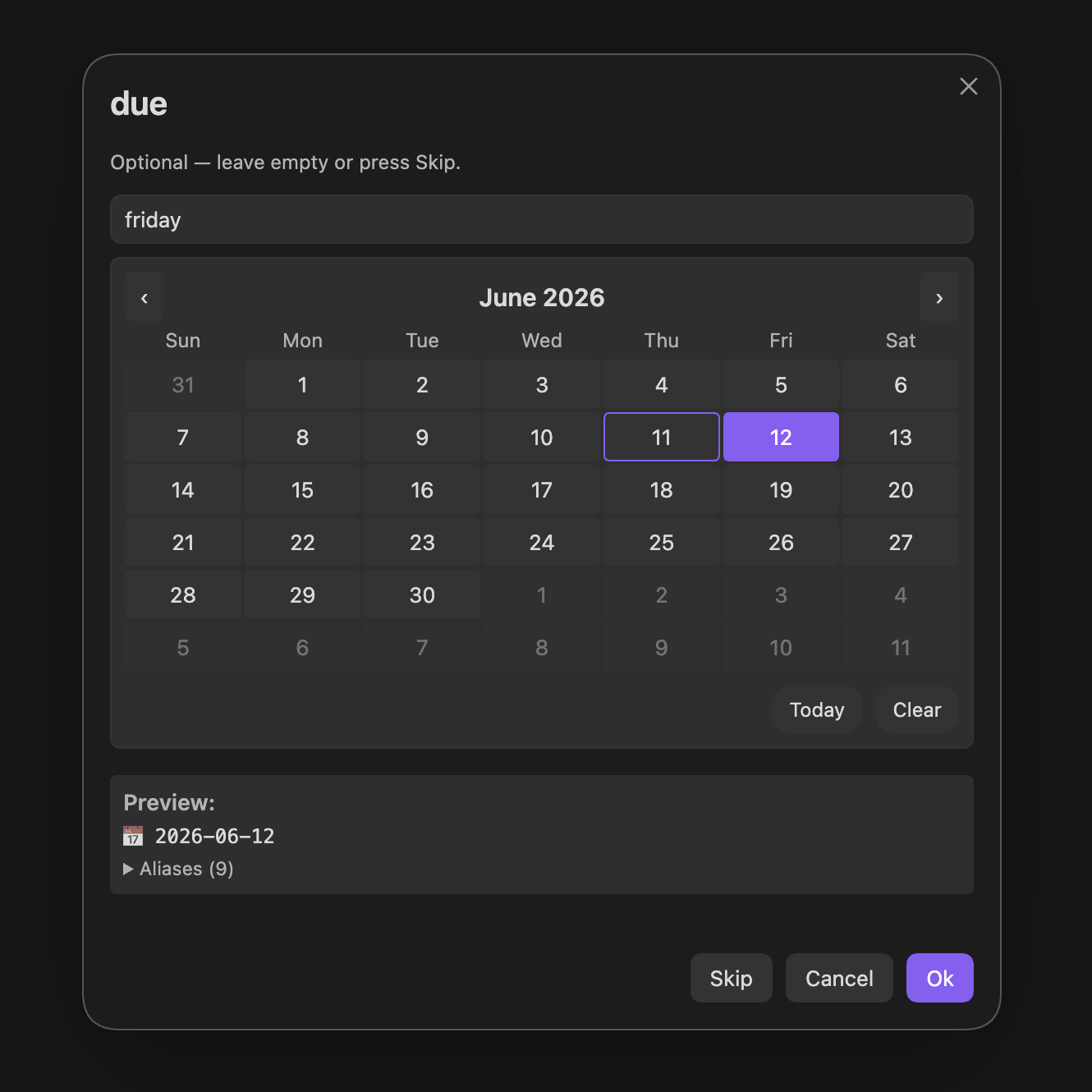
- Works on
{{VALUE}},{{NAME}}, named variables, option lists ({{VALUE:low,medium,high|optional}}), and{{VDATE}}. - Text, multiline, and date prompts get a Skip button; suggesters skip with
Ctrl/Cmd+Shift+Enter. - In the One-Page Input modal, optional fields show an (optional) badge and optional dropdowns get a "Skip (leave empty)" entry.
- Combine with defaults in any order:
{{VALUE:reminder|call mom|optional}}pre-fills "call mom", and clearing it submits empty. - Skipping never re-prompts later in the run — and
Escstill cancels the whole choice, so "skip this answer" and "abort everything" stay distinct.
Heads-up for one existing pattern:
optionalis now a reserved flag word. If you genuinely want the literal default text "optional", write{{VALUE:x|default:optional}}.
🔍 The choice picker now searches inside your folders
If you organize choices in folders (Multi choices), you no longer have to drill into them. Typing in the picker now fuzzy-matches every nested choice under the current level, with a subtle breadcrumb showing where each result lives — and your query can match path names too, so work meeting finds "New meeting" inside Work / Meetings straight from the root.
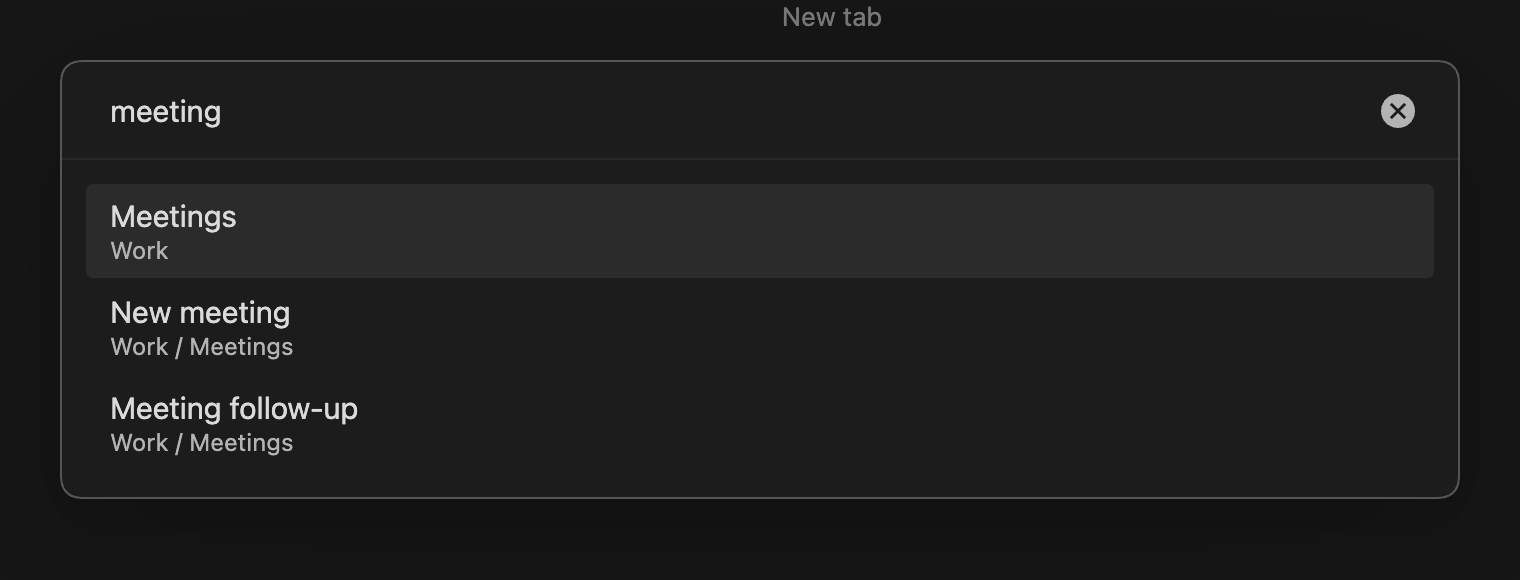
Browsing without typing is unchanged — you still see one level at a time. Prefer the old behavior? Turn off Search nested choices in the settings.
📄 Apply a template to a note that already exists
No more deleting a note and recreating it because you forgot the template. Run the new command "QuickAdd: Apply template to active note" (or right-click a file → Apply QuickAdd template), pick any Template choice or a file from your templates folder…
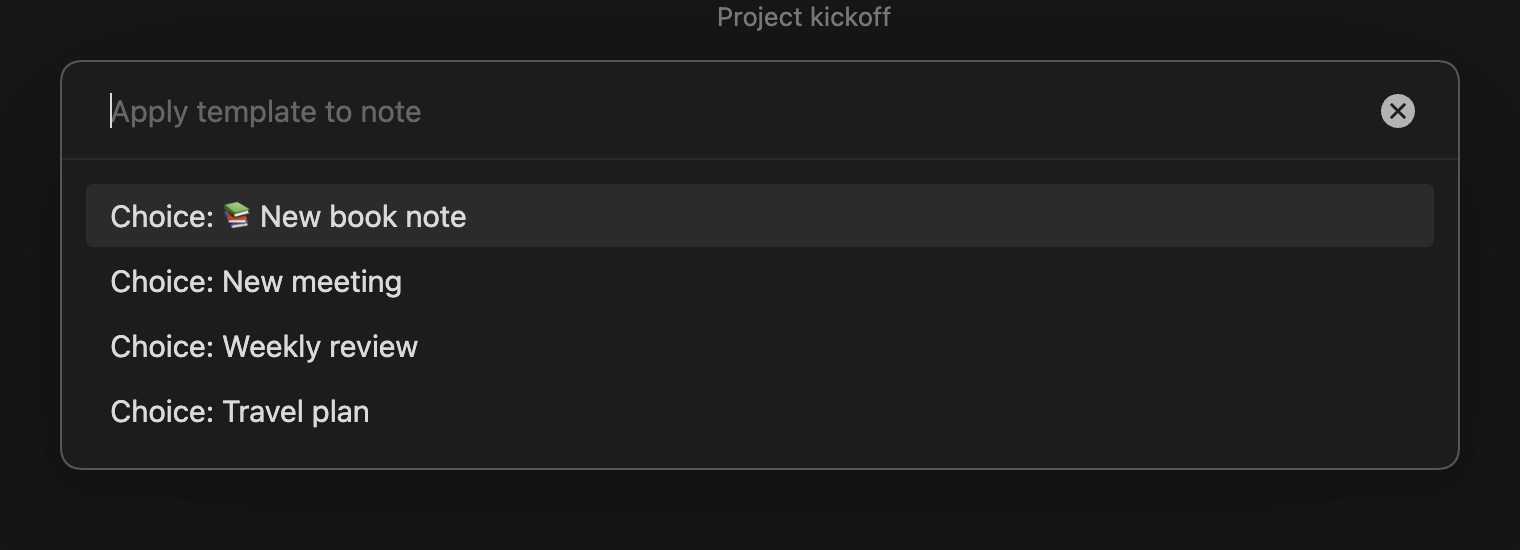
…then choose how to apply it:
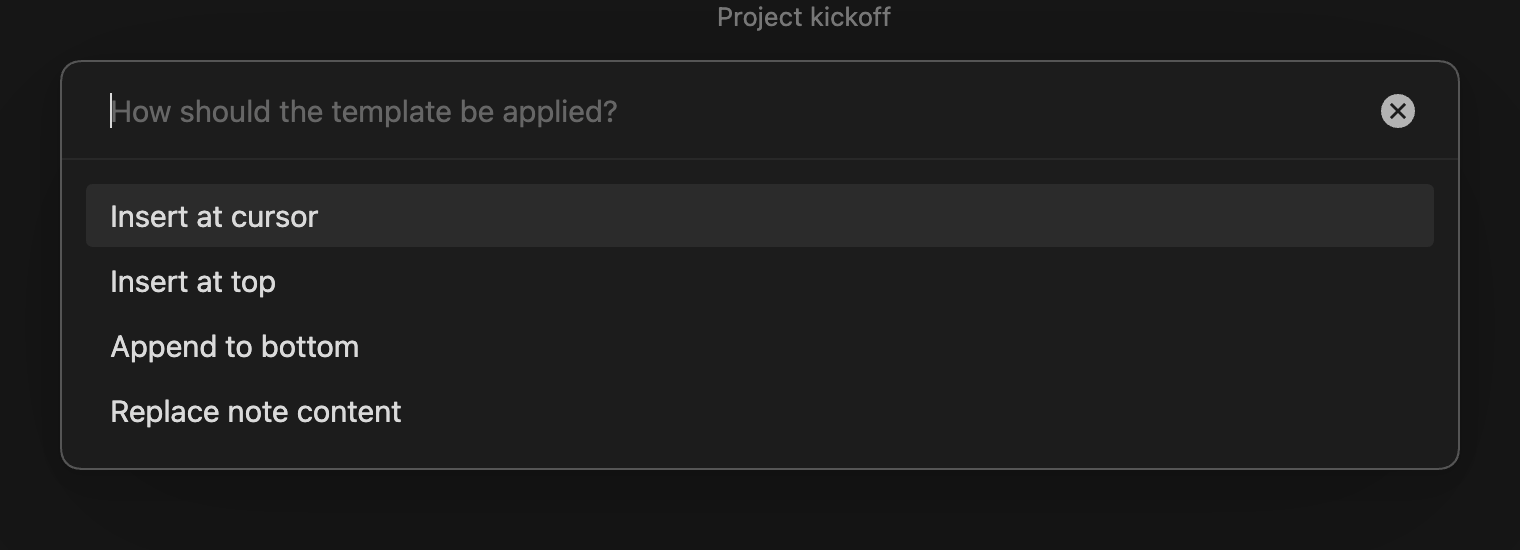
It's smart about the common cases:
- Empty notes skip the "how" question — the template just becomes the content.
{{title}}and the unnamed{{VALUE}}fill in from the note's name instead of prompting.- The template's frontmatter merges into the note's existing properties — your values win, and you never get a duplicate
---block. - If the Template choice normally files notes into a specific folder or name format, QuickAdd offers to move/rename the note to match, updating links automatically.
Script authors get the same power without prompts: await quickAddApi.applyTemplateToActiveFile("templates/meeting.md", { mode: "top" }). (Markdown notes only — canvas and base files are excluded.)
✨ Creating & organizing choices, reworked
The old "type a name next to an unexplained dropdown" flow is gone. New choice opens a menu that tells you what each type actually does, and New folder creates a group directly — "Multi" is now simply called a folder everywhere in the UI (your existing setup is untouched).
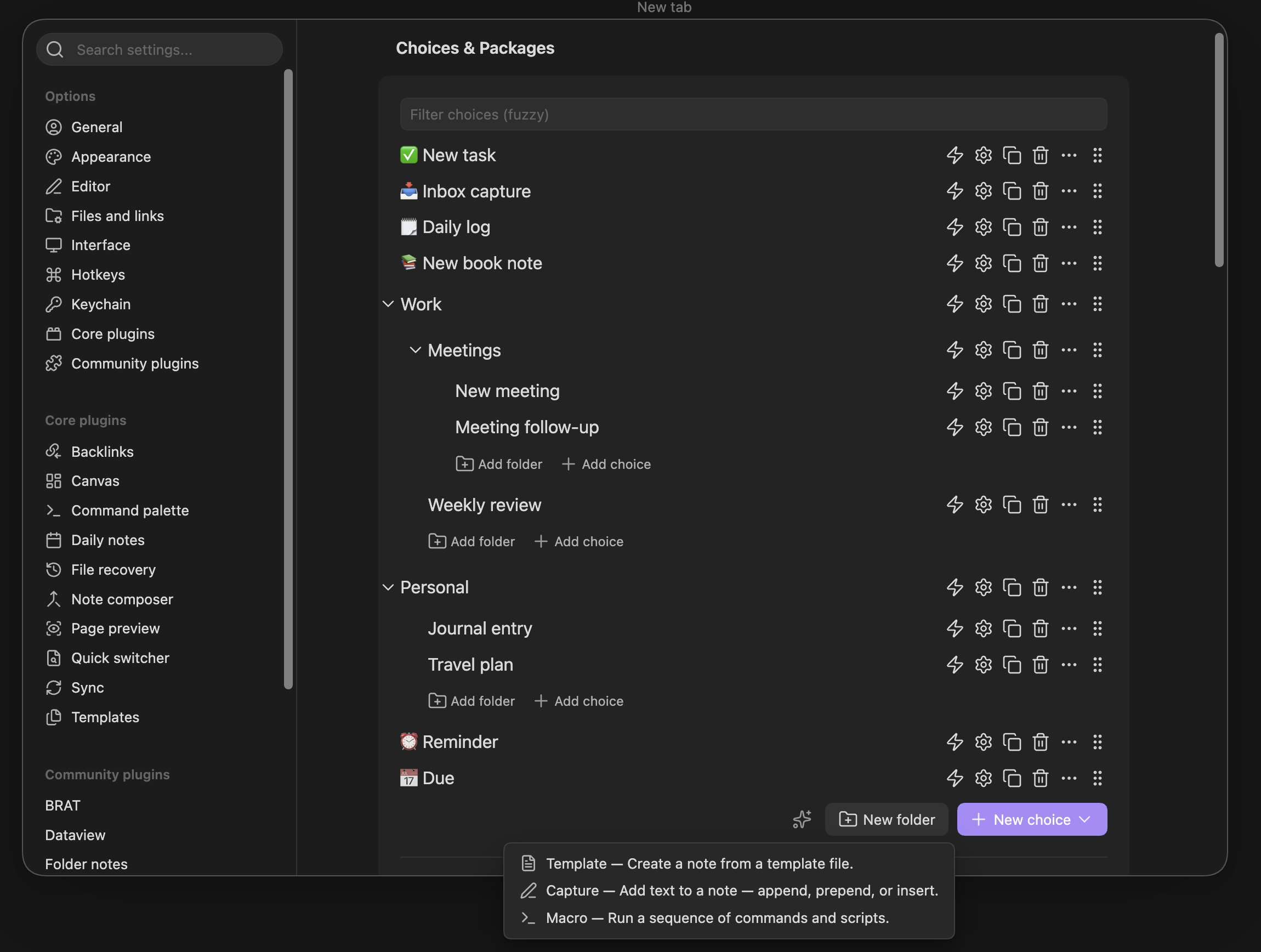
- New choices are auto-named and open their builder immediately — no naming ceremony before you can configure. (Hold
Alt/⌥while picking a type to scaffold several choices quickly without opening the builder.) - Every expanded folder has its own Add choice / Add folder links, so you can create things inside a folder at any depth instead of dragging them in afterwards.
- While dragging, folders light up as drop targets, and empty folders show a hint and a comfortable landing zone.
- Fixed along the way: dragging a choice between the root list and a folder could leave a duplicate behind — choices now land exactly once. Reordering follows your cursor smoothly, folder collapse toggles respond on the first click, and settings writes are batched into one save per change-burst (less churn for synced vaults).
- A fresh install now shows a proper welcome screen instead of an empty list.
🛡️ See exactly what a package will do before you import it
Shared QuickAdd packages can bundle scripts and macros that run with full access to your vault and network. The import screen is now a real security review: a "What this package can do" panel ranks the package's capabilities and names the choice each one comes from.
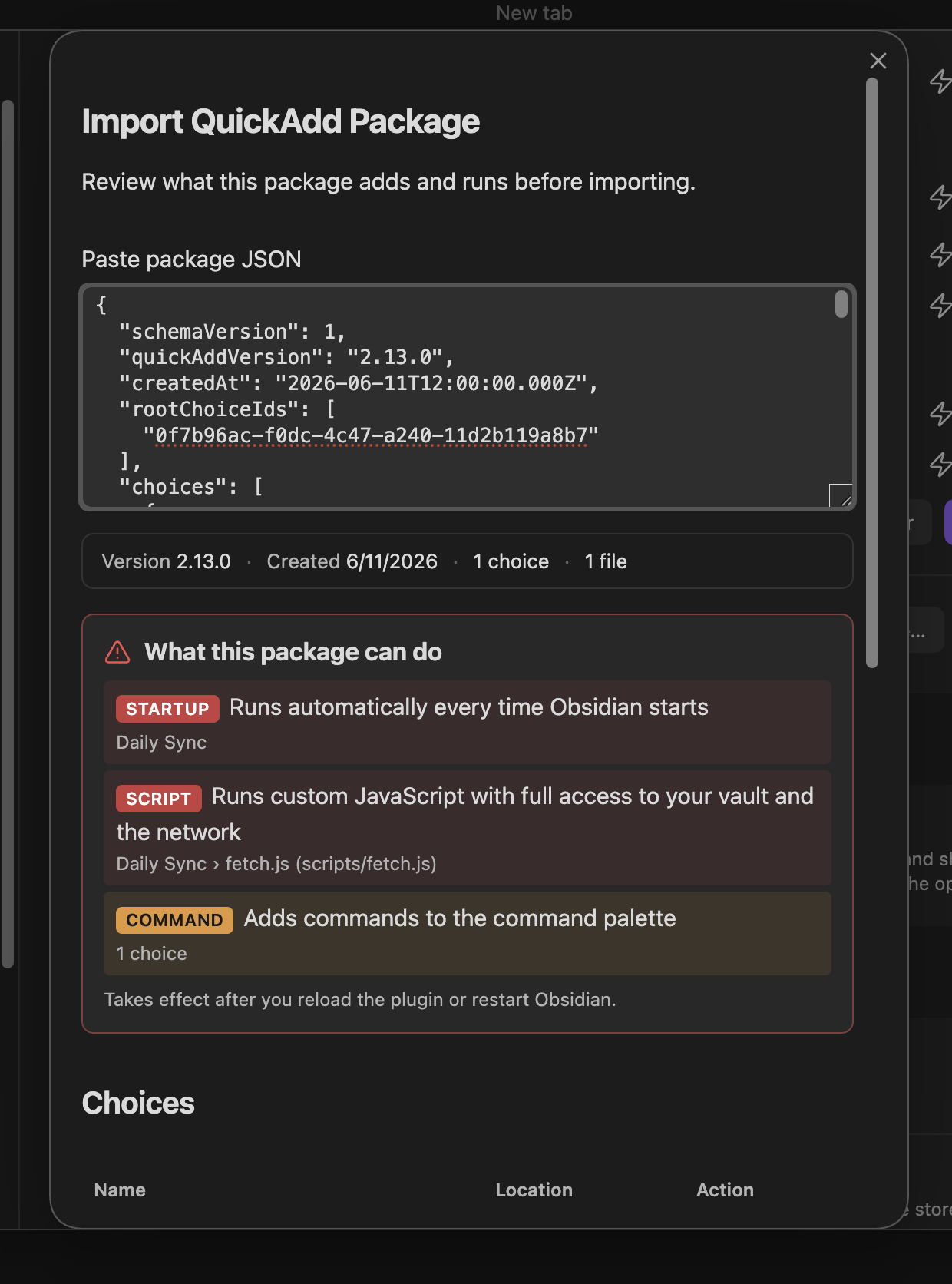
Every bundled file is listed as Added or Will overwrite with a View contents button so you can read it before anything is written. If a package runs code, the Import button stays locked until you've actually opened each executable script and ticked the acknowledgement:
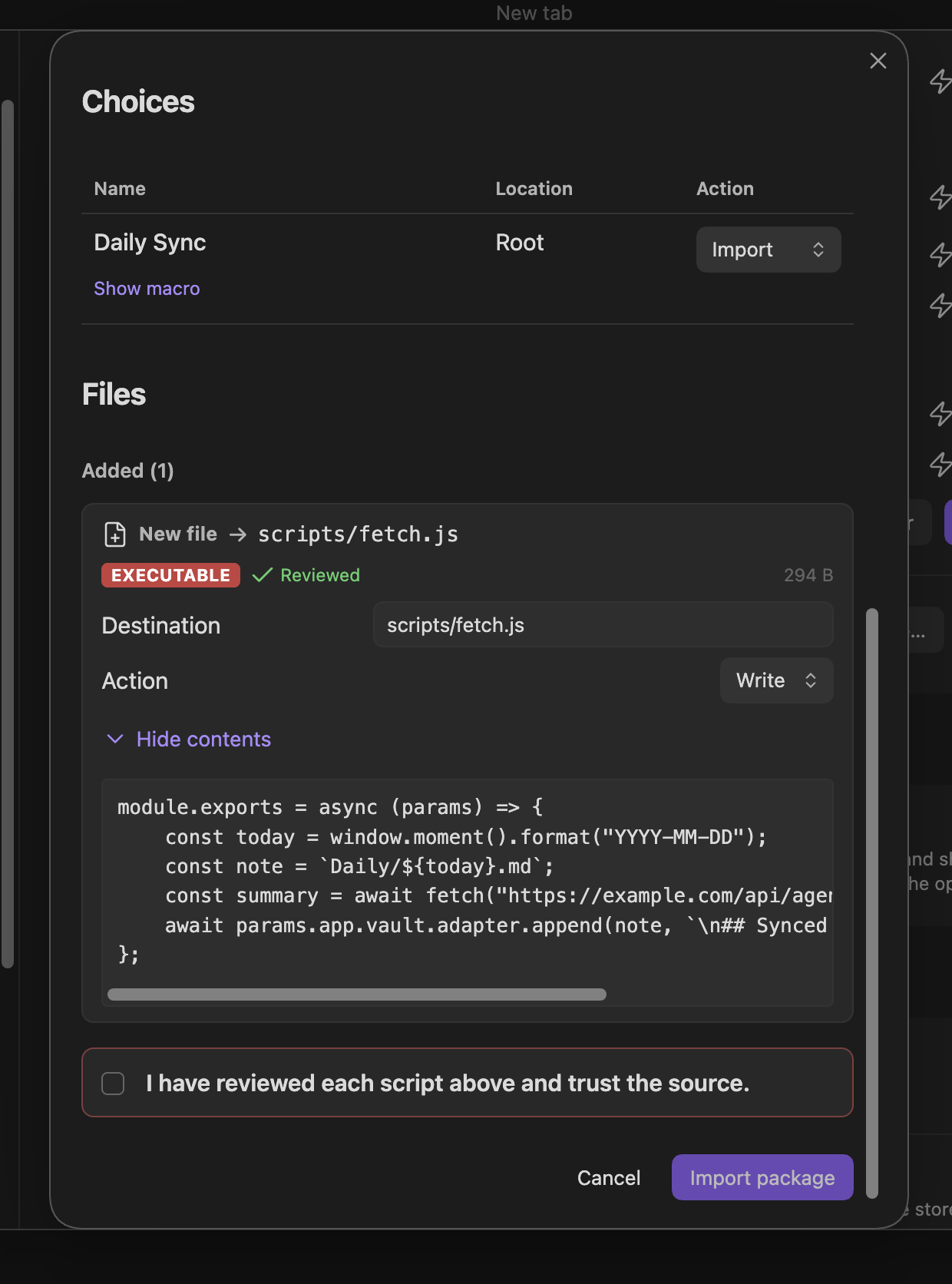
Overwrite detection now also catches files in hidden folders like .obsidian/, which were previously overwritten silently.
📌 Capture: insert before a line
Capture choices have a new "Before line…" write position — the counterpart to "After line…". Perfect for keeping a log section that always grows at the end, just above a closing heading:
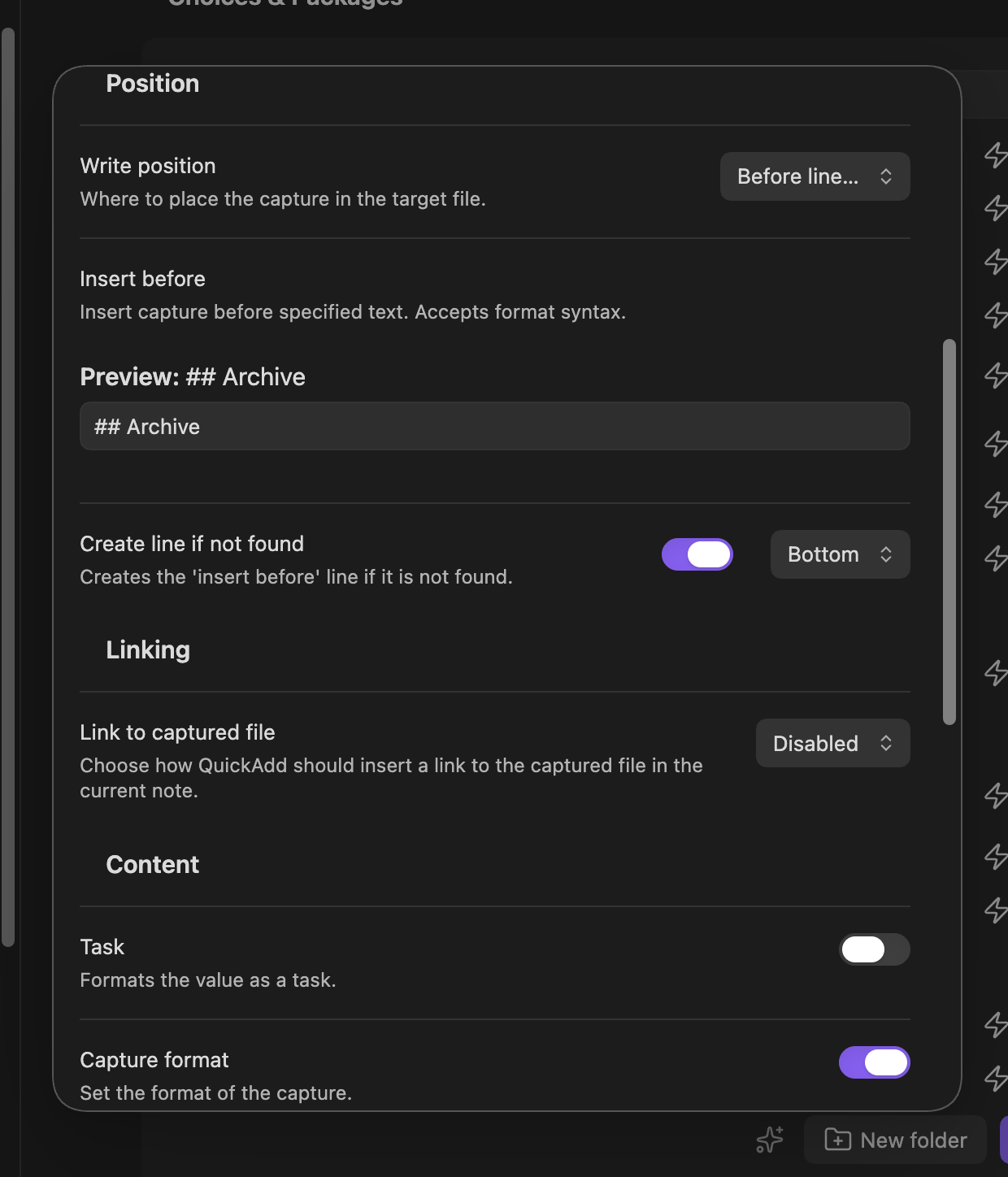
The target accepts format syntax (e.g. {{DATE:YYYY-MM-DD}}) with a live preview, supports Create line if not found, and works in Canvas captures too.
🔎 Settings, keyboard & accessibility
- Settings are now searchable from Obsidian's settings search (the reason for the 1.13 requirement). Type "multi-line" or "capture notification" in the Settings search bar and jump straight to the QuickAdd option. The tab itself is organized under clear group headings.
- Everything works from the keyboard: Tab through a choice row's buttons, press the grip handle and use
ArrowUp/ArrowDownto reorder (same in the macro editor), and open the new ⋮ "More options" menu (Rename, Move to folder) with Enter — previously right-click-only. Buttons carry proper screen-reader labels throughout. - On mobile: long-press to reorder, full-width action buttons, and row actions tucked into the ⋮ menu.
- Also fixed here: dragging a folder nested inside another folder could silently overwrite the parent folder's contents — gone.
🧱 A modern foundation
QuickAdd's entire UI was rewritten on Svelte 5 — deliberately behavior-preserving, so everything looks and works the same, but on a maintained framework that makes future improvements faster and safer. Alongside it, the automated test suite grew substantially (core-logic tests, UI component tests, and a real-Obsidian end-to-end test), so updates are far less likely to break things. If anything behaves differently than in 2.12, please report it.
🐛 Fixes
- Your typed input is no longer lost when a capture or template fails. If a choice errors after you submit a prompt (invalid filename, disk error…), re-running it reopens the prompt with your text already filled in. Drafts clear automatically once the choice succeeds.
- Field suggestions no longer show raw
{{FIELD:...}}tokens — or crash Obsidian. Templates that quote field tokens in frontmatter (needed for links in properties) used to leak the literal token into suggestions; picking it could hang the app. Fixed, resolving long-standing #644. - One-page input no longer asks twice for
{{FIELD:...}}values. ...