


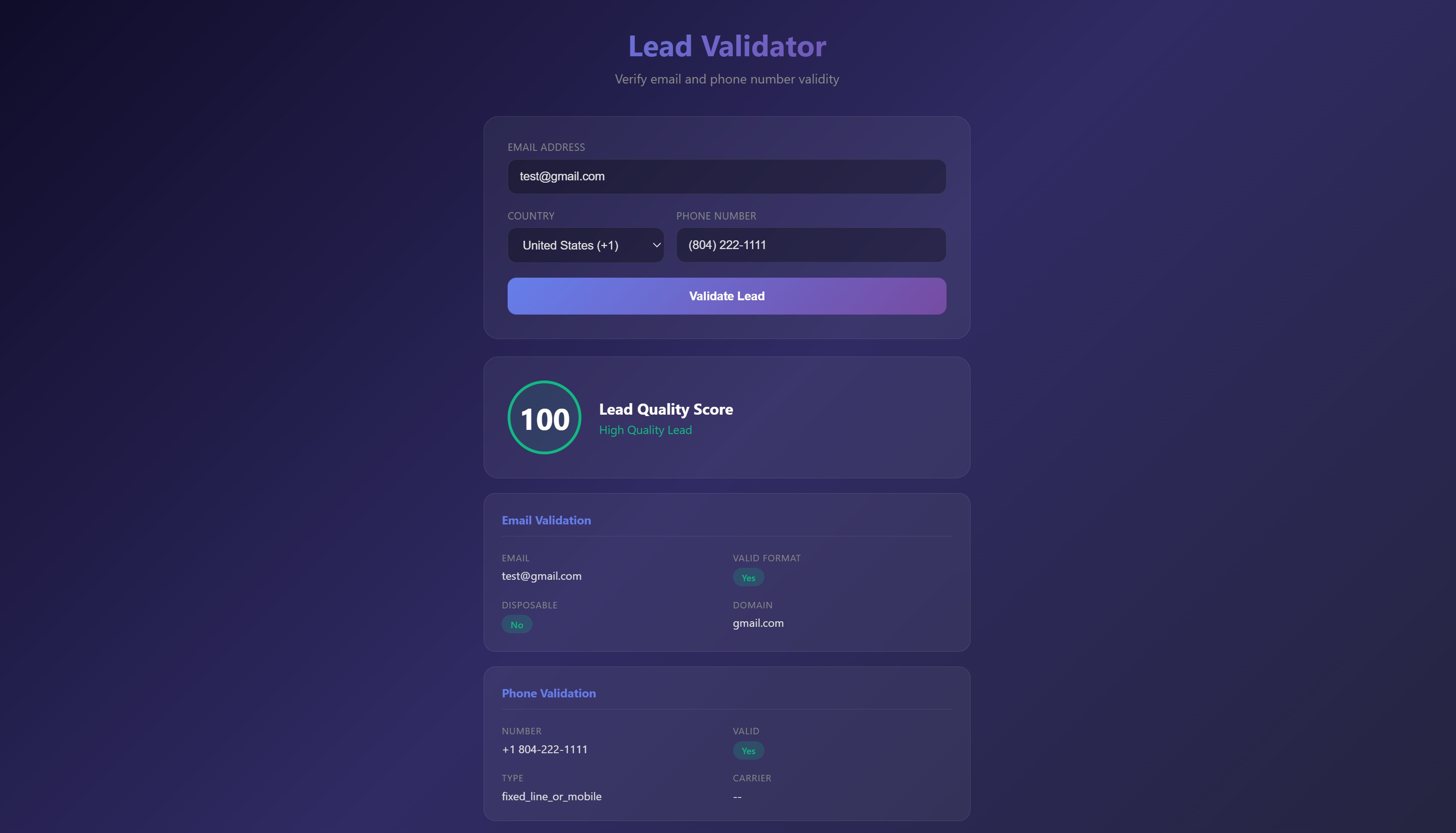
A powerful lead validation tool built with Next.js 14. Verify email addresses and phone numbers to qualify leads with a beautiful, modern UI and quality scoring.
This tutorial requires an APIVerve API key. Sign up free - no credit card required.
- Email validation (format, deliverability, disposable detection)
- Phone number validation with carrier lookup
- Multi-country phone support (10+ countries)
- Lead quality score calculation
- Beautiful glassmorphism UI design
- Server-side API integration (secure)
- Real-time validation feedback
- Responsive mobile design
-
Clone this repository
git clone https://github.com/apiverve/lead-validator-nextjs-tutorial.git cd lead-validator-nextjs-tutorial -
Install dependencies
npm install
-
Add your API key
Open
app/api/validate/route.jsand replace the placeholder:const API_KEY = 'your-api-key-here';
-
Start the development server
npm run dev
-
Open in browser
Navigate to
http://localhost:3000
lead-validator-nextjs-tutorial/
├── app/
│   ├── api/
│   │   └── validate/
│   │       └── route.js     # API route for validation
│   ├── globals.css          # Global styles
│   ├── layout.js            # Root layout
│   ├── page.js              # Main page component
│   └── page.module.css      # Page styles
├── package.json             # Dependencies
├── next.config.js           # Next.js configuration
├── screenshot.jpg           # Preview image
├── LICENSE                  # MIT license
├── .gitignore               # Git ignore rules
└── README.md                # This file
- User enters lead info - Email and/or phone number
- Form submission - Data sent to API route
- Parallel validation - Email and phone validated simultaneously
- Score calculation - Quality score computed from results
- Results display - Visual feedback with detailed breakdown
// Email Validation
const emailResponse = await fetch(
  `${EMAIL_API}?email=${encodeURIComponent(email)}`,
  { headers: { 'x-api-key': API_KEY } }
);

// Phone Validation
const phoneResponse = await fetch(
  `${PHONE_API}?number=${encodeURIComponent(phone)}&country=${country}`,
  { headers: { 'x-api-key': API_KEY } }
);Endpoint: GET https://api.apiverve.com/v1/emailvalidator
Query Parameters:
| Parameter | Type | Required | Description |
|---|---|---|---|
email |
string | Yes | Email address to validate |
Example Response:
{
  "status": "ok",
  "data": {
    "valid": true,
    "email": "[email protected]",
    "domain": "example.com",
    "isDisposable": false
  }
}Endpoint: GET https://api.apiverve.com/v1/phonenumbervalidator
Query Parameters:
| Parameter | Type | Required | Description |
|---|---|---|---|
number |
string | Yes | Phone number to validate |
country |
string | No | ISO country code (e.g., "US") |
Example Response:
{
  "status": "ok",
  "data": {
    "valid": true,
    "formatted": "+1 555-123-4567",
    "type": "mobile",
    "carrier": "Verizon"
  }
}The lead quality score is calculated based on:
| Criteria | Impact |
|---|---|
| Valid email format | +50% |
| Non-disposable email | +25% (included in email) |
| Valid phone number | +50% |
Score Interpretation:
- 80-100: High quality lead - prioritize outreach
- 50-79: Medium quality - verify manually
- 0-49: Low quality - requires review
Lead validation is essential for:
- Sales Teams - Qualify leads before outreach
- Marketing - Clean email lists for campaigns
- SaaS Signups - Verify new user registrations
- E-commerce - Validate checkout information
- CRM Integration - Enrich contact data
- Lead Generation - Filter low-quality submissions
- Add bulk validation for CSV uploads
- Integrate with HubSpot, Salesforce, or other CRMs
- Add more validation fields (address, company)
- Create webhook notifications for new leads
- Add lead scoring based on custom criteria
- Export validation reports
- Next.js 14 - React framework with App Router
- React 18 - UI library
- CSS Modules - Scoped styling
Explore more APIs at APIVerve:
- Email Validator - Validate email addresses
- Phone Number Validator - Validate phone numbers
- Email Disposable Checker - Detect disposable emails
MIT - see LICENSE
- Get API Key - Sign up free
- APIVerve Marketplace - Browse 300+ APIs
- Email Validator API - API details