






🧐 Are you a PowerShell user without a Christmas tree? PSChristmasTree is here to solve that problem.
Everyone loves a Christmas tree, but few people can have one, and even fewer have a real one.
It all started in December, when I wanted to learn PowerShell. I needed a project idea and came across a streamer who was writing a Bash script to display a Christmas tree. Building one in PowerShell sounded fun, so here we go 🙌
PSChristmasTree is a customizable open-source PowerShell module designed for terminal enthusiasts.
It displays an animated Christmas tree with decorations that light up in all colors (by default).
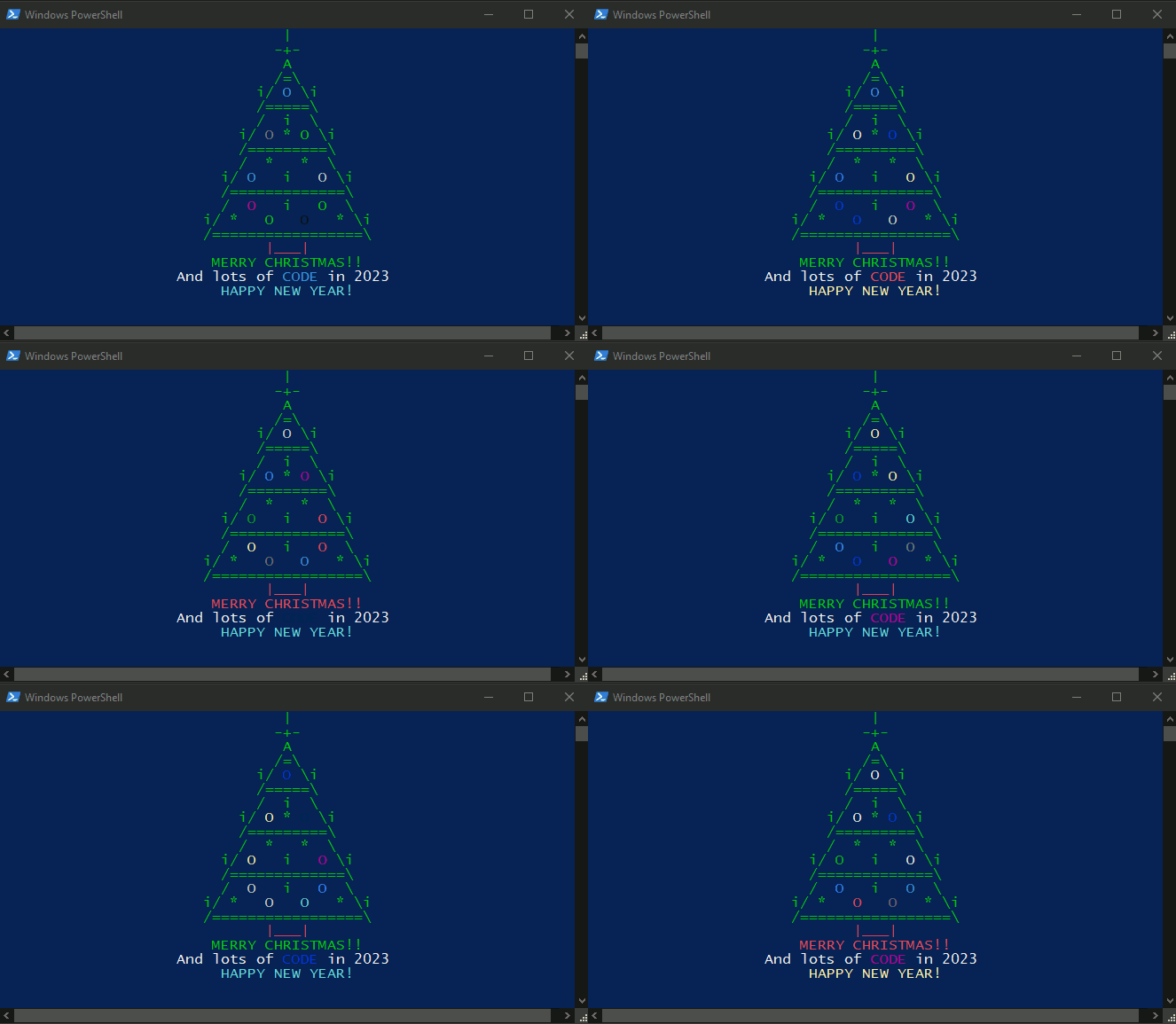
PSChristmasTree provides many parameters for customization and is cross-platform, including optional playback of "We Wish You a Merry Christmas" during rendering.
-
Install PSChristmasTree via PowerShell Gallery:
Install-Module -Name PSChristmasTree
Note - PSChristmasTree supports PowerShell 5.0 or newer.
-
Obtain the release
- Download the latest release
-
Navigate to the extracted directory
cd path/to/PSChristmasTree
-
Import the module
Import-Module (Get-ChildItem -Path . -Filter PSChristmasTree.psd1 -Recurse | Select-Object -First 1 -ExpandProperty FullName)
Note - This command finds the extracted manifest and imports it directly.
-
Obtain the source
- Clone the repository (needs git)
git clone https://github.com/Sofiane-77/PSChristmasTree
Warning - Repository ahead. Proceed at your own risk!
-
Navigate to the source directory
cd path/to/PSChristmasTree
-
Import the module
Import-Module ./PSChristmasTree/PSChristmasTree.psd1
-
Run directly via a Docker image hosted publicly on DockerHub:
docker run -it --rm sofiane77/pschristmastree
Read full installation instructions in the documentation.
- InvokeBuild module, available on PowerShell Gallery
- PowerShell Core 7.0 or greater on Windows/Linux/macOS
Pester Tests are located in path/to/PSChristmasTree/Tests folder.
-
In the root folder of your local repository, run:
./tools/Invoke-PSChristmasTreeBuild.ps1 -Task Init,Test
./tools/Invoke-PSChristmasTreeTests.ps1 -Output Detailed
PowerShell formatting is driven by the repository PSScriptAnalyzer settings and can be auto-applied with Invoke-Formatter. The default formatting task targets the build, test, and tooling scripts to keep the workflow incremental and low-friction; pass explicit paths if you want to format module source files too.
-
Apply formatting locally:
./tools/Invoke-PSChristmasTreeBuild.ps1 -Task Format
./tools/Invoke-PSChristmasTreeFormatter.ps1 -Path PSChristmasTree
-
Check formatting, lint, tests, and generated help before opening a pull request:
./tools/Invoke-PSChristmasTreeBuild.ps1 -Task FormatCheck,Analyze,Test,DocsCheck
-
Run the Windows PowerShell 5.1 compatibility path locally on Windows:
./tools/Invoke-PSChristmasTreeBuild.ps1 -Task TestWindowsPowerShell
The repository keeps coverage and performance measurement out of the default CI path, but exposes them through Invoke-Build for local investigation.
./tools/Invoke-PSChristmasTreeBuild.ps1 -Task Coverage
./tools/Invoke-PSChristmasTreeBuild.ps1 -Task BenchmarkThe command reference (.md files in docs/) is generated from comment-based help via platyPS.
-
Install platyPS (once):
Install-Module platyPS -Scope CurrentUser
-
Regenerate after editing a public cmdlet:
./docs/UpdateDocs.ps1 -Verbose
-
Verify generated command help is still synchronized with the repository:
./tools/Invoke-PSChristmasTreeBuild.ps1 -Task DocsCheck
Note - The CI workflow
UpdateDocs.yamlruns this script automatically on every push tomainthat touches a public cmdlet, and commits the updated.mdfiles back to the repository.
| Edition | Minimum Version | Tested Versions | Status |
|---|---|---|---|
| Windows PowerShell | 5.0 | 5.0, 5.1 | ✅ |
| PowerShell Core | 7.0 | 7.2, 7.4, 7.5 | ✅ |
Note - Audio playback (
-PlayCarol) requires Windows. All other features are cross-platform (Windows, Linux, macOS).
If you're here for the first time, we recommend running:
Show-PSChristmasTreeShow-PSChristmasTree -TreeStyle Wide -ColorMode Palette -Palette Green,Yellow -AnimationSpeed 120
# For the full, always up-to-date parameter list:
Get-Help Show-PSChristmasTree -FullThere are many ways to contribute:
- Star this repository.
- Improve the documentation.
- Recommend the project to others.
- Report a confirmed bug by opening an issue.
- Ask a question, suggest a feature, or share your setup via Discussions.
- Participate in discussions, review pull requests, and verify fixes or new features.
- Submit your own fixes or features as a pull request — discuss it first in Discussions if the change is substantial.
- Submit test cases.
Read through our contributing guidelines to learn about our submission process, coding rules and more.


Help us keep PSChristmasTree open and inclusive. Please read and follow our Code of Conduct. For more information, open a Discussion with any additional questions or comments.
See Support for more information.
This project is licensed under the MIT license. A complete version of the license is available in the LICENSE file in this repository.