


ONLYOFFICE Desktop Editors is a free office suite that combines text, spreadsheet, presentation, and PDF editors & Diagram Viewer. The application allows creating, viewing and editing documents stored on your Windows/Linux PC or Mac without an Internet connection. It is fully compatible with Office Open XML formats: .docx, .xlsx, .pptx.

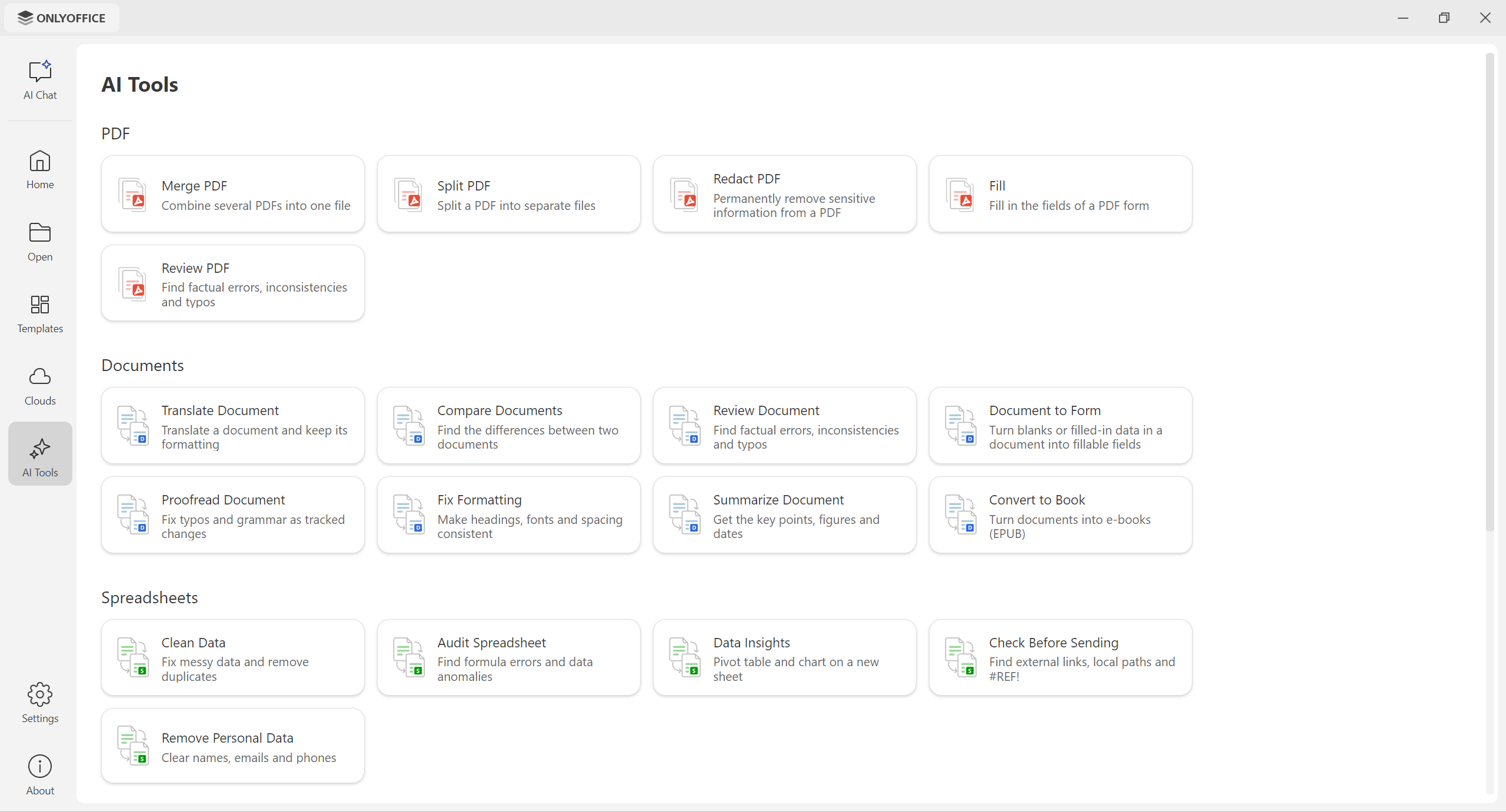
ONLYOFFICE Desktop Editors 10.0 brings a new approach to AI, a redesigned start window, a new cloud provider, and more:
- AI Chat – talk to the AI assistant of your choice (ChatGPT, Claude, Mistral, Google Gemini, Groq, xAI, DeepSeek, or local LLMs via Ollama, LM Studio, or GPT4All) right from the start window. Attach documents, spreadsheets, presentations, forms, or PDFs and work with them without opening the editors.
- AI Tools – ready-made presets for common tasks: review, compare, translate, and summarize documents; clean data, spot formula errors, and build pivot tables and charts in spreadsheets; generate slides or turn documents into presentations; merge, split, and redact PDFs.
- AI in every editor, including the PDF Editor, plus custom quick actions, AI assistants that respond to your edits, and saved prompts.
- Optional AI module (beta) – AI is no longer pre-installed, so you get an AI-free editing experience by default. Install the module in one click from the start window when you need it, and uninstall it anytime in Settings.
- Redesigned start window with a cleaner sidebar and refreshed Templates and Cloud sections.
- Odoo as a new cloud provider.
- Linux and macOS improvements: thinner window frames and window shadows on Linux, context menus for file tabs on macOS.
- Editor updates: metadata removal with the Redact tool, reusable signatures in forms, sheet backgrounds and an AutoComplete toggle in spreadsheets, new display modes and extended print settings in presentations, exporting slides as GIF or video, and more.
See the full changelog for details.
Take advantage of the powerful editors included in ONLYOFFICE Desktop Editors:
- ONLYOFFICE Document Editor
- ONLYOFFICE Spreadsheet Editor
- ONLYOFFICE Presentation Editor
- ONLYOFFICE Form Creator
- ONLYOFFICE PDF Editor
- ONLYOFFICE Diagram Viewer
The suite empowers you to create, edit, save, and export text documents, spreadsheets, presentations, PDFs, fill out PDF forms, open diagrams, all while offering additional advanced features such as:
- Connection to the cloud (ONLYOFFICE, Moodle, Box, Dropbox, ownCloud, Nextcloud, Seafile, Liferay, kDrive, Odoo) for real-time collaboration ☁️
- AI Chat and AI Tools working with the AI provider of your choice, including local models, available as an optional module 🤖
- Ready-to-use templates for documents, spreadsheets, presentations, and forms 📋
- Digital signatures ✍️🔏
- Password protection 🔒🔑
- Scalable UI options (including dark mode 🌓)
ONLYOFFICE is constantly improving localization of the editors to make the suite accessible to all users, all over the world.
- Interface available in 46 languages
- RTL support
- Hieroglyph support 🈴
ONLYOFFICE Desktop Editors offer support for plugins allowing developers to add specific features to the editors that are not directly related to the OOXML format. For more information, see our API or visit the GitHub plugins repo.
Would like to explore the existing plugins in details? You are welcome to visit our Marketplace.
ONLYOFFICE Desktop Editors contain the following components:
- desktop-apps - the frontend for ONLYOFFICE Desktop Editors which is used to build the program interface for the operating system selected.
- desktop-sdk - SDK which is a core part of ONLYOFFICE Desktop Editors.
- core - server core components for ONLYOFFICE Document Server which is a part of ONLYOFFICE Desktop Editors and is used to enable the conversion between the most popular office document formats (DOC, DOCX, ODT, RTF, TXT, PDF, HTML, EPUB, XPS, DjVu, XLS, XLSX, ODS, CSV, PPT, PPTX, ODP).
- sdkjs - JavaScript SDK for the ONLYOFFICE Document Server which is a part of ONLYOFFICE Desktop Editors and contains API for all the included components client-side interaction.
- web-apps - the frontend for ONLYOFFICE Document Server which is a part of ONLYOFFICE Desktop Editors that allows the user to create, edit, save and export text, spreadsheet and presentation documents using the common interface of a document editor.
- dictionaries - the dictionaries of various languages used for spellchecking in ONLYOFFICE Desktop Editors.
Get set up quickly with deb, rpm, exe, or dmg packages from our official website️.
Prefer other methods?
- Snap package. Get on snapcraft.io. The official source code for ONLYOFFICE Desktop Editors Snap package.
- Flatpak. Get on flathub.org. The official source code for ONLYOFFICE Desktop Editors Flatpak.
- AppImage. Get on AppImageHub. The official source code for ONLYOFFICE Desktop Editors AppImage.
- Microsoft Store. Download
ONLYOFFICE Desktop Editors is licensed under the GNU Affero Public License, version 3.0, ensuring its transparency and commitment to the open-source community.
See LICENSE for more information.
You can find the detailed instructions for building ONLYOFFICE Desktop Editors in build_tools.
We ❤️ community contributions!
- 🐞 Found a bug? Please report it by creating an issue.
- ❓ Have a question? Ask other users and our developers in the ONLYOFFICE Community.
- 🥷 Want to be a power user? Visit our YouTube channel and Help Center.
- 👨💻 Need help for developers? Check our API documentation.
- 💡 Want to suggest a feature? Share your ideas here.
Ready to try ONLYOFFICE Desktop Editors? 👉 Download ✨
Made with ❤️ by the ONLYOFFICE Team