

svctl is an interactive runit controller.
Note: Binaries are available for download at Github Releases.
Otherwise, install from source:
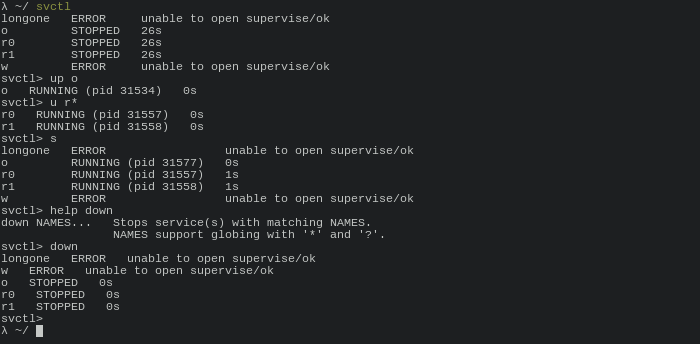
go install github.com/KenjiTakahashi/svctl@latestTyping svctl will show statuses of all services in current SVDIR and open a prompt for interactive use.
In accordance with the sv command, svctl uses $SVDIR environment variable value as the services directory. If not set, defaults to /service/.
- ... means that multiple arguments can be supplied.
- All service name arguments can contain standard globing characters, i.e.
*and/or?. - While
svreads only first letter (e.g.ugdefis a validupcommand),svctlexpects either just the first letter or a full name of the command.
(e)xit / Ctrl-D Terminates svctl.
svctl supports all standard sv commands, excluding exit/shutdown.
(u)p / start NAMES... Starts service(s) with matching NAMES.
(d)own / stop NAMES... Stops service(s) with matching NAMES.
r / restart NAMES... Restarts service(s) with matching NAMES. Waits up to 7 seconds for the service to get back up, then reports TIMEOUT.
(o)nce NAMES... Start service(s) once and does not try to restart them if they stop.
(p)ause NAMES... Sends signal STOP to running service(s) with matching NAMES.
(c)ont NAMES... Sends signal CONT to running service(s) with matching NAMES.
(h)up / reload NAMES... Sends signal HUP to running service(s) with matching NAMES.
(a)larm NAMES... Sends signal ALRM to running service(s) with matching NAMES.
(i)interrupt NAMES... Sends signal INT to running service(s) with matching NAMES.
(q)uit NAMES... Sends signal QUIT to running service(s) with matching NAMES.
1 NAMES... Sends signal USR1 to running service(s) with matching NAMES.
2 NAMES... Sends signal USR2 to running service(s) with matching NAMES.
(t)erm NAMES... Sends signal TERM to running service(s) with matching NAMES.
(k)ill NAMES... Sends signal KILL to running service(s) with matching NAMES.
I have decided not to support "destructive" commands, i.e. exit and shutdown in a third party tool. If you want to terminate runsv monitor completely, you should use sv directly.
There is nothing wrong with sv and svctl is meant to complement, not replace, it. That is why there is only interactive usage and no standard CLI. Please use sv for your scripting needs.