Fixed Colour and ColourRange parsing errors - #2
Conversation


…ction just received the colors[0] value (HUE°) instead of the whole Colour string.
…on to avoid culture specific errors, when parsing a Colour string.

|
Hey @sqrMin1, thanks for the PR!
As long as the editor uses the functions in MgMercury itself for serialization things should be fine since it always uses InvariantCulture. In fact I recommend always using InvariantCulture for data like this.
You're very welcome :) This was a really fun project to work on. There's definitely some room for optimization if I ever revisit it though! |

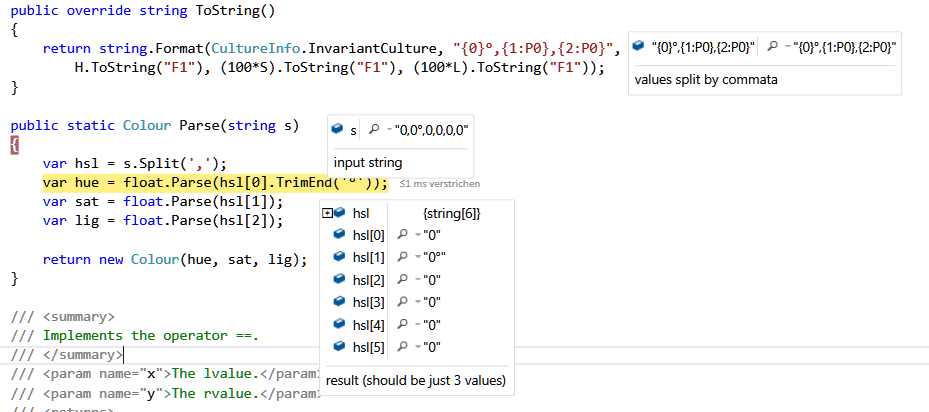
Yes, I thought the same, that's why this error confused me:
I'm using only the official ToString() override and this static Parse function and as you can see, the splittet string is wrong. This error dissapears, when applying the fixes I did (change commata with semicolon). I also tried to change the CultureInfo with no success. PS: The string input is just a Colour.ToString() value. |
2 participants


I just encountered some parsing errors in the Colour.cs and ColourRange.cs class.
First fix:
In the string override Colour.ToString() I changed the splitting char from comma to semicolon, because the comma is also used in floats in some cultures and the values H,S,L are defined in floats.
The splitted string should have been something like "0.0°, 0.0, 0.0" but it came in like "0,0°, 0,0, 0,0" (notice the commata).
string.Split(',') then created 6 different strings instead of 3, which resulted in float parsing errors in the next lines (and wrong values).
Second fix:
The Colour.Parse functions in ColorRange.Parse received only the HUE value and not the whole colour string.
I think these errors are only interesting when working in editor environments and I know that your project was merged with MonoGame.Extended, but I use your class library in one of my projects, that's why I wanted to mention it here.
Anyways, thanks for the MonoGame port of the Mercury Particle Engine 👍