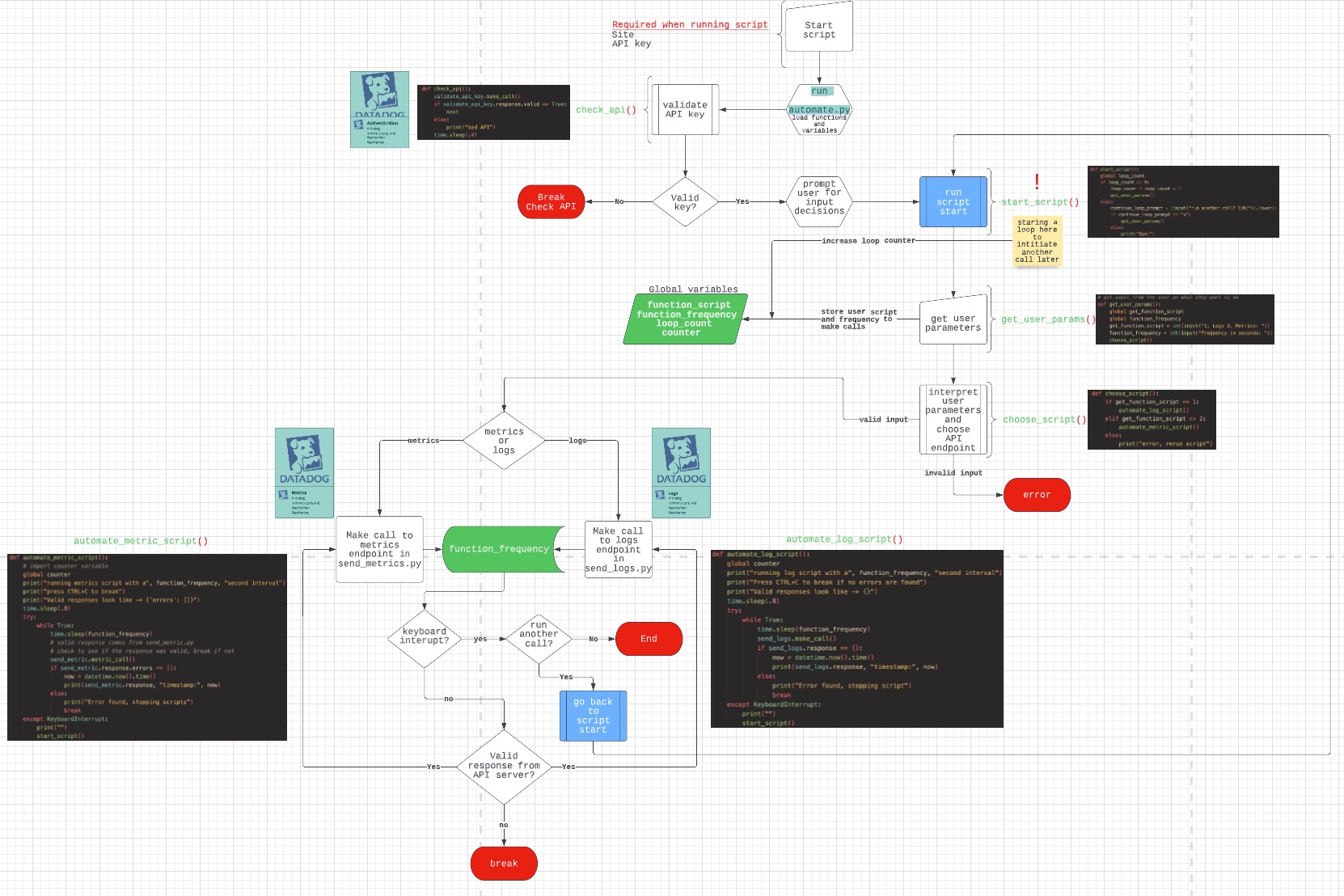
Simple script to automate sending Metrics or Logs based on user defined frequency
clone this repo to your local machine using terminal, navigate inside of the folder that was made when you cloned the repo to run script -> DD_SITE="datadoghq.com" DD_API_KEY="<API_KEY>" python3 automate.py
- Use at your own risk! I'm not a professional software engineer, this is just a fun project - so expect some jank!
- The script automatically checks to see if the api key you entered is valid or not. If your key is invalid the script will break. Just fix the key and rerun.
- The automate.py file needs send_log.py, send_metric.py, and validate_api_key.py to function. It just won't work without them in same place.
- Once you run the script you'll be prompted to specify what API you want to hit and how often to make a call in seconds. I recommend a large frequency at first so you can see what's happening at first.
- Once you run the script, the only way to MANUALLY stop it is CTRL+C.
- I've included some safeguards to prevent errors "OOTB", it might be on you to figure out what's broken if things are messed up.
- If the response from the API server is anything but a 2** response, the script will stop.
- I'd love feedback on what I could improve!
validate api key before running scriptinclude timestamps- implement dynamic calls (make 5 calls in 5 seconds, 10 calls in 5 seconds, etc)
implement looping feature when stopping script- enhance user experience
- install ddtrace and log api calls as traces