Depends on #58 and #60
Adding a new member should only be allowed from the edit group screen:

Please add proper permission handling for requesting access to contacts.
After clicking the add new member option and allowing access to contacts, the list of contacts should be displayed, similar to:
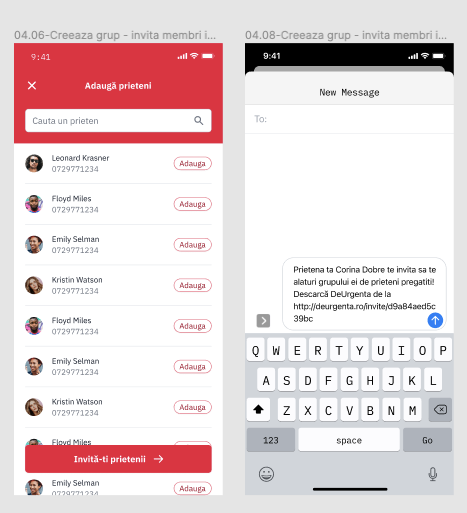
The button at the bottom of the screen is not needed, only the buttons next to each contact should be added. Pressing the button should open the send sms app with a custom text pre-filled (the text should be extracted in the strings file).
To be implemented in the future, after backend is ready: the link to be added in the sms should be retrieved form the backend.
Implement add new group member functionality. Link to API in swagger
Please define related colors and text & button styles in the corresponding values files.
Please use material design guidelines for android. The figma design is a bit ios oriented, it needs a bit of adapting for android :) For example, the title should be placed in the action bar with a back button instead of the X.
Depends on #58 and #60
Adding a new member should only be allowed from the edit group screen:

Please add proper permission handling for requesting access to contacts.
After clicking the add new member option and allowing access to contacts, the list of contacts should be displayed, similar to:

The button at the bottom of the screen is not needed, only the buttons next to each contact should be added. Pressing the button should open the send sms app with a custom text pre-filled (the text should be extracted in the strings file).
To be implemented in the future, after backend is ready: the link to be added in the sms should be retrieved form the backend.
Implement add new group member functionality. Link to API in swagger
Please define related colors and text & button styles in the corresponding values files.
Please use material design guidelines for android. The figma design is a bit ios oriented, it needs a bit of adapting for android :) For example, the title should be placed in the action bar with a back button instead of the X.